Connect Xero to FRCS in 3 minutes.
Then never think about VMS again.
Every invoice you raise in Xero is signed and sent to FRCS VMS automatically, in real time. It all runs in the cloud — nothing to install, no hardware, no setup fee. You keep using Xero exactly as you do today.
Plans from $83.25 / month FJD, VAT included · billed yearly · cancel anytime
Pay by card and you are live today — no setup fee, no hardware, cancel anytime. Rather try first? Create an account and fiscalise 10 real invoices free. No card, no expiry.
Fiji VAT-registered businesses face fines and back-assessments for non-compliant invoices under VMS. Don't leave it to chance — one missed invoice is one too many.
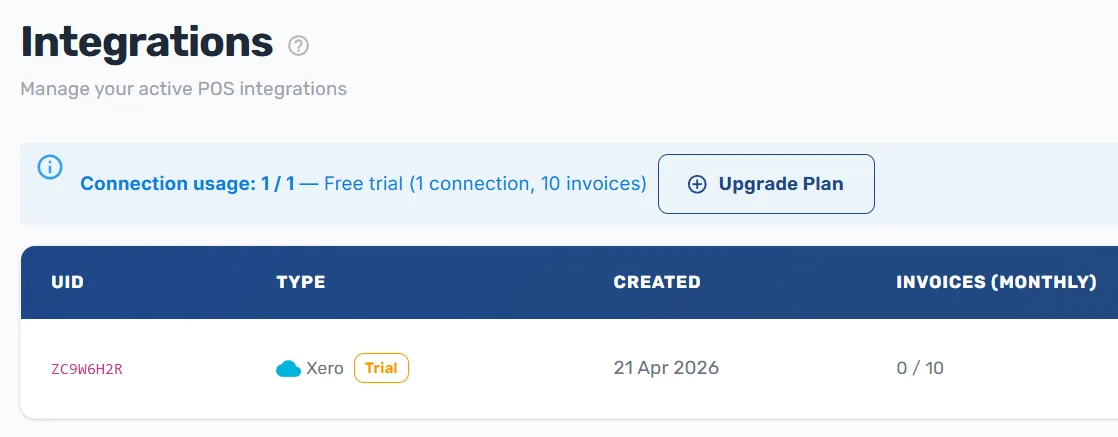
Xero to FRCS, without you in the middle
Once it's connected, there is no button to press, no file to export and no end-of-day routine. This is the whole process.
You save an invoice in Xero
Your normal invoice, raised by you or your bookkeeper, in the Xero you already use.
We sign it with your certificate
Your FRCS digital certificate is stored encrypted and used to digitally sign the invoice.
Submitted to FRCS VMS
Sent the moment it's saved. If FRCS or your internet is down, it's queued and retried until accepted.
Fiscal details written back
The fiscal number and verification link land back on the invoice in Xero, ready for any audit.
You do step one. We do the rest — on every invoice, forever.
Three steps, and you're done for good
No consultant, no site visit, no IT project. Everything below happens in your browser.
Create your account
Name, email, password. Under a minute, and no card needed to look around.
Upload your FRCS certificate
Drag in the PFX file FRCS issued to your business. Stored encrypted, used only to sign your invoices.
Connect Xero with one click
Sign in to Xero the way you always do and approve the connection. No API keys, no IT person. From your very next invoice, it's automatic.
One thing to have ready: your FRCS certificate
The 3 minutes assume you already hold your PFX digital certificate. If you don't have one yet, request it from the FRCS Taxpayer Administration Portal (TAP) under POS Access Requests — FRCS emails you a download link. We'll walk you through it step by step, and you can set up your FiscoBridge account while you wait.
One subscription. That's the whole bill.
No quotes, no onboarding invoice, no per-invoice charge creeping in later.
- Setup or onboarding fee $0
- Hardware, SDC box or smart card None
- Software to install or update None
- Per-invoice or per-transaction fee None
- Changes to how you invoice in Xero None
Two things we honestly don't cover, so there are no surprises: your FRCS digital certificate comes from FRCS, and your Xero subscription stays with Xero. We don't resell or mark up either.
Why Fiji businesses put Xero on FiscoBridge
Keep using Xero your way
Your bookkeeper, your accountant, your routine — nothing changes. Nobody has to learn new software.
Fiscalised the moment you hit save
Xero invoices go to FRCS VMS in real time — no end-of-day rush, no batch jobs, no waiting until tomorrow.
Everything runs in the cloud
No SDC box to plug in, no smart card to lose, nothing installed on your machines and nothing to keep updated. Sign in from any browser.
Accredited by FRCS
FiscoBridge is a licensed, FRCS-accredited SDC. We've done the paperwork so every invoice meets VMS requirements out of the box.
Audit-ready anytime
One dashboard shows what's been fiscalised and what hasn't. If FRCS asks, you can show them everything in seconds.
If FRCS is down, we wait
Internet down? FRCS offline? Invoices are queued and retried automatically — nothing is lost and nothing becomes your problem.
Manual fiscalisation vs FiscoBridge
Doing it by hand isn't compliance — it's a slow leak.
| Feature | Manual entry | FiscoBridge★ Best for Xero |
|---|---|---|
| Works with your existing Xero | No | Yes |
| Time to set up | n/a | 3 minutes |
| Hardware required | Depends on your setup | None — 100% cloud |
| Ongoing manual work | Every single invoice | Zero |
| Risk of missed invoices | High | Auto-retry, none lost |
| FRCS-accredited | No | Yes |
| Setup fee | Staff time, every month | $0 |
| What it costs | Hidden — staff time + risk | From $83.25/month |
Simple pricing. No surprises.
Pick the plan that covers your busiest month. All prices in FJD and include VAT. Cancel any time — no lock-in.
Business
Up to 3,000 invoices / month
FJD / year
that's $83.25 a month $999.00 billed once a year Save $309.00 a year- Automatic Xero fiscalisation
- Real-time FRCS VMS submission
- Auto-retry on FRCS downtime
- Priority email support
Billed yearly · Live today · Cancel anytime
Or test 10 invoices free first →Professional
Up to 10,000 invoices / month
FJD / year
that's $166.58 a month $1,999.00 billed once a year Save $629.00 a year- Everything in Business
- High-volume processing
- Phone & WhatsApp support
- Dedicated account contact
Billed yearly · Live today · Cancel anytime
Or test 10 invoices free first →Enterprise
10,000+ invoices / month
Tailored to your volume
- Custom invoice volume
- SLA & uptime guarantees
- On-site setup support
- Dedicated account manager
One connection per plan. A plan covers one Xero organisation. Running several businesses? Add a plan for each — they all sit under one FiscoBridge account.
Invoice limits are hard limits, not overage. If you reach your plan's monthly invoice count, fiscalisation stops until you upgrade from the Customer Portal — there is no per-invoice overage charge. Upgrades take effect immediately and the queue resumes, but we strongly recommend sizing your plan for your busiest month rather than your average one.
Volume counting. Only invoices FiscoBridge successfully fiscalises in a calendar month count. Drafts and quotes in Xero don't.
Accepted Payment Methods






SSL Encrypted Payment
Your information is protected by 256-bit SSL encryption.
An FRCS-accredited SDC, not a workaround
FiscoBridge is licensed and accredited by the Fiji Revenue & Customs Service, and also runs fiscalisation for Vanuatu (VSMS) and Samoa (TIMS). Your certificate is encrypted at rest and your Xero connection uses OAuth — we never see or store your Xero password.
Prefer a hand locally?
Buy online in two minutes, or work with the IT names you already know. Our authorised Fiji partners can set you up, train your team and look after you on the ground.

Inest Solutions
Reseller Partner
Computer 1
Reseller Partner
Datec Fiji
Reseller PartnerRather do it yourself right now? See plans and subscribe →
Before you buy
No. Keep issuing invoices in Xero exactly as you do now. FiscoBridge connects to your Xero organisation and fiscalises every invoice in the background. Your workflow, your templates and your accountant's process all stay the same.
Yes, if you already hold your FRCS PFX certificate: create your account, upload the certificate, approve the Xero connection — about three minutes in total, all in your browser. If you still need to request the certificate from FRCS, that part runs on FRCS's timetable, not ours. You can set up your FiscoBridge account and connect Xero while you wait for it.
No. FiscoBridge is entirely cloud-based. There is no SDC box, no smart card, no local server and nothing to install or update on your computers. Everything happens between Xero, our cloud and FRCS — you just need a browser and an internet connection.
Nothing. There is no setup fee, no onboarding charge, no hardware to buy and no per-invoice fee. You pay one subscription — monthly or yearly, VAT included — and nothing else. Your FRCS certificate comes from FRCS and your Xero subscription stays with Xero; we don't resell or mark up either.
Yes. Every new integration includes 10 free fiscalised invoices on one connection — no card needed and no expiry date. Connect Xero, fiscalise ten invoices end to end, and subscribe when you're satisfied. Nothing rolls over into a paid subscription automatically; you only pay when you choose a plan.
Fiscalisation stops until you upgrade — there is no overage billing, so you can never be surprised by an extra charge. To carry on in the same month, upgrade to a higher tier from the Customer Portal; it takes effect immediately and your queued invoices resume. Because a stoppage is disruptive, pick a plan that comfortably covers your busiest month rather than your average month.
Yes. One plan covers one connection — one Xero organisation, with its own FRCS certificate. If you run several businesses, add a plan for each; they all sit under a single FiscoBridge account with one login.
A PFX (Personal Information Exchange) certificate is the digital certificate FRCS issues to your business. It holds your unique cryptographic keys and is what digitally signs your fiscal invoices. Request it from the FRCS Taxpayer Administration Portal (TAP) under POS Access Requests; FRCS emails you a download link. You then upload it once to FiscoBridge, where it is encrypted at rest.
FiscoBridge queues your invoices and retries automatically once FRCS VMS is back online. The same applies if your own internet drops. You don't need to do anything, and nothing is lost — every invoice is fiscalised as soon as the system is reachable again.
Yes, any time, from the Customer Portal. Cancellation takes effect at the end of your current billing period and you keep full access until then. There is no lock-in contract and no exit fee.
Three minutes now, or a compliance problem later.
Subscribe and connect Xero today — every invoice from your very next one is signed and submitted to FRCS VMS automatically.
No setup fee · No hardware · Cancel anytime · 10 free fiscalised invoices if you want to test first
Questions first? Message us on WhatsApp© 2026 FiscoBridge. Prices shown in FJD, VAT included.