
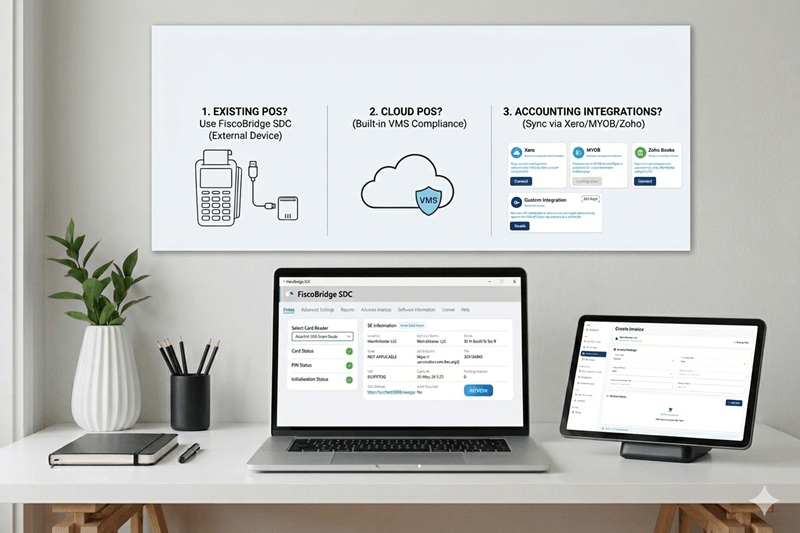
Many businesses in Fiji are asking the same question: “Is my POS system compatible with FRCS VMS?”
The answer depends on how your system works — and more importantly, how it connects to fiscalization requirements.
In this guide, we’ll explain in simple terms:
- What FRCS VMS expects from your system
- Common POS scenarios
- Which solution fits your setup
What does FRCS VMS require?
FRCS VMS is a compliance system. Your POS or invoicing solution must:
- Send invoice data in the correct format
- Follow the required V3 API flow
- Handle validation and responses correctly
- Work reliably even when internet is unstable
Most systems are not built for this by default, which is why an additional layer is required.
Scenario 1: You already have a POS system
If you already use a POS system, the first thing to check is: is it installed locally (on-premise) or is it cloud-based?
On-premise POS (installed on a computer)
This type of POS runs on a local device (usually a Windows PC).
In this case, you can connect your POS to a Sales Data Controller (SDC).
- Works with existing on-premise POS systems
- Handles VMS communication
- Supports offline operation
- Runs on Windows devices
This is the most common solution for businesses with existing POS setups.
Cloud POS (web-based system)
Some POS systems are fully cloud-based and run in a browser. These systems can still work with FRCS VMS if they provide a suitable API or integration method.
- We first review the API or webhook options available in your POS
- Where supported, invoices can be fiscalized through a cloud integration
- Some systems may require a custom integration depending on their API
- You can keep using your existing cloud POS
If you are using a cloud POS, contact us and tell us which system you use. We can review the available API and recommend the best fiscalization approach.
Scenario 2: You don’t have a POS system
If you don’t already have a POS system, the right option depends on whether you only need simple invoice issuing or a complete till solution.
Simple invoice issuing
- Works on phone, tablet, or laptop
- No installation required
- Simple invoice creation and fiscalization
- Ideal for businesses that do not need a full retail POS
Web Invoicing is ideal if you want to issue compliant invoices quickly without installing or maintaining a full POS system.
Need a complete till or retail POS
- Designed for day-to-day till and POS operations
- Suitable for retail, hospitality and other businesses needing a full POS workflow
- Includes fiscalization as part of the FiscoBridge setup
- Runs on Windows
Scenario 3: You use accounting software or ERP
If you use systems like Xero, MYOB, Odoo or Zoho, you may not need to replace them.
These systems are designed for accounting — not fiscalization.
That means they don’t directly connect to FRCS VMS.
- Connects Xero, MYOB, Odoo, Zoho and other supported systems
- Automates invoice processing
- No manual work required
- Keeps accounting and compliance aligned
This allows you to keep using your existing accounting tools while staying compliant.
Quick checklist
- Do you have a POS system?
- Is it on-premise or cloud-based?
- Does it support integration?
- Do you need offline support?
- Are you using accounting software?
Final thoughts
There is no single solution for every business.
- Existing local POS → FiscoBridge SDC
- Existing cloud POS with API → cloud/custom integration depending on the available API
- No POS / simple invoice issuing → FiscoBridge Web Invoicing
- Need a complete till → FiscoBridge Desktop POS
- Xero / MYOB / Odoo → FiscoBridge Cloud Integration
Choosing the right setup ensures your business stays compliant and avoids issues later.