
Fiji businesses using the VAT Monitoring System (VMS) should check more than their card expiry date. They should also confirm whether their POS, SDC, and Secure Element setup is ready for VMS Version 3.
FRCS has issued a public notice on the expiry of VMS cards, warning that card or file expiry may disrupt the continuity of POS operations. For businesses that issue fiscal invoices every day, this can quickly become an operational problem.
The practical warning is simple:
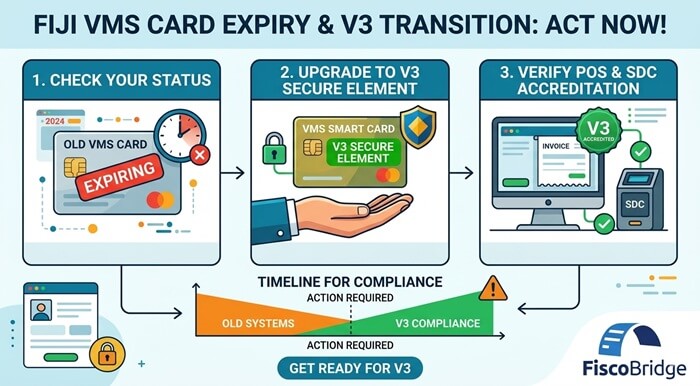
Old VMS setup may stop working → request the correct V3 Secure Element/card → use a V3-ready POS and SDC setup → avoid invoice disruption.
This guide explains why the VMS card is not just an accessory, why businesses should prepare for VMS Version 3, and how a V3-ready POS/SDC setup helps keep fiscal invoicing running.
TL;DR / Summary
- Your VMS card or Secure Element is a core fiscal component, not just a small device or file.
- FRCS has warned businesses to check VMS card/file expiry because expiry may disrupt POS operations.
- The Secure Element identifies the taxpayer and is used to digitally sign fiscal invoices.
- Businesses should not only renew old cards; they should request the correct V3 Secure Element for VMS Version 3.
- An old VMS Version 2 POS/SDC setup may not be enough for VMS Version 3.
- Businesses should confirm that their POS is connected to a V3-ready SDC or fiscalization layer.
- FRCS separates the V3 Accreditation List from older accreditation lists.
- FiscoBridge SDC is listed under the FRCS V3 Accreditation List as an ESDC.
Table of contents
- Why VMS card expiry matters for Fiji businesses
- How do I check if my Fiji VMS card is expiring?
- What happens if a VMS card or certificate expires?
- Why should businesses request a V3 Secure Element card?
- Do I need to switch my POS from VMS V2 to VMS V3?
- What role does the SDC play between the POS and FRCS VMS?
- How do I know if my POS or SDC is ready for VMS V3?
- Can invoice issuing continue if the internet is unavailable?
- What should Xero, ERP, and accounting software users check?
- What should POS vendors check before moving clients to VMS V3?
- Fiji VMS V3 readiness checklist
- How FiscoBridge can help
- Frequently asked questions
Why VMS card expiry matters for Fiji businesses
A Fiji VMS card, certificate, or Secure Element is not only a login tool. It is part of the fiscal invoice issuing process.
FRCS explains that the Secure Element contains the taxpayer’s electronic certificate and is used by the Sales Data Controller to digitally sign invoices. This means the Secure Element is directly connected to taxpayer identification, invoice authenticity, and fiscal data integrity.
If the card, certificate, or old VMS setup is not ready, the business may face practical problems such as:
- POS interruption
- failed invoice signing
- checkout delays
- inability to issue fiscal invoices correctly
- staff confusion during sales
- risk of using an outdated VMS Version 2 workflow
- compliance issues if the business continues with the wrong setup
This is why businesses should treat VMS card expiry as a warning sign. The bigger question is whether the whole invoice workflow is ready for VMS Version 3.
How do I check if my Fiji VMS card is expiring?
FRCS advises businesses using VMS to check the expiry date of their VMS cards or files. According to the official notice, VMS cards are valid for three years, and it is the taxpayer’s responsibility to contact FRCS for renewal.
Businesses should check:
- the expiry date of each VMS card or certificate file
- whether the card belongs to the correct taxpayer
- whether the card is assigned to the correct business location
- whether POS cards, admin cards, or certificate files need renewal
- whether the business should request a V3 Secure Element instead of continuing with an older setup
If your business issues invoices daily, do not wait until the card is already expired. Renewal, migration, configuration, and testing can take time.
What happens if a VMS card or certificate expires?
If a VMS card or certificate expires, the business may not be able to continue the same fiscal invoice workflow without interruption.
This risk is higher when:
- the business did not notice expiry reminders
- the registered representative email is outdated
- the card is used at a busy POS terminal
- the business has multiple branches and does not track cards per location
- the business is still using a VMS Version 2 setup while Fiji is moving to VMS Version 3
Businesses should treat VMS card checks as normal compliance maintenance, similar to renewing licenses, updating tax records, and checking accounting system access.
Why should businesses request a V3 Secure Element card?
Fiji VMS is moving to Version 3, so businesses should not only ask whether their current card is still active. They should also ask whether the card, POS, and SDC setup is ready for VMS V3.
A V3 Secure Element card or file is important because it supports the V3 fiscalization environment and works with V3-ready POS and SDC components.
Businesses should request or prepare the correct V3 Secure Element when:
- moving from an old VMS setup to VMS Version 3
- upgrading their POS or SDC solution
- opening a new branch or business location
- switching from manual or old software workflows to fiscalized invoicing
- integrating accounting software, ERP, or POS systems with VMS
- preparing before their VMS Phase 3 compliance deadline
The best time to request the correct V3 Secure Element is before the business depends on it for live invoicing.
Do I need to switch my POS from VMS V2 to VMS V3?
Yes, businesses should confirm that their POS and fiscalization setup are ready for VMS Version 3. The card or Secure Element is only one part of the setup. If the POS or SDC is still built around an older VMS Version 2 workflow, the business may face problems when moving to VMS Version 3.
A VMS-ready setup usually depends on three parts working together:
- POS: creates the sale or invoice.
- SDC: fiscalizes the invoice and connects the POS workflow with VMS requirements.
- Secure Element: identifies the taxpayer and signs the invoice using the taxpayer’s digital certificate.
This means businesses should not only ask, “Is my VMS card still valid?” They should also ask:
- Is my POS ready for VMS V3?
- Is my SDC accredited or ready for VMS V3?
- Do I have the correct V3 Secure Element?
- Has my provider tested the full invoice workflow under VMS V3?
If your POS is not ready for VMS V3, you may not need to replace the whole POS immediately. In many cases, the POS can be connected to a V3-ready SDC through an integration layer.
FiscoBridge SDC can work as the fiscalization layer between your POS and FRCS VMS. POS vendors can review the integration guide here: POS to SDC Protocol.
What role does the SDC play between the POS and FRCS VMS?
The SDC is the fiscalization layer between the POS and FRCS VMS. It should not be treated as a simple connector only. It is a core fiscal component in the invoice workflow.
In a typical POS-to-SDC workflow:
- The POS creates the sale or invoice.
- The POS sends invoice data to the SDC.
- The SDC works with the Secure Element to digitally sign the invoice.
- The SDC returns fiscal invoice data back to the POS.
- The POS prints or sends the fiscal invoice to the customer.
- The SDC stores and reports fiscal data according to VMS requirements.
This is why businesses using an existing POS should check whether the POS can connect to a V3-ready SDC. If it can, the business may be able to keep the POS interface while replacing or upgrading the fiscalization layer.
How do I know if my POS or SDC is ready for VMS V3?
A business should check the official FRCS accreditation list and confirm whether the POS or SDC solution is listed for V3.
It is not enough for a system to create normal receipts or accounting invoices. For VMS compliance, the system must issue fiscal invoices using the correct VMS workflow.
Before relying on your current system, ask your POS or software provider:
- Is our POS approved or ready for Fiji VMS V3?
- Does our POS work with a V3-accredited SDC?
- Does our setup support the correct V3 Secure Element?
- Can our system issue fiscal invoices after the VMS V3 move?
- Can our system print the required fiscal invoice information?
- Can our system handle refunds, copies, proforma, and training invoices correctly?
- Can our system continue operating during internet issues if we use an External SDC?
FiscoBridge SDC is listed under the FRCS V3 Accreditation List and is designed for businesses and POS vendors that need a VMS-ready fiscalization layer between their POS and FRCS VMS. Learn more here: FiscoBridge SDC.
Can invoice issuing continue if the internet is unavailable?
For many Fiji businesses, internet stability is a major operational concern. Retailers, restaurants, supermarkets, hotels, and service companies cannot always stop sales because of a connectivity problem.
This makes the SDC choice important. Businesses should ask whether their setup can continue issuing invoices locally when the internet is unstable and synchronize later according to VMS requirements.
If offline continuity matters for your business, review: FiscoBridge SDC.
What should Xero, ERP, and accounting software users check?
Businesses using Xero, ERP systems, or custom accounting software should not only check the VMS card. They should also check when and how invoices are fiscalized.
Accounting and ERP users should ask:
- When is an invoice sent for fiscalization?
- Is fiscalization triggered on invoice approval, payment, or another event?
- Is the fiscalized PDF, journal, or verification data attached back to the accounting invoice?
- Does each branch or business location have the correct Secure Element?
- Does the integration support VMS V3?
- Can the integration handle errors if the card, certificate, or tax authority service is unavailable?
FiscoBridge provides integration options for businesses that need to connect accounting software, ERP systems, or custom invoice workflows with fiscalization: FiscoBridge Integrations.
What should POS vendors check before moving clients to VMS V3?
POS vendors serving Fiji clients should treat VMS V3 as a full compliance upgrade, not only a small software change.
Before moving clients to VMS V3, POS vendors should confirm:
- the POS sends invoice data in the required VMS V3 structure
- the POS is compatible with the selected V3 SDC
- the system supports the correct Secure Element flow
- the solution handles successful and failed fiscalization responses
- the POS prints or displays required fiscal invoice data
- the system supports common invoice types and business workflows
- the vendor has a clear support path for V3 card and certificate issues
POS vendors can connect their software with FiscoBridge SDC using the POS-to-SDC API workflow: POS to SDC Protocol.
Fiji VMS V3 readiness checklist
Use this checklist before an old VMS setup causes invoice disruption.
- Check your VMS card expiry: confirm expiry dates for POS cards, admin cards, and certificate files.
- Update representative details: make sure the correct person receives FRCS notices and expiry reminders.
- Request the correct V3 Secure Element early: do not wait until the old card or file expires.
- Check the FRCS V3 Accreditation List: confirm your POS or SDC is listed or ready for V3.
- Review POS compatibility: make sure your POS can communicate with the selected V3-ready SDC.
- Confirm V2 to V3 migration: ask your provider whether the old VMS Version 2 setup has been upgraded.
- Test invoice issuing: verify that fiscal invoices are created, signed, printed, and stored correctly.
- Test refund and copy workflows: confirm that non-standard invoice flows are handled correctly.
- Check offline workflow: confirm what happens if internet is unavailable.
- Train staff: cashiers and finance teams should know what to do if a card, certificate, or POS error appears.
- Plan before your deadline: VMS V3 readiness should be completed before daily invoicing depends on the new setup.
How FiscoBridge can help
FiscoBridge helps Fiji businesses, POS vendors, and accounting software users prepare for VMS V3 fiscalization.
Depending on your current setup, FiscoBridge can support:
- FiscoBridge SDC for businesses and POS vendors that need a VMS V3-ready fiscalization layer.
- FiscoBridge Web Invoicing for businesses that need a simple browser-based invoicing workflow.
- FiscoBridge Desktop POS for retail shops, restaurants, cafés, hotels, and other businesses that need to replace an outdated POS with a complete VMS-ready sales system.
- FiscoBridge Integrations for accounting systems, ERP systems, and custom invoice workflows.
- POS to SDC Protocol for software vendors that want to connect their POS with FiscoBridge SDC.
The goal is to help businesses avoid invoice disruption by using the correct V3 Secure Element, a V3-ready fiscalization workflow, and an accredited POS/SDC setup.
Best solution by business situation
| Business situation | Main risk | Recommended FiscoBridge option |
|---|---|---|
| You already use a POS | Your POS may still be using an old VMS V2 workflow | FiscoBridge SDC |
| You are a POS vendor | Your clients may need V3 fiscalization without rebuilding the full SDC layer | POS to SDC Protocol |
| You use Xero, ERP, or accounting software | Invoices may need a fiscalization integration before or after approval/payment | FiscoBridge Integrations |
| You need a simple invoicing tool | Your current workflow may not issue fiscal invoices correctly | FiscoBridge Web Invoicing |
| You need to replace an outdated POS | Your current POS may not support VMS V3 or the operational features your business needs | FiscoBridge Desktop POS |
Frequently asked questions
How do I check if my Fiji VMS card is expiring?
FRCS advises businesses to check VMS card or file expiry through the TaxCore portal using the Admin Card. Businesses should review card registration dates, expiry dates, and the business location connected to each card.
What should I do if my VMS card is about to expire?
You should start the renewal process early and confirm whether your business should request the correct V3 Secure Element card or file. Businesses should not wait until the old card or certificate has already expired.
Can an expired VMS card stop fiscal invoice issuing?
Yes. Expiry can affect POS operations and fiscal invoice issuing. FRCS has warned that expiry of VMS cards or files may disrupt the continuity of POS operations.
Do Fiji businesses need V3 cards for VMS Version 3?
Businesses moving to VMS Version 3 should request and configure the correct V3 Secure Element. They should also confirm that their POS and SDC setup is ready for VMS V3.
Do I need to switch my POS from VMS V2 to VMS V3?
Yes. Businesses should confirm that their POS and SDC setup is ready for VMS Version 3. If the POS or SDC is still built only around an older VMS Version 2 workflow, the business may face invoice issuing problems during the move to VMS V3.
Can I keep my existing POS and still move to VMS V3?
In many cases, yes. If your existing POS can send invoice data to a V3-ready SDC, you may be able to keep the POS interface and add or upgrade the fiscalization layer.
What is the role of the SDC in Fiji VMS?
The SDC works as the fiscalization layer between the POS and FRCS VMS. It receives invoice data from the POS, works with the Secure Element to sign the invoice, returns fiscal invoice data back to the POS, and supports storage and reporting according to VMS requirements.
How do I know if my POS is compatible with Fiji VMS V3?
Ask your POS provider whether the POS supports VMS V3 invoice workflows, whether it works with a V3-accredited SDC, and whether it supports the correct V3 Secure Element.
Can FiscoBridge help if my current POS needs VMS V3 support?
Yes. If your current POS can connect to an external fiscalization layer, FiscoBridge SDC can help bridge the POS workflow with Fiji VMS requirements. POS vendors can review the integration guide through the POS to SDC Protocol.
Final thoughts
Fiji businesses should not treat VMS card expiry as a small administrative detail. The VMS card or Secure Element is part of the fiscal invoice workflow and can directly affect whether the business can issue invoices correctly.
With Fiji VMS moving to Version 3, the safest approach is to act early:
- check your current VMS card or file expiry
- request the correct V3 Secure Element
- confirm your old VMS V2 POS/SDC setup has been upgraded or connected to a VMS V3-ready fiscalization layer
- test invoice issuing before relying on the new setup in live operations
Need help preparing for Fiji VMS V3? Explore FiscoBridge SDC, Web Invoicing, Desktop POS, or Integrations.