
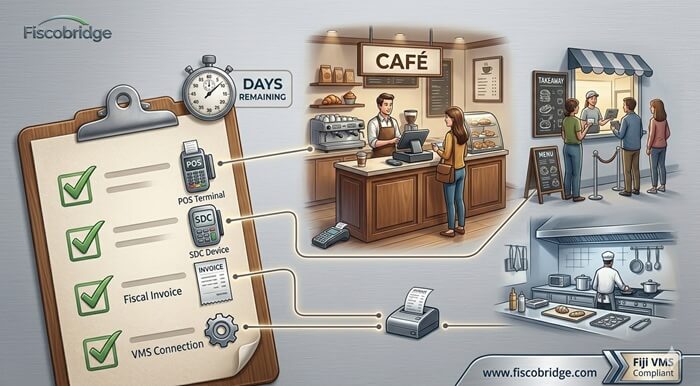
Fiji VMS compliance is now an urgent operational topic for restaurants, cafés, takeaways, bakeries, catering businesses, food courts, bars with food service, and other food service operators.
FRCS confirms that the Food Services group has a VMS implementation due date of 30 June 2026. The same official notice also states that this is the correct implementation date for Food Services, not 31 December 2025 as published earlier.
For food service businesses, the risk is not only a compliance risk. It is also an invoice disruption risk. If your POS, SDC, Secure Element, printer, tax labels, or accounting workflow is not ready, your team may struggle to issue fiscal invoices during normal service hours.
This checklist is written for Fiji food service operators who need to prepare for VMS Version 3 / VMS V3 without replacing systems unnecessarily.
TL;DR / Summary
- FRCS lists Food Services with VMS implementation due on 30 June 2026.
- Food service businesses should check whether they are required to register and comply under the official FRCS timelines.
- Phase 3 businesses should prepare for VMS Version 3 / VMS V3, not only old VMS V2 workflows.
- You may not need to replace your whole POS if your current POS can connect to a compliant SDC.
- The POS creates the sale or invoice, while the SDC performs the fiscalization layer.
- Restaurants and cafés should test fiscal invoice issuing before the deadline, including VAT tax labels, receipt printing, Secure Element access, and daily staff workflows.
- Businesses using Xero, ERP, accounting software, or custom systems should check whether an accounting software integration is the better route.
- Use the FiscoBridge Solution Checker if you are not sure whether you need Desktop POS, SDC, Web Invoicing, or an integration.
Table of contents
- What is the Fiji VMS deadline for Food Services?
- Which food service businesses should check VMS compliance?
- Do food service operators need VMS V3?
- Can a restaurant keep its existing POS?
- What does the SDC do in a compliant POS setup?
- Fiscal invoice, Tax Invoice and Proforma Invoice risks
- What should restaurants test before the deadline?
- Final Fiji VMS checklist for food services
- How FiscoBridge can help
- Best solution by business situation
- Frequently asked questions
What is the Fiji VMS deadline for Food Services?
FRCS confirms the following timeline for Food Services under the Electronic Fiscal Device (EFD) Phase 3 rollout:
| Business group | Registration due | Implementation due |
|---|---|---|
| Food Services | 31 December 2025 | 30 June 2026 |
The official notice also says that all businesses with gross annual turnover of $50,000 and above are expected to comply with the stipulated timelines. Businesses should check their exact obligation with FRCS or their tax adviser, especially if they are below the VAT threshold but still fall within the published VMS Phase 3 scope.
Which food service businesses should check VMS compliance?
This deadline is especially important for businesses that issue sales through a POS, accounting system, or manual invoice process in the food service sector.
Food service operators should review their setup if they operate as:
- Restaurants
- Cafés
- Takeaways
- Bakeries
- Catering businesses
- Food courts
- Quick service restaurants
- Bars or hospitality businesses that also issue food service invoices
- Central kitchens or multi-branch food service operators
The practical question is not only “Am I on the FRCS timeline?” It is also “Can my business issue a fiscal invoice without slowing down service?”
Do food service operators need VMS V3?
Food Services are part of the Phase 3 rollout. FRCS explains that Phase 3 businesses as per Gazette Notice 61 of 2025 are required to register on Version 3.0 in line with the registration and implementation timelines.
This means food service operators should not assume that an old VMS V2 setup is enough for new Phase 3 implementation. Businesses should check:
- Whether their POS is ready for VMS Version 3 / VMS V3
- Whether their selected SDC is V3-ready
- Whether the product is shown under the relevant V3 Accreditation List
- Whether old V2 workflows need to be upgraded before service begins under V3
- Whether their vendor has tested the exact business workflow, not only the technical connection
FRCS also states that Version 2.0 will cease by 31 December 2026. Businesses using any older VMS setup should plan early and avoid a late migration.
Can a restaurant keep its existing POS and still become VMS compliant?
In many cases, yes. A business may not need to replace its whole POS if the POS can connect to a compliant SDC and produce the required fiscal invoice workflow.
This is important for food services because replacing a POS can affect menus, table management, kitchen printing, modifiers, discounts, loyalty, shift reports, and staff training.
Before replacing your POS, ask your POS vendor these questions:
- Can our current POS connect to an External SDC?
- Is the integration ready for Fiji VMS V3?
- Can the POS send invoice data to the SDC and receive fiscal invoice data back?
- Can the POS print or display the required fiscal invoice information?
- Can the system handle refunds, voids, discounts, service charges, and VAT labels correctly?
- Can we test the workflow before going live?
If your current POS can be integrated, a fiscalization layer may be enough. If your current POS cannot integrate, then FiscoBridge Desktop POS may be suitable for a complete food service workflow, while FiscoBridge Web Invoicing may fit businesses that only need simple browser-based invoicing.
What does the SDC do in a compliant POS setup?
An SDC should be understood as the fiscalization layer between the POS and the tax authority system.
The POS creates the sale or invoice, while the SDC performs the fiscalization layer. It receives invoice data from the POS, works with the Secure Element to sign the invoice, returns fiscal invoice data back to the POS, and supports storage and reporting according to fiscalization requirements.
For restaurants and cafés, this means your staff can continue using the POS for normal service, while the SDC handles the fiscal invoice process behind the scenes when the POS is integrated correctly.
For an on-premise External SDC workflow, businesses should also check the Secure Element, smart card reader, local device availability, printer setup, and network stability before the implementation date.
Fiscal invoice, Tax Invoice and Proforma Invoice risks
Food service businesses should treat invoice setup as a business-critical task, not only a technical setup.
FRCS has issued separate guidance for VAT-registered taxpayers on Tax Invoices and Proforma Invoices for input tax credit claims. The guidance explains that a Tax Invoice is used as the basis for input tax claims, while a Proforma Invoice does not constitute a Tax Invoice and cannot be used to claim Input Tax Credits.
Before the 30 June 2026 Food Services implementation date, check that your POS or invoice system clearly handles:
- Fiscal invoice issuing
- Correct VAT tax labels
- Tax Invoice wording where required
- Proforma Invoice wording where applicable
- Payment method reporting
- Refunds, cancellations, voids, and corrections
- Daily reporting and invoice storage
This is especially important for restaurants that serve both individual customers and business customers who may request valid tax invoice information for accounting and VAT input tax credit purposes.
What should restaurants test before the deadline?
A restaurant POS can look simple at the counter but still have many invoice scenarios. Testing only one small cash sale is not enough.
Food service operators should test:
- Cash sale
- Card sale
- Split payment
- Discounted order
- Service charge or surcharge
- Refund or cancellation
- Takeaway order
- Dine-in order
- Multiple VAT labels, if used
- Invoice printing after fiscalization
- QR code or verification details, where applicable
- Offline or unstable internet scenario, depending on the selected solution
- End-of-day review and reporting
Testing should include the people who will actually use the system: cashiers, supervisors, managers, accountants, and POS support staff.
Final Fiji VMS checklist for food services
Use this checklist before the 30 June 2026 implementation date.
1. Confirm your business category and deadline
- Check whether your business falls under Food Services.
- Confirm the official FRCS timeline for your business group.
- Check whether your turnover and business activity bring you into scope.
- Speak with FRCS or your tax adviser if your situation is unclear.
2. Check your POS and VMS V3 readiness
- Ask your POS vendor if your POS supports Fiji VMS V3.
- Check whether your POS can connect to a compliant SDC.
- Check whether the POS and SDC workflow has been tested for your business type.
- Do not assume that a VMS V2 workflow is automatically ready for VMS V3.
3. Check your SDC and Secure Element setup
- Confirm whether you will use an External SDC, Virtual SDC, Web Invoicing, Desktop POS, or accounting software integration.
- Check whether your Secure Element, smart card, reader, or certificate workflow is ready.
- Check expiry dates and access credentials early.
- Test fiscal invoice signing before your live date.
4. Check invoice printing and customer receipts
- Confirm that fiscal invoice data is printed correctly.
- Check receipt layout on your actual printer.
- Test busy counter scenarios, not only back-office scenarios.
- Make sure staff know what to do if printing fails.
5. Check VAT labels and invoice types
- Review your VAT tax labels and menu item mapping.
- Check zero-rated, exempt, or special cases if your business uses them.
- Confirm how Tax Invoice and Proforma Invoice workflows are handled.
- Ask your accountant to review invoice samples before go-live.
6. Check Xero, ERP, or accounting software workflows
- Identify whether invoices are created only in the POS, only in accounting software, or in both systems.
- If Xero, ERP, or custom software issues invoices, check whether those invoices need fiscalization.
- Do not leave accounting software integration until the last week.
- Test fiscalized invoice attachments, reporting, and customer document flow.
7. Train staff before implementation
- Train cashiers on fiscal invoice issuing.
- Train supervisors on failed fiscalization scenarios.
- Train managers on daily checks and reporting.
- Give staff a simple escalation process if the POS or SDC has an issue.
8. Keep vendor and support contacts ready
- Keep your POS vendor contact available.
- Keep your SDC provider contact available.
- Keep your accountant or finance contact available during the first days of use.
- Keep FRCS official enquiry details and guidance links available for compliance questions.
How FiscoBridge can help
FiscoBridge provides fiscalization solutions for Fiji, Samoa, and Vanuatu. For Fiji food service operators preparing for VMS V3, the right option depends on your current system.
- FiscoBridge SDC can support businesses that want to keep their existing POS and connect it to a fiscalization layer.
- FiscoBridge Web Invoicing can support businesses that need a simple browser-based invoicing workflow.
- FiscoBridge Desktop POS can support restaurants, cafés, takeaways, bakeries, and other food service businesses that need a complete POS with order management, inventory, staff controls, and reporting.
- FiscoBridge Integrations can support businesses using Xero, ERP, accounting software, or custom systems where invoices need to be fiscalized from those systems.
- POS to SDC Protocol helps POS vendors and software developers connect their POS to FiscoBridge SDC.
- FiscoBridge Solution Checker helps you understand which solution may fit your business situation.
FiscoBridge can help support the fiscalization workflow, but each business should still check its official obligations, registration status, and exact compliance requirements with FRCS or its tax adviser.
Best solution by business situation
| Business situation | Main risk/problem | Recommended FiscoBridge option |
|---|---|---|
| Restaurant or café already has a POS | The POS may not be connected to a compliant fiscalization layer | FiscoBridge SDC |
| Restaurant, café, takeaway, or bakery needs a complete POS | Manual issuing or an old cash register may not support efficient operations or the VMS V3 workflow | FiscoBridge Desktop POS |
| Small food or catering business only needs simple invoicing | A complete POS may be more than the business needs | FiscoBridge Web Invoicing |
| Business issues invoices from Xero or accounting software | Accounting invoices may need fiscalization and correct document attachment | FiscoBridge Integrations |
| POS vendor supports restaurants and cafés in Fiji | Multiple clients may need VMS V3 integration before the deadline | POS to SDC Protocol |
| Business is not sure which setup is needed | Choosing the wrong route can delay compliance and increase disruption | Solution Checker |
Frequently asked questions
Is the Fiji VMS Food Services implementation date 30 June 2026?
Yes. FRCS lists Food Services with implementation due on 30 June 2026. The official notice also clarifies that this is the correct implementation date for Food Services, not 31 December 2025 as published earlier.
Do restaurants and cafés need to move to VMS V3?
Food Services are part of the Phase 3 rollout. FRCS explains that Phase 3 businesses as per Gazette Notice 61 of 2025 are required to register on Version 3.0 in line with the registration and implementation timelines. Businesses should confirm their exact position with FRCS or their tax adviser.
Can I keep my existing restaurant POS and still become compliant?
Possibly. If your POS can connect to a compliant SDC and return fiscal invoice data correctly, you may not need to replace your whole POS. You should ask your POS vendor whether your current system supports Fiji VMS V3 and whether it can connect to an External SDC.
What is the role of an SDC in Fiji VMS?
The SDC performs the fiscalization layer. The POS creates the sale or invoice, sends the invoice data to the SDC, and receives fiscal invoice data back after fiscalization. The SDC works with the Secure Element and supports storage and reporting according to fiscalization requirements.
Can Xero connect to Fiji VMS fiscalization?
Yes, accounting software integration can be used where invoices are created in Xero or another accounting system. FiscoBridge Integrations are designed for businesses that need fiscalization from Xero, ERP, accounting software, or custom systems.
Can an expired VMS card or Secure Element issue stop fiscal invoice issuing?
It can interrupt issuing in workflows that depend on a Secure Element, smart card, reader, or certificate. Food service businesses should check access, expiry dates, device availability, and signing tests before the deadline.
What should food service operators test before going live?
Test cash payments, card payments, split payments, discounts, refunds, voids, dine-in orders, takeaway orders, receipt printing, VAT labels, Tax Invoice wording, and end-of-day reporting. Testing should be done with the actual POS, printer, SDC, Secure Element, and staff workflow.
What should POS vendors check before upgrading food service clients?
POS vendors should check VMS V3 compatibility, invoice data mapping, connection to SDC, receipt output, VAT labels, refund handling, offline or unstable internet scenarios, and support readiness for multiple clients before the deadline.
Which FiscoBridge solution fits my food service business?
If you already have a POS, check FiscoBridge SDC. If you need a complete POS for restaurant, café, takeaway, or bakery operations, check FiscoBridge Desktop POS. If you only need simple browser-based invoicing, check FiscoBridge Web Invoicing. If your invoices are created in Xero, ERP, or accounting software, check FiscoBridge Integrations. If you are unsure, use the FiscoBridge Solution Checker.
Final thoughts
The 30 June 2026 Fiji VMS implementation date for Food Services should be treated as an operational deadline, not only a tax deadline. Restaurants, cafés, and takeaways need a setup that can issue fiscal invoices during real service hours without slowing down staff or creating invoice errors.
The safest approach is to check your POS, SDC, Secure Element, invoice formats, VAT labels, and staff workflow early. If your existing POS can connect to a compliant SDC, you may be able to keep your current system. If not, Desktop POS, Web Invoicing, or an accounting software integration may be more practical, depending on where invoices are created.
To review your options, visit FiscoBridge SDC, FiscoBridge Web Invoicing, FiscoBridge Desktop POS, FiscoBridge Integrations, or start with the FiscoBridge Solution Checker.