
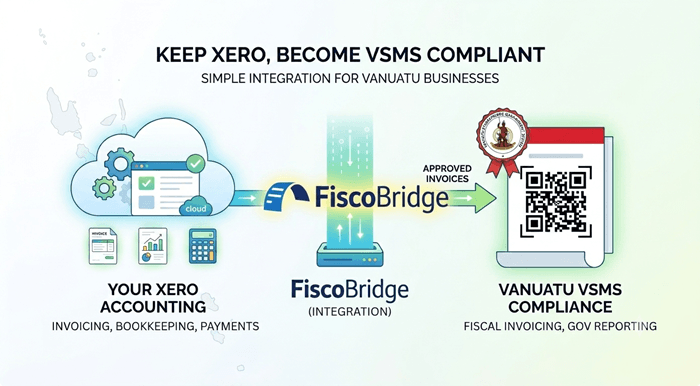
Vanuatu VSMS is changing how VAT-registered businesses issue fiscal invoices, but many businesses do not want to replace their accounting workflow.
For many companies in Port Vila, Shefa, and across Vanuatu, Xero is already used for invoicing, bookkeeping, customer accounts, payments, and accountant review. The practical question is simple:
Can a business keep using Xero and still become VSMS-compliant?
In many cases, the answer is yes. The business may be able to keep Xero as the main invoicing or accounting system and connect approved invoices to a VSMS fiscalization workflow using an integration.
This article explains how Xero and VSMS can work together, what businesses should check, and when FiscoBridge can help with a Xero integration, Web Invoicing, Desktop POS, SDC, or custom fiscalization setup.
TL;DR / Summary
- Vanuatu VSMS applies to VAT-registered businesses and requires the use of an accredited Electronic Fiscal Device (EFD) solution.
- Many Vanuatu businesses and accountants already use Xero for invoicing and bookkeeping.
- A business may not need to replace Xero if Xero invoices can be connected to VSMS fiscalization.
- The usual workflow is: create or approve the invoice in Xero, send the invoice data to the fiscalization solution, receive fiscal invoice data, and attach or store the fiscal result.
- Businesses should check whether fiscalization happens when the invoice is approved, paid, or issued to the customer.
- FiscoBridge Integrations can help connect Xero and other accounting software to fiscalization workflows where supported.
- Businesses that need simple browser-based invoicing can review FiscoBridge Web Invoicing.
- Retail shops, restaurants, cafés, hotels, and other businesses that need a complete POS can review FiscoBridge Desktop POS.
- FiscoBridge SDC can help when invoices are created in a POS or another system that needs a fiscalization layer.
- FiscoBridge supports fiscalization solutions for Fiji VMS, Samoa TIMS, and Vanuatu VSMS.
Table of contents
- Can Vanuatu businesses keep using Xero for VSMS?
- How can Xero invoices connect to VSMS fiscalization?
- Which Xero workflow should businesses check?
- What invoice data may need to be fiscalized?
- What should accountants check before VSMS onboarding?
- What if the business also uses a POS?
- V-SDC, E-SDC, POS, Secure Element, and Xero
- Why keeping Xero can reduce disruption
- Checklist
- How FiscoBridge can help
- Best solution by business situation
- Frequently asked questions
Can Vanuatu businesses keep using Xero for VSMS?
Many Vanuatu businesses use Xero because it is simple for invoicing, bookkeeping, accountant access, payment tracking, and monthly reporting.
VSMS does not automatically mean that every business must stop using Xero. The key issue is whether the invoice data created in Xero can be connected to a compliant fiscalization workflow.
For a business using Xero, the main question is:
Can the Xero invoice be sent to a VSMS fiscalization solution before or when it becomes the official customer invoice?
If this can be done correctly, the business may be able to keep using Xero while adding the VSMS fiscalization step in the background.
How can Xero invoices connect to VSMS fiscalization?
A Xero VSMS integration is normally designed to keep the accounting workflow familiar while adding the required fiscalization process.
A typical flow may look like this:
- The business creates an invoice in Xero.
- The invoice is approved or reaches the configured trigger point.
- The integration reads the invoice data from Xero.
- The invoice data is sent to the VSMS fiscalization workflow.
- The fiscal invoice data is returned after fiscalization.
- The fiscal PDF, QR code, or fiscal reference can be attached or stored with the original invoice workflow where supported.
- The accountant and business continue using Xero for normal bookkeeping and reporting.
This helps businesses avoid duplicate work. Staff do not need to create the same invoice once in Xero and again in a separate fiscalization tool if the integration is configured correctly.
FiscoBridge Integrations are built for businesses that use Xero, accounting software, ERP systems, or custom invoice systems and need to connect those invoices to fiscalization.
Which Xero workflow should businesses check?
Before connecting Xero to VSMS, the business should identify the real invoice workflow.
Different businesses use Xero in different ways:
- Some businesses create and approve invoices directly in Xero.
- Some create invoices in a POS or PMS and only sync summary data to Xero.
- Some create draft invoices first and approve them later.
- Some issue invoices only after payment.
- Some use Xero for bookkeeping only, while customer invoices are issued from another system.
This matters because VSMS fiscalization should be connected to the correct invoice event. For example, fiscalization may need to happen when the invoice is approved, when the invoice is issued, or when payment is recorded, depending on the business process and applicable requirements.
Businesses should not guess this step. They should review their process with their accountant, software provider, and fiscalization provider before going live.
What invoice data may need to be fiscalized?
The VSMS fiscalization workflow depends on accurate invoice data.
For Xero invoices, businesses should check whether the integration can correctly read and send information such as:
- Invoice number
- Invoice date and time
- Customer details where required
- Line items
- Quantities
- Unit prices
- Discounts
- VAT treatment
- Total amount
- Payment status if relevant
- Credit notes, refunds, or corrections
The business should also check whether Xero tax codes match the VAT treatment expected in the fiscalization workflow. Incorrect tax mapping can create errors, delays, or wrong fiscal invoice data.
What should accountants check before VSMS onboarding?
Accountants play an important role because they often manage Xero settings, invoice templates, tax codes, chart of accounts, and reporting.
Before a business connects Xero to VSMS, accountants should check:
- Which Xero organisation is used for the business
- Whether each VAT-registered business has the correct Xero setup
- Whether invoices are created in Xero or imported from another system
- Whether tax codes are used consistently
- Whether invoice approval is controlled by the right users
- Whether credit notes and refunds are handled correctly
- Whether multiple branches or locations need separate VSMS setup
- Whether fiscal invoice PDFs or references should be attached to the Xero invoice
This is especially important for businesses with several branches, restaurants, shops, or service locations.
What if the business also uses a POS?
Some businesses use Xero together with a POS, restaurant POS, hotel POS, PMS, or custom sales system.
In that case, the business should not assume that Xero is always the correct system to fiscalize from.
The business should check where the real customer invoice is created:
- If the customer invoice is created in Xero, a Xero integration may be the right option.
- If the customer invoice is created in the POS, the POS may need to connect to an SDC or VSMS workflow.
- If the invoice is created in a PMS, the PMS may need a direct or custom integration.
- If Xero only receives summary totals, fiscalizing from Xero may not be enough.
For businesses that already use a POS, FiscoBridge SDC can support the fiscalization layer between the POS and the tax authority system where applicable.
V-SDC, E-SDC, POS, Secure Element, and Xero
Under VSMS, businesses will see several important terms:
- POS: The system that creates the sale or invoice.
- SDC: The Sales Data Controller that performs the fiscalization process.
- Secure Element: The required secure component used in the fiscalization workflow.
- EFD: The Electronic Fiscal Device solution used to issue fiscal invoices.
- V-SDC: A virtual Sales Data Controller model.
- E-SDC: An external Sales Data Controller model.
For a Xero-based business, Xero remains the accounting and invoicing system, while the integration connects invoice data to the fiscalization process.
The business should still complete the official VSMS taxpayer process, including registration, enrollment, Secure Element setup, and the use of an accredited EFD solution where required.
Why keeping Xero can reduce disruption
Changing accounting software can be risky for a business that already depends on Xero.
Keeping Xero can help reduce disruption because:
- Staff already know how to create invoices.
- Accountants already have access to the books.
- Customer records may already be in Xero.
- Payment reconciliation may already be configured.
- Monthly reporting can continue in the same system.
- Invoice history stays in one place.
The goal is not to replace a working accounting process if it can be connected properly. The goal is to add the VSMS fiscalization step in a controlled way.
Checklist
Vanuatu businesses using Xero can use this checklist before choosing a VSMS solution:
- Confirm that the business is VAT-registered and required to complete VSMS registration.
- Complete the official VSMS registration and enrollment steps through the DCIR process.
- Confirm whether invoices are created in Xero, POS, PMS, ERP, or another system.
- Decide whether fiscalization should happen on invoice approval, invoice issue, or payment.
- Check whether Xero tax codes are mapped correctly for VAT and exempt transactions.
- Check how credit notes, refunds, cancellations, and corrections are handled.
- Confirm whether each branch or business location needs a separate setup.
- Confirm Secure Element requirements and timing.
- Check whether fiscal invoice PDFs or references should be attached back to Xero.
- Test invoices before going live.
- Train staff and accountants on the new fiscalization workflow.
- Keep official DCIR source links and support contacts available.
How FiscoBridge can help
FiscoBridge provides fiscalization solutions for Fiji VMS, Samoa TIMS, and Vanuatu VSMS.
For Vanuatu businesses using Xero, FiscoBridge can help connect the accounting workflow to VSMS fiscalization where supported.
- FiscoBridge Integrations for Xero, accounting software, ERP, PMS, and custom invoice workflows.
- FiscoBridge Web Invoicing for businesses that need a simple browser-based invoicing option.
- FiscoBridge Desktop POS for retail shops, restaurants, cafés, hotels, and other businesses that need a complete POS with inventory, staff controls, and reporting.
- FiscoBridge SDC for businesses that need a fiscalization layer between their POS and the tax authority system.
- Solution Checker for businesses that are not sure whether they need Xero integration, Web Invoicing, Desktop POS, SDC, or a custom setup.
FiscoBridge can also help businesses review whether Xero is the correct system to connect, or whether fiscalization should happen from a POS, PMS, hotel system, restaurant POS, or custom software.
Best solution by business situation
| Business situation | Main risk/problem | Recommended FiscoBridge option |
|---|---|---|
| Business creates invoices directly in Xero | Invoices need to be connected to VSMS fiscalization | FiscoBridge Xero Integration |
| Accountant manages invoices and tax codes in Xero | Tax mapping and invoice approval must match the fiscalization workflow | FiscoBridge Integrations |
| Business uses POS for sales and Xero for bookkeeping | Xero may only receive summaries, so fiscalization may need to happen from the POS | FiscoBridge SDC or custom integration |
| Small service business needs simple invoicing | Manual invoicing may create delays and duplicate work | FiscoBridge Web Invoicing |
| Restaurant, retail shop, café, or hotel needs a complete POS | The business needs sales processing, inventory, staff controls, and reporting together with VSMS compliance | FiscoBridge Desktop POS |
| Hotel, resort, or PMS user syncs invoices to Xero | The invoice may be created outside Xero, so the correct fiscalization point must be confirmed | FiscoBridge Integrations or custom PMS integration |
| Business is unsure which system should connect to VSMS | Wrong setup can cause invoice disruption or duplicate work | FiscoBridge Solution Checker |
Frequently asked questions
Can I keep using Xero and become VSMS-compliant in Vanuatu?
In many cases, yes. If your invoices are created in Xero and can be connected to a VSMS fiscalization workflow, you may be able to keep your normal Xero process and add fiscalization through an integration.
Does VSMS mean I must replace Xero?
No. VSMS does not automatically mean that you must replace Xero. The key question is whether Xero is the correct place where your customer invoices are created and whether those invoices can be fiscalized correctly.
When should a Xero invoice be fiscalized?
This depends on the business workflow and applicable requirements. Some businesses may fiscalize when the invoice is approved, while others may need a different trigger. Businesses should confirm the correct workflow before going live.
Can FiscoBridge attach the fiscal invoice back to Xero?
Where supported, the integration can attach or store fiscal invoice data, fiscal PDF, QR code, or fiscal reference with the original invoice workflow. The exact setup depends on the integration configuration and business process.
What if my POS creates invoices and Xero only receives summaries?
If the POS creates the real customer invoice, fiscalization may need to happen from the POS instead of Xero. In that case, the POS may need to connect to an SDC or another VSMS fiscalization workflow.
Can Xero connect to VSMS for restaurants or hotels?
It depends on where the invoice is created. If the restaurant or hotel creates customer invoices in Xero, a Xero integration may fit. If invoices are created in a restaurant POS, hotel POS, or PMS, the POS or PMS may need to connect directly to the fiscalization workflow.
What should accountants check before connecting Xero to VSMS?
Accountants should check the Xero organisation, tax codes, invoice approval process, credit notes, refunds, branches, business locations, and whether fiscal invoice records should be attached back to Xero.
Do VAT-registered businesses in Vanuatu need to register for VSMS?
DCIR guidance says VSMS registration is for VAT-registered taxpayers. Businesses should check the official DCIR VSMS registration guidance and complete the required registration and enrollment process.
What is the difference between Xero integration, Web Invoicing, and Desktop POS?
Xero integration is for businesses that already create invoices in Xero and want to keep that workflow. Web Invoicing is for businesses that need a simple browser-based invoicing option. Desktop POS is for businesses that need a complete system for sales, inventory, staff controls, and reporting.
Which FiscoBridge solution fits my business?
If you use Xero for invoicing, FiscoBridge Integrations may fit. If you already use a POS, FiscoBridge SDC or a POS integration may fit. If you need simple browser-based invoicing, FiscoBridge Web Invoicing may fit. If you need a complete POS for sales, inventory, staff, and reporting, FiscoBridge Desktop POS may fit. If you are unsure, use the Solution Checker.
Final thoughts
Many Vanuatu businesses and accountants already have a working Xero process. VSMS compliance should not automatically mean changing the whole accounting workflow.
The important step is to identify where the customer invoice is created, how VAT is handled, when the invoice should be fiscalized, and how fiscal invoice data should be stored or attached.
FiscoBridge can help Vanuatu businesses review whether they need Xero integration, Web Invoicing, Desktop POS, SDC, or a custom POS/PMS integration. Businesses can also use the Solution Checker to understand the best option before making changes.