
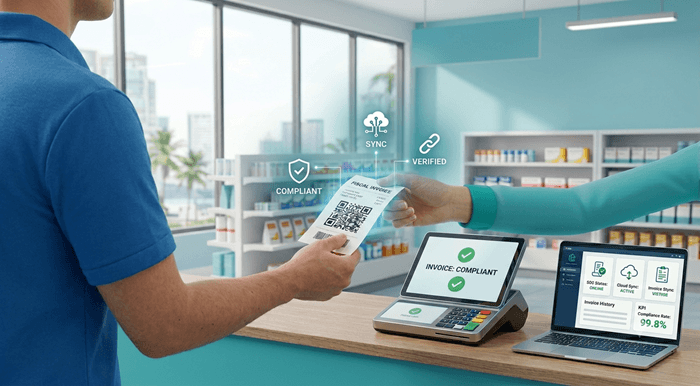
For customers, a fiscal invoice is more than a receipt. It is proof that the sale was recorded through the required fiscalization process. For businesses, it helps reduce compliance risk, customer complaints, invoice disputes, and operational disruption.
When a customer does not receive a fiscal invoice, the issue can quickly become bigger than a missing piece of paper. The customer may ask for a corrected invoice, complain to the business, report the issue, or have problems using the invoice for accounting, VAT input tax credit, expense claims, or internal approval.
This article explains why fiscal invoices matter, what may happen when customers do not receive one, and how businesses can avoid problems by using reliable Desktop POS software, Web Invoicing, SDC, or accounting software integration.
TL;DR / Summary
- A fiscal invoice confirms that a sale was processed through the required fiscalization workflow.
- In Fiji VMS, Samoa TIMS, and Vanuatu VSMS, fiscal invoices are connected to systems such as POS, SDC, Secure Element, EFD, and tax authority reporting.
- If a customer does not receive a fiscal invoice, they may ask for a corrected invoice, delay payment, raise a complaint, or report the issue.
- Business customers may need a valid fiscal invoice to support VAT input tax credit, internal expense approval, or accounting records.
- Businesses should not rely on manual workarounds if fiscal invoice issuing fails.
- Reliable Desktop POS software, Web Invoicing, SDC, or accounting software integration can help reduce non-issuance risk.
- FiscoBridge SDC can provide the fiscalization layer between a POS and the tax authority system.
- FiscoBridge Web Invoicing can help businesses issue fiscal invoices from a browser.
- FiscoBridge Desktop POS can help retail shops, cafés, restaurants, hotels, and other businesses manage sales and issue fiscal invoices from a complete POS system.
- FiscoBridge Integrations can help businesses using Xero, ERP, accounting software, PMS, Cloudbeds, or custom systems.
- The safest approach is to test normal sales, refunds, Tax Invoices, customer details, offline situations, and invoice reprints before going live.
Table of contents
- Why do fiscal invoices matter?
- What may customers do if they do not receive a fiscal invoice?
- What compliance risks can businesses face?
- Why fiscal invoices matter for VAT input tax credit
- Common reasons fiscal invoices are not issued
- How this applies to Fiji VMS, Samoa TIMS, and Vanuatu VSMS
- What if invoices are created in Xero or cloud accounting software?
- How Desktop POS, Web Invoicing, and SDC help prevent non-issuance
- Checklist
- How FiscoBridge can help
- Best solution by business situation
- Frequently asked questions
Why do fiscal invoices matter?
A fiscal invoice is the invoice or receipt produced after the sale has passed through the required fiscalization process.
In simple terms, the business records the sale in a POS, invoicing system, accounting software, or other sales system. The fiscalization layer then signs or validates the invoice using the required components, such as an SDC and Secure Element, and returns fiscal invoice data back to the sales system.
This fiscal invoice data may include items such as:
- Fiscal invoice number
- Invoice date and time
- Business and location details
- Invoice type
- Tax amounts
- Verification link or QR code where applicable
- Fiscal signature or fiscal reference
- Other required invoice fields
For the customer, this gives confidence that the sale was recorded properly. For the business, it helps create a compliant invoice trail and reduces the risk of missing fiscal data.
What may customers do if they do not receive a fiscal invoice?
If a customer expects a fiscal invoice but does not receive one, they may take action immediately or later when they review their records.
A customer may:
- Ask the cashier or business owner to issue a proper fiscal invoice.
- Request a corrected Tax Invoice or fiscal invoice copy.
- Delay payment until a valid invoice is issued.
- Reject the invoice for internal accounting or expense approval.
- Ask their accountant whether the invoice can be used.
- Complain to the business if the invoice does not include required fiscal details.
- Report the issue to the relevant tax authority or compliance office.
For small cash sales, this may look like a simple customer service issue. For B2B sales, hotel invoices, restaurant invoices, supplier invoices, service invoices, and accounting software invoices, it can become a bigger problem because the customer may need the invoice for accounting, VAT, audit, or internal approval.
What compliance risks can businesses face?
When a business regularly fails to issue fiscal invoices, it may create compliance and operational risk.
Possible risks include:
- Customer complaints about missing fiscal invoice data
- Disputes with business customers that require valid Tax Invoices
- Manual corrections and extra accounting work
- Invoice reissue requests
- Gaps between POS sales and fiscalized sales
- Problems during tax authority checks or internal audits
- Staff confusion about which invoice is valid
- Invoice disruption if the POS, SDC, Secure Element, or integration is unreliable
Businesses should check the exact legal rules, penalties, and reporting obligations with the official tax authority guidance or their tax adviser. The practical point is clear: a reliable fiscal invoice process is much safer than fixing invoice issues after customers complain.
Why fiscal invoices matter for VAT input tax credit
Business customers often need correct invoice documents for accounting and VAT records.
In markets such as Fiji VMS and Vanuatu VSMS, a customer may need a proper Tax Invoice or fiscal invoice to support VAT input tax credit, depending on the applicable rules and the customer’s situation.
This is why missing fiscal invoice data can affect more than the seller. It can also affect the buyer’s accounting process.
For example, a business customer may ask:
- Is this a valid Tax Invoice?
- Does the invoice include the required fiscal invoice data?
- Can we use this invoice for VAT input tax credit?
- Can our accountant accept this invoice?
- Can we verify the fiscal invoice?
If the answer is unclear, the customer may come back to the seller and request a corrected fiscal invoice.
Common reasons fiscal invoices are not issued
Fiscal invoice non-issuance is not always intentional. In many cases, it happens because the business process is not ready or the software setup is incomplete.
Common reasons include:
- The POS is not connected to the SDC.
- The SDC is offline, blocked, misconfigured, or not available.
- The Secure Element is missing, expired, or not correctly connected.
- The business is using a normal invoice template instead of a fiscal invoice workflow.
- The cashier prints a proforma or draft invoice instead of a fiscal invoice.
- The accounting software invoice is not connected to fiscalization.
- The POS vendor has not upgraded the system for VMS, TIMS, or VSMS.
- Refunds, cancellations, or credit notes are not configured correctly.
- Internet or network problems interrupt invoice issuing.
- Staff do not understand when the invoice becomes official.
The solution is not only software. Businesses also need clear staff training, a tested invoice workflow, and a support process for errors.
How this applies to Fiji VMS, Samoa TIMS, and Vanuatu VSMS
Fiji VMS, Samoa TIMS, and Vanuatu VSMS use similar fiscalization concepts, but businesses should always follow the official guidance for their country.
| Market | Fiscalization system | What businesses should check |
|---|---|---|
| Fiji | Fiji VMS / VMS V3 | Check POS, SDC, Secure Element, EFD, fiscal invoice format, Tax Invoice handling, V3 Accreditation List, and VMS readiness. |
| Samoa | Samoa TIMS / TIMS v3 | Check fiscal invoice workflow, POS upgrade, External SDC or Virtual SDC, offline fiscal invoicing, and accounting software integration. |
| Vanuatu | Vanuatu VSMS | Check EFD, POS, SDC, Secure Element, taxpayer registration, enrollment, business location setup, and VAT-registered business requirements. |
The names may differ by country, but the business problem is similar: every sale that should be fiscalized needs to end with a valid fiscal invoice.
What if invoices are created in Xero or cloud accounting software?
Many businesses do not create invoices from a traditional cash register. They create invoices in Xero, ERP software, hotel systems, PMS platforms, cloud invoicing tools, or custom business software.
In that situation, the business should check where the official invoice is created.
Important questions include:
- Is the customer invoice created in Xero?
- Is the invoice created in a POS and then synced to Xero?
- Is the invoice created in a hotel PMS or Cloudbeds?
- Is the invoice created in ERP or custom software?
- Does the system issue a fiscal invoice or only a normal invoice?
- Does the fiscal PDF or fiscal reference get attached back to the original invoice?
If the invoice is created in Xero or another cloud system, a fiscalization integration may be the best way to keep the existing accounting workflow while adding the required fiscal invoice step.
FiscoBridge Integrations can help businesses connect systems such as Xero, ERP, PMS, Cloudbeds, accounting software, and custom invoicing software to fiscalization workflows where supported.
How Desktop POS, Web Invoicing, and SDC help prevent non-issuance
To avoid missing fiscal invoices, the business needs a reliable path from sale creation to fiscal invoice output.
For many businesses, this means one of four main setups:
- Existing POS + SDC: The POS creates the sale, and the SDC performs the fiscalization layer.
- Desktop POS: The business uses a complete desktop sales system with inventory, staff controls, and reporting, together with fiscal compliance.
- Web Invoicing: The business issues fiscal invoices through a simple browser-based system.
- Software integration: Xero, ERP, PMS, Cloudbeds, or custom software sends invoice data to fiscalization.
The POS creates the sale or invoice, while the SDC performs the fiscalization layer. It receives invoice data from the POS, works with the Secure Element to sign the invoice, returns fiscal invoice data back to the POS, and supports storage/reporting according to fiscalization requirements.
This helps prevent situations where the customer receives only a normal receipt, draft invoice, proforma invoice, or accounting invoice without fiscal invoice data.
Checklist
Businesses can use this checklist to reduce the risk of fiscal invoice non-issuance:
- Confirm which sales must be fiscalized under the relevant country rules.
- Check whether invoices are created in POS, Xero, ERP, PMS, Cloudbeds, or custom software.
- Confirm whether the business uses the correct EFD, SDC, Secure Element, or accredited solution.
- Test normal sales before going live.
- Test B2B Tax Invoices and buyer/customer details where required.
- Test refunds, cancellations, credit notes, and corrections.
- Test invoice printing, email delivery, PDF attachment, and QR code visibility where applicable.
- Check what happens if internet connection is unstable.
- Check what happens if the Secure Element is unavailable, expired, or blocked.
- Train staff to understand the difference between draft, proforma, normal receipt, and fiscal invoice.
- Keep a clear support process for failed invoices.
- Review invoice reports regularly to detect missing or failed fiscalization attempts.
How FiscoBridge can help
FiscoBridge provides fiscalization solutions for Fiji VMS, Samoa TIMS, and Vanuatu VSMS.
FiscoBridge helps businesses issue fiscal invoices from different workflows:
- FiscoBridge SDC for businesses that already have a POS and need a fiscalization layer.
- FiscoBridge Web Invoicing for businesses that need a simple browser-based fiscal invoicing solution.
- FiscoBridge Desktop POS for retail shops, cafés, restaurants, hotels, and other businesses that need a complete sales, inventory, staff, and reporting solution.
- FiscoBridge Integrations for Xero, ERP, PMS, Cloudbeds, accounting software, and custom invoice workflows.
- Solution Checker for businesses that are not sure whether they need Desktop POS, SDC, Web Invoicing, or integration.
For POS vendors and software developers, FiscoBridge can also help with integration planning so their software can send invoice data to the fiscalization layer correctly.
The goal is simple: every sale that should produce a fiscal invoice should produce one reliably, with fewer manual corrections and fewer customer complaints.
Best solution by business situation
| Business situation | Main risk/problem | Recommended FiscoBridge option |
|---|---|---|
| Business already uses a POS | POS may issue receipts without fiscal invoice data | FiscoBridge SDC |
| Business uses Xero for invoicing | Xero invoices may not be connected to fiscalization | FiscoBridge Integrations |
| Business uses ERP, PMS, Cloudbeds, or custom software | Invoice data may need a custom fiscalization workflow | FiscoBridge Integrations |
| Small business has no POS or accounting system | Manual invoicing can lead to missing fiscal invoices | FiscoBridge Web Invoicing |
| Restaurant, café, hotel, or retail shop has many daily sales | High invoice volume increases the risk of missed or failed invoices | FiscoBridge Desktop POS |
| Business is unsure which workflow is correct | Wrong setup can cause invoice disruption and customer complaints | FiscoBridge Solution Checker |
Frequently asked questions
What happens if a customer does not receive a fiscal invoice?
The customer may ask for a corrected invoice, delay payment, reject the invoice for accounting purposes, complain to the business, or report the issue to the relevant authority. The exact outcome depends on the country, customer type, and transaction.
Why is a fiscal invoice important?
A fiscal invoice shows that the sale was processed through the required fiscalization workflow. It helps support proper sales records, customer proof of purchase, tax reporting, and accounting documentation.
Can a normal receipt replace a fiscal invoice?
Not always. If the sale is required to be fiscalized, a normal receipt, draft invoice, proforma invoice, or internal invoice may not be enough. The business should issue the correct fiscal invoice according to the applicable rules.
Can customers report missing fiscal invoices?
Customers may report missing or incorrect fiscal invoices, depending on the local tax authority process. Businesses should not rely on customers ignoring missing fiscal invoice data.
How does this apply to Fiji VMS?
In Fiji VMS, businesses should check VMS V3 readiness, POS, SDC, Secure Element, EFD setup, fiscal invoice format, Tax Invoice handling, VAT input tax credit support, and the relevant accreditation guidance.
How does this apply to Samoa TIMS?
In Samoa TIMS, businesses should check whether their POS, External SDC, Virtual SDC, offline fiscal invoicing, and accounting software integration can issue fiscal invoices correctly.
How does this apply to Vanuatu VSMS?
In Vanuatu VSMS, VAT-registered businesses should check taxpayer registration, enrollment, Secure Element setup, accredited EFD solution, POS, SDC, and invoice issuing process.
Can Xero invoices be fiscalized?
Yes, integration may be possible depending on the country, invoice workflow, and system setup. If invoices are created in Xero, FiscoBridge Integrations can help connect the invoice workflow to fiscalization where supported.
What if my POS or accounting software fails to issue a fiscal invoice?
The business should investigate the failure, avoid manual shortcuts, confirm whether the invoice needs to be reissued or corrected, and contact the software or fiscalization provider. Staff should know the approved process before problems happen.
Which FiscoBridge solution helps prevent missing fiscal invoices?
If you already have a POS, FiscoBridge SDC may fit. If you use Xero, ERP, PMS, Cloudbeds, or accounting software, FiscoBridge Integrations may fit. If you need simple browser-based invoicing, FiscoBridge Web Invoicing may fit. If you need a complete system for counter sales, inventory, staff, and reporting, FiscoBridge Desktop POS may fit. You can also use the Solution Checker.
Final thoughts
A missing fiscal invoice can create more than a customer service problem. It can create accounting issues, VAT documentation problems, complaints, manual corrections, and compliance risk.
Businesses in Fiji VMS, Samoa TIMS, and Vanuatu VSMS should review where invoices are created, how fiscalization is triggered, and what happens when the invoice process fails.
FiscoBridge can help businesses review whether they need SDC, Web Invoicing, Desktop POS, Xero or accounting software integration, or a custom fiscalization workflow. Businesses can also use the Solution Checker to understand which option fits their situation.