
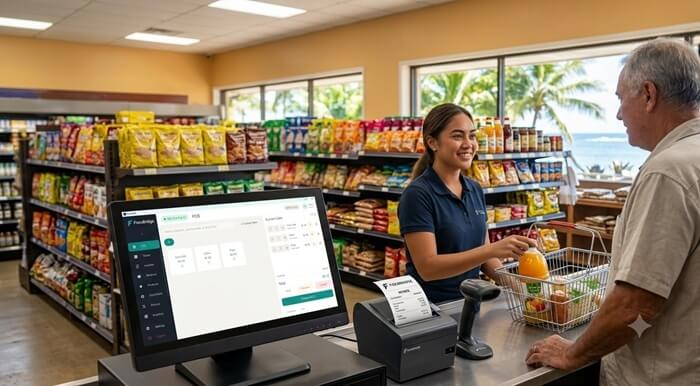
Fiji VMS, Samoa TIMS and Vanuatu VSMS require affected businesses to issue fiscal invoices through an approved fiscalization workflow. For retailers, restaurants and cafés, this means choosing a POS that can manage everyday sales while communicating correctly with the required Sales Data Controller (SDC) and Secure Element.
FiscoBridge Desktop POS combines a modern, touch-friendly checkout with inventory, shifts, discounts, customer management, restaurant tables, reports and offline fiscal invoicing. It connects directly to the FiscoBridge SDC, which handles invoice signing and communication with the relevant tax authority.
The result is one practical system for running the business and supporting fiscalization, without requiring staff to enter each sale into a separate application.
TL;DR / Summary
- FiscoBridge Desktop POS is designed for retail shops, restaurants, cafés and other businesses operating from a physical checkout.
- It runs on Windows, macOS and Linux and supports touch screens, barcode scanners, receipt printers, cash drawers and customer displays.
- Every sale is sent to the FiscoBridge SDC for fiscal signing and reporting to Fiji VMS, Samoa TIMS or Vanuatu VSMS.
- The offline-first design allows supported External SDC workflows to continue issuing fiscal invoices during an internet disruption and submit queued data after reconnection.
- Lite includes checkout, shifts, discounts, receipts, reports and audit logs.
- Pro adds restaurant tables, split and merged bills, customers, advance billing, inventory, suppliers and purchase orders.
- Businesses with an existing POS may only need the FiscoBridge SDC instead of replacing their current system.
- Businesses invoicing through Xero, MYOB or another supported platform should consider a FiscoBridge accounting software integration.
- Accreditation applies to specific products, versions and configurations. Businesses should check the current official accreditation list and confirm their setup before going live.
Table of contents
- How do I make my POS compliant with VMS, TIMS or VSMS?
- What features are included in FiscoBridge Desktop POS?
- Which edition do I need: Lite or Pro?
- Is it suitable for retail businesses?
- Is it suitable for restaurants and cafés?
- Can it issue fiscal invoices when the internet is down?
- What changes between Fiji, Samoa and Vanuatu?
- Do I need to upgrade from VMS V2 or TIMS v2?
- Can I keep my existing POS?
- What happens if my fiscal card expires?
- What POS hardware is supported?
- How is FiscoBridge Desktop POS installed?
- Implementation checklist
- How FiscoBridge can help
- Frequently asked questions
How do I make my POS compliant with VMS, TIMS or VSMS?
A normal POS records the sale. A compliant fiscal workflow must also create the required invoice data, digitally sign the invoice and submit the fiscal information to the tax authority.
In a typical External SDC setup, the process is:
- The cashier completes a sale in FiscoBridge Desktop POS.
- The POS sends the transaction data to FiscoBridge SDC.
- The SDC uses the tax-authority-issued Secure Element to sign the invoice.
- The signed fiscal response is returned to the POS.
- The receipt can be printed on a thermal printer or produced as a PDF invoice.
- The required fiscal data is transmitted to Fiji VMS, Samoa TIMS or Vanuatu VSMS.
This means staff can process sales from one checkout screen while the fiscalization steps happen in the background.
FRCS explains that a Fiji Electronic Fiscal Device, or EFD, consists of a POS, an SDC and an FRCS-issued Secure Element. Samoa and Vanuatu use a similar POS-to-SDC structure. The exact products and versions used by a business must meet the rules of the applicable jurisdiction.
What features are included in FiscoBridge Desktop POS?
FiscoBridge Desktop POS is more than a basic fiscal invoice screen. It includes the operational features needed at a busy retail or restaurant checkout.
Fast, touch-friendly checkout
- Visual product grid
- Fast item search and selection
- Cart management
- Quantity adjustment
- Open pricing when an item does not have a fixed price
- Barcode scanner support
- Clear totals and change-due calculation
The interface is designed for touch screens and everyday counter use, helping cashiers complete transactions with fewer steps.
Shift and cash management
- Open and close cashier shifts
- Record cash added to or removed from the drawer
- Track sales by shift
- Reconcile expected and counted cash
- Print X and Z reports
This provides a clearer record of who operated the till, when the shift was active and how cash moved during the day.
Promotions and discounts
- Rules-based automatic promotions
- Discounts on individual invoice lines
- Discounts on the complete cart
- Audit records for discounts and price changes
Businesses can run promotions without asking cashiers to calculate discounts manually.
Customer-facing display
A second screen can show the customer:
- Items being added
- Quantities and prices
- Discounts
- Transaction total
- Change due
This improves checkout transparency and helps customers identify an incorrect item before the fiscal invoice is completed.
Thermal receipts and PDF invoices
FiscoBridge Desktop POS supports ESC/POS thermal printing for fast counter receipts. It can also generate a formal PDF invoice for B2B customers, email delivery or A4 printing.
Businesses should configure their invoice type carefully. FRCS has clarified that a Proforma Invoice is not a Tax Invoice and cannot be used to support a Fiji VAT input tax credit claim. The final document must be issued using the correct invoice type and contain the required fiscal information.
Sales reports and dashboard
- Daily revenue overview
- Sales by payment method
- Sales by category
- Top-selling products
- Shift and cash reconciliation
- Invoice history
These reports help owners and managers understand daily operations without checking every individual transaction.
Administrative audit log
The admin-only audit log records important activities, including:
- User logins
- Price changes
- Discounts
- Refunds
- Shift operations
- Other controlled POS actions
An audit trail is especially useful when a manager needs to investigate an unusual refund, discount or cash difference.
Inventory and purchasing
The Pro edition includes:
- Product and stock management
- Stock takes
- Low-stock alerts
- Supplier records
- Purchase orders
Stock movement is connected to the sales workflow, reducing the need to maintain a separate manual stock list.
Which edition do I need: Lite or Pro?
| Feature | Lite | Pro |
|---|---|---|
| Touch-friendly point of sale | Included | Included |
| Cart and open pricing | Included | Included |
| Shifts and cash movements | Included | Included |
| Promotions and discounts | Included | Included |
| Customer display | Included | Included |
| Thermal and PDF receipts | Included | Included |
| Reports, dashboard and audit log | Included | Included |
| Restaurant table management | Not included | Included |
| Split, merge and transfer tables | Not included | Included |
| Customer database and advance billing | Not included | Included |
| Inventory and stock takes | Not included | Included |
| Suppliers and purchase orders | Not included | Included |
Lite is suitable for a straightforward checkout that does not require table service or full inventory operations. Pro is the better option for restaurants and businesses that need stock, purchasing, supplier and customer management.
Is FiscoBridge Desktop POS suitable for retail businesses?
Yes. It is designed for shops, supermarkets, pharmacies, convenience stores and other businesses that need fast checkout and reliable fiscal invoicing.
Useful retail features include:
- Barcode-based checkout
- Fast product selection
- Promotions and discounts
- Inventory and stock takes
- Low-stock warnings
- Cashier shifts
- Customer-facing display
- Thermal receipt printing
- Sales and payment reports
- Offline fiscal invoice processing through the connected External SDC workflow
Because the POS runs locally, it is also practical for locations where internet connectivity may be unstable.
Is FiscoBridge Desktop POS suitable for restaurants and cafés?
Yes. The Pro edition provides table-service features in the same application used for counter sales and fiscalization.
- Restaurant table management
- Transfer orders between tables
- Merge tables or bills
- Split bills for separate customer payments
- Kitchen printer support
- Customer records
- Advance billing
- Inventory and purchasing
- Promotions and discounts
This allows a restaurant to manage orders and complete the fiscal invoice from one workflow instead of maintaining separate table-management and fiscalization applications.
Can it issue fiscal invoices when the internet is down?
FiscoBridge Desktop POS is built for offline-first operation when it is connected to the supported FiscoBridge External SDC setup.
During an internet disruption:
- The POS continues running locally.
- The transaction is sent to the local SDC.
- The invoice is signed using the available Secure Element.
- Fiscal data is stored securely in the local queue.
- Queued information is submitted automatically after connectivity returns.
This reduces invoice disruption in locations with unreliable internet. The computer, printer, SDC and card reader must still have power and be working correctly.
The Samoa Ministry of Revenue has specifically explained that TIMS POS systems using an External SDC can continue operating offline during system unavailability, while a Virtual SDC depends on connectivity. DCIR gives similar guidance for Vanuatu VSMS.
What changes between Fiji VMS, Samoa TIMS and Vanuatu VSMS?
| Country | Fiscal system | Important implementation point |
|---|---|---|
| Fiji | FRCS VMS Version 3 | The EFD workflow uses a POS, SDC and FRCS-issued Secure Element. Businesses should check the V3 Accreditation List and use the correct Tax Invoice type. |
| Samoa | TIMS v3 | The Ministry has advised taxpayers to upgrade accredited POS and SDC components to v3-compatible systems. An External SDC supports offline fiscal invoicing. |
| Vanuatu | VSMS | Businesses must complete taxpayer registration and enrollment and select accredited EFD components. DCIR lists FiscoBridge SDC as an accredited External SDC. |
For Vanuatu, VAT-registered businesses in Port Vila, Shefa and other designated taxpayer groups should follow the applicable registration, enrollment and compliance deadlines published by DCIR. The official VSMS FAQ says deadlines are phased and taxpayers should begin early to avoid delays.
For every country, businesses should verify that the exact POS, SDC, Secure Element and software versions in their proposed configuration are accepted for their jurisdiction.
Do I need to upgrade from VMS V2 or TIMS v2?
A product appearing on a V2 accreditation list should not automatically be treated as V3-compatible.
In Fiji, businesses should:
- Check the current FRCS V3 Accreditation List.
- Confirm the exact POS and SDC product versions with the supplier.
- Check whether the existing Secure Element and card reader setup is suitable.
- Plan installation and testing before changing the live checkout.
In Samoa, the Ministry’s official TIMS upgrade notice says v2-compliant systems could operate temporarily after the platform upgrade, but taxpayers are required to move to v3-compliant POS and SDC systems for ongoing compatibility.
Businesses should not wait for an old POS to stop issuing invoices before checking its upgrade status. A controlled upgrade reduces the risk of checkout and fiscal invoice disruption.
Can I keep my existing POS and still become compliant?
Possibly. You may not need to replace an existing POS if its vendor or developer can connect it to an approved SDC and complete any required accreditation or compatibility work.
The FiscoBridge SDC exposes integration endpoints that an existing POS, ERP or invoicing application can call. This is often the right option when the current software already manages complex business processes and only lacks fiscalization.
Before keeping an existing POS, check:
- Whether the vendor still supports the product
- Whether developers can modify its invoice workflow
- Whether it can send the required sale, refund and payment data to an SDC
- Whether it can print or display the returned fiscal invoice
- Whether the required version and configuration can be accredited
- Whether it can handle offline and retry scenarios safely
If the old POS cannot be upgraded reliably, replacing it with FiscoBridge Desktop POS may provide a simpler route.
What happens if my fiscal card or Secure Element expires?
An expired, blocked or unavailable Secure Element can prevent the SDC from signing new fiscal invoices. This can interrupt checkout even when the POS application itself is working.
Businesses should:
- Monitor the Secure Element expiry date.
- Keep the tax authority’s registered email address current.
- Request renewal before the expiry date.
- Test the replacement Secure Element before the old one expires.
- Contact the EFD supplier if the POS cannot create a fiscal invoice.
- Contact the tax authority if the certificate is expired, blocked, lost or cannot be renewed through the portal.
DCIR states that Vanuatu renewal requests should be submitted through the VSMS Taxpayer Portal. It also identifies expired certificates, blocked smart cards, reader configuration and connectivity as common reasons why a fiscal invoice cannot be created.
What POS hardware is supported?
FiscoBridge Desktop POS runs on Windows, macOS and Linux and can work with common checkout equipment.
- Touch-screen computers and standard desktop computers
- ESC/POS thermal receipt printers
- Kitchen printers
- Barcode scanners
- Cash drawers
- Customer-facing second displays
- Card terminals through a supported pluggable adapter
- Smart card reader and tax-authority-issued Secure Element where required
Compatibility should be confirmed before purchasing or reusing hardware, especially for receipt printers, card terminals and smart card readers.
How is FiscoBridge Desktop POS installed?
The standard setup has three main stages.
- Install the POS. Download and install FiscoBridge Desktop POS on the Windows, macOS or Linux checkout terminal.
- Connect the fiscalization components. Install and configure FiscoBridge SDC, the card reader and the tax-authority-issued Secure Element.
- Configure and test the business workflow. Add products, tax labels, prices, payment methods, printers, users and permissions. Complete test transactions before starting live fiscal invoicing.
The business should test normal sales, refunds, discounts, cash and card payments, receipt printing, shift closure and offline recovery before go-live.
Checklist
- Confirm which fiscal system applies: Fiji VMS V3, Samoa TIMS v3 or Vanuatu VSMS.
- Complete taxpayer registration and enrollment with the relevant tax authority.
- Check the current official POS and SDC accreditation lists.
- Confirm the approved product version and configuration with the supplier.
- Order or renew the required Secure Element.
- Check the Secure Element expiry date.
- Confirm that the computer meets the operating-system requirements.
- Test the thermal printer, barcode scanner, cash drawer and customer display.
- Configure products, prices, tax labels and payment methods.
- Set up cashiers, managers and access permissions.
- Test normal sales, refunds and discounts.
- Test Tax Invoice and Proforma Invoice workflows where applicable.
- Test offline fiscal invoicing and automatic reconnection.
- Train staff before the live implementation date.
- Keep supplier and tax-authority support details available at the checkout.
How FiscoBridge can help
FiscoBridge offers four main ways to support fiscalization in Fiji, Samoa and Vanuatu.
- FiscoBridge Desktop POS: A complete local checkout for retail and restaurants, with shifts, discounts, reports, inventory and restaurant operations.
- FiscoBridge SDC: For businesses that want to keep an existing POS or ERP and connect it to an External SDC through an API.
- FiscoBridge Web Invoicing: A browser-based option for businesses that issue a lower volume of invoices and do not need a complete retail till.
- FiscoBridge Integrations: For automatic fiscalization from supported accounting and ERP platforms, including Xero and MYOB.
The right option depends on where sales are created. A shop or restaurant normally needs a Desktop POS. A company with a suitable existing POS may only need the SDC. A professional-service business may prefer Web Invoicing, while a company already creating invoices in Xero may benefit from a Xero integration.
Best solution by business situation
| Business situation | Main risk/problem | Recommended FiscoBridge option |
|---|---|---|
| Retail shop starting with a new checkout | Needs fast sales, receipts, shifts and fiscalization | Desktop POS Lite with FiscoBridge SDC |
| Retailer requiring inventory and purchasing | Stock errors and separate purchasing records | Desktop POS Pro with FiscoBridge SDC |
| Restaurant or café | Needs tables, split bills, kitchen printing and fiscal invoices | Desktop POS Pro with FiscoBridge SDC |
| Business with a supported existing POS | Current software does not communicate with VMS, TIMS or VSMS | FiscoBridge SDC integration |
| POS or ERP vendor | Needs fiscalization endpoints for its own software | FiscoBridge SDC API |
| Small business issuing occasional invoices | A full retail POS would be more than it needs | FiscoBridge Web Invoicing |
| Business creating invoices in Xero or MYOB | Double entry between accounting software and fiscalization | FiscoBridge accounting software integration |
| Location with unreliable internet | Invoice disruption during connectivity outages | Desktop POS with FiscoBridge External SDC |
Frequently asked questions
Do I need to switch my POS from VMS V2 to VMS V3?
Businesses using Fiji VMS should check whether their exact POS and SDC versions appear on the current FRCS V3 Accreditation List. A V2 accreditation does not automatically confirm V3 compatibility. Confirm the upgrade path with the supplier before changing the live system.
Can I keep my existing POS and still become compliant?
Yes, if the existing POS can integrate with an approved SDC and meet the applicable accreditation requirements. FiscoBridge SDC exposes endpoints that POS and ERP developers can call from their own software. If the existing POS cannot be modified, FiscoBridge Desktop POS may be the more practical option.
Can an expired VMS or VSMS card stop fiscal invoice issuing?
Yes. An expired, blocked or unavailable Secure Element can prevent the SDC from digitally signing new invoices. Monitor the expiry date, request renewal early and contact the supplier or tax authority if the replacement cannot be activated.
Can Xero connect to VMS, TIMS or VSMS?
Yes. A supported FiscoBridge Xero integration can fiscalize invoices created in Xero without requiring users to re-enter them into a POS. Businesses should configure the required tax rates and invoice workflow before activation.
How do I know if my POS is compatible?
Check the tax authority’s current accreditation list, confirm the exact product and software version, and ask the supplier which SDC and Secure Element configuration was tested. Compatibility should be confirmed before go-live.
What should POS vendors check before upgrading clients?
POS vendors should verify the required API version, tax labels, invoice types, refunds, payment mappings, Secure Element handling, offline queues, retry logic, receipt formatting and accreditation requirements. Testing should cover both normal operation and connectivity failures.
Does FiscoBridge Desktop POS work without internet?
It is designed for offline-first operation with the supported FiscoBridge External SDC setup. The invoice can be signed and queued locally and the fiscal data can be transmitted after the connection returns. Power and functioning local fiscal components are still required.
Is FiscoBridge Desktop POS an accredited POS?
Accreditation is jurisdiction-specific and applies to exact product versions and configurations. FiscoBridge Desktop POS is designed to work with the FiscoBridge SDC fiscalization workflow, but businesses should verify the current listing of the proposed POS and SDC configuration with FRCS, Samoa’s Ministry of Revenue or Vanuatu DCIR before implementation.
Which FiscoBridge solution fits my business?
Choose Desktop POS for a retail or restaurant checkout, SDC when keeping an existing POS or ERP, Web Invoicing for simpler browser-based invoicing, or an accounting integration when invoices are already created in Xero, MYOB or another supported platform.
Final thoughts
A good compliant POS should do more than produce a fiscal receipt. It should help cashiers work quickly, give managers reliable controls and continue supporting sales when internet connectivity becomes unstable.
FiscoBridge Desktop POS brings checkout, restaurant operations, stock, shifts, discounts, reporting and fiscalization into one practical desktop application. When connected to the FiscoBridge SDC and the correct Secure Element, it can support businesses preparing for Fiji VMS V3, Samoa TIMS v3 or Vanuatu VSMS.
Before implementation, businesses should confirm their taxpayer enrollment, accreditation requirements, Secure Element status and exact software configuration. FiscoBridge can help assess whether the right route is Desktop POS, an SDC connection, Web Invoicing or an accounting software integration.
Official sources
- FRCS — V3 and V2 Accredited POS and SDC lists
- FRCS — Clarification on Tax Invoices, Proforma Invoices and VAT input tax credit claims
- Samoa Ministry of Revenue — TIMS v3 upgrade notice
- Samoa Ministry of Revenue — Accredited POS technical guideline
- Vanuatu DCIR — Vanuatu Sales Monitoring System and accredited EFD components