
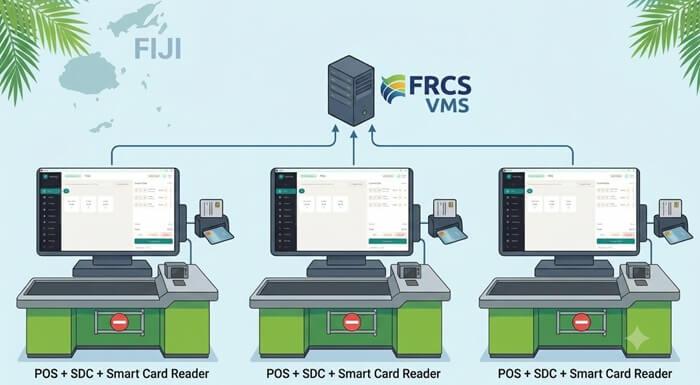
Running one Fiji business from several tills, departments or branches creates an important VMS question: should every POS have its own SDC and Secure Element, or can several invoicing computers share one E-SDC?
For supermarkets, busy retailers, restaurants and other businesses with several active cashiers, a separate SDC and Secure Element for each POS is normally the easier and more resilient structure.
Each checkout has its own fiscalization path. A problem with one POS, smart-card reader or Secure Element does not automatically stop every other cashier.
FRCS says that taxpayers can use different Electronic Fiscal Device structures. These include several invoicing systems sharing one E-SDC and several invoicing systems operating with their own E-SDCs.
A shared E-SDC server is possible. However, all connected cashiers then depend on that server, the local network, the smart-card reader and the Secure Element remaining available. For a FiscoBridge SDC server setup, the physical smart-card reader and smart card must remain connected to the server while fiscal invoices are being issued.
This guide compares the main options for supermarkets, wholesalers, hotels, restaurants, multi-branch retailers and other Fiji businesses that issue invoices from more than one device.
TL;DR / Summary
- A Fiji VMS Electronic Fiscal Device, or EFD, includes a POS or invoicing system, an SDC and a Secure Element.
- For busy stores, one SDC and one Secure Element per POS is normally the preferred structure.
- Separate POS setups reduce the risk that one server, network or smart-card problem stops every cashier.
- Each Secure Element has its own UID, making it easier to identify fiscal activity by checkout device.
- The POS can also record cashier accounts or Cashier TIN information, depending on the POS configuration.
- Several POS terminals can share one E-SDC, but every terminal then depends on the same server and local network.
- The smart-card reader and Secure Element must remain physically connected to the computer running a shared FiscoBridge SDC.
- FRCS says additional Secure Elements should be requested when a business has more E-SDC instances.
- Secure Elements must be requested for the correct registered business location.
- Multiple branches can manage products and inventory centrally while keeping fiscalization local to each branch and POS.
- FiscoBridge Desktop POS and FiscoBridge SDC can be combined as an on-premise POS and fiscalization solution.
- The optional FiscoBridge POS Back Office can centrally manage products, inventory and operational data across several POS terminals and locations.
- Businesses using Xero, MYOB, QuickBooks, Zoho Books, Odoo or another ERP can review FiscoBridge Integrations.
Table of contents
- How should a Fiji business structure VMS across multiple locations?
- How do Secure Elements relate to business locations?
- Should each POS or cashier have its own SDC?
- Can several cashiers share one E-SDC server?
- One SDC per POS or one shared E-SDC: which is better?
- Can networked invoicing PCs use an SDC on a central server?
- Can a shared SDC separate sales by cashier?
- How should multiple branches be configured?
- Can inventory be managed centrally across all POS locations?
- How should mixed POS and ERP invoicing work?
- Can a business keep its existing POS?
- What should businesses check before moving to VMS V3?
- Can an expired fiscal card stop invoice issuing?
- How can businesses reduce fiscal invoice disruption?
- Fiji VMS multi-location checklist
- How FiscoBridge can help
- Best solution by business situation
- Frequently asked questions
How should a Fiji business structure VMS across multiple locations?
Start by listing the physical business locations and every system that issues a customer invoice.
Do not begin only with the company TIN, accounting platform or head-office server. Fiji VMS setup decisions also depend on where the sale is made, which Secure Element is used and which POS or invoicing system creates the fiscal invoice.
For each business location, record:
- The number of active POS terminals.
- The number of cashiers working at the same time.
- Any office computers that issue invoices.
- Any ERP, accounting or hotel systems that create customer invoices.
- The Secure Elements assigned to the location.
- The E-SDC installed on each device or server.
- The local network and internet reliability.
- The effect on the business if one device stops working.
The main practical question is not only whether one shared E-SDC can work. It is also how many cashiers would be unable to issue a fiscal invoice if that shared component failed.
A setup that is acceptable for two low-volume invoicing computers may create too much risk for a supermarket with fifteen checkout lanes.
How do Secure Elements relate to business locations?
FRCS says that additional certificate requests require the taxpayer to select the business location for which the Secure Element is needed.
FRCS also says that businesses with more E-SDC instances should request additional certificates for those E-SDCs. For an E-SDC setup, those certificates are normally supplied as smart-card Secure Elements.
This means a Secure Element should not be treated as a general company card that can automatically be moved between unrelated branches.
For every location, businesses should check:
- The location is correctly registered in the Taxpayer Administration Portal.
- The Secure Element was requested for the correct business location.
- The correct smart card is connected to the correct E-SDC.
- The card has not expired or been revoked.
- The PIN is known only to authorised staff.
- The smart-card reader is physically protected.
- The fiscal invoice displays the correct taxpayer and location information.
For example, a retailer with stores in Suva, Nadi and Lautoka should plan the Secure Elements and E-SDC installations for each location separately, even when all stores use the same product catalogue and Back Office.
Should each POS or cashier have its own SDC?
For busy retail operations, one SDC and one Secure Element per POS is normally the preferred structure.
A typical checkout setup looks like this:
Cashier POS → Local FiscoBridge SDC → Local smart-card reader and Secure Element → Fiji VMS
Each POS has its own direct fiscalization path.
The POS creates the sale or invoice, while the SDC performs the fiscalization layer. It receives invoice data from the POS, works with the Secure Element to sign the invoice, returns fiscal invoice data to the POS, and supports storage and reporting according to fiscalization requirements.
Using a separate SDC for each POS provides several practical benefits:
- Independent operation: One failed checkout does not automatically stop all other cashiers.
- Clear device identification: Each Secure Element has its own UID.
- Easier troubleshooting: The affected POS, SDC, reader or Secure Element can be identified quickly.
- Lower network dependency: The POS does not need to reach one shared SDC server over the local network.
- Simpler maintenance: One POS can be restarted or serviced while other checkouts continue working.
- Easier expansion: A new checkout can be added as a separate POS and SDC installation.
- Reduced invoice disruption: A single server problem is less likely to stop the full business location.
This structure is particularly suitable for:
- Supermarkets
- Pharmacies
- Hardware stores
- Department stores
- Restaurants and cafés
- Hotels with several billing points
- Retail chains
- High-volume wholesalers
There are more SDC installations, smart-card readers and Secure Elements to manage. However, the business should compare this cost with the possible cost of stopping every checkout when one shared server fails.
Can several cashiers share one E-SDC server?
Yes. FRCS says that multiple invoicing systems can connect through a local network to one E-SDC.
A shared setup may look like this:
Several POS terminals or invoicing PCs → Local network → Shared E-SDC server → Smart-card reader and Secure Element → Fiji VMS
This can be suitable for a showroom, office or low-volume sales facility where only a small number of users issue invoices.
However, every connected POS or invoicing computer depends on the shared infrastructure.
For the setup to operate:
- The server must remain switched on.
- The server operating system must remain available.
- The FiscoBridge SDC service must remain running.
- The local network must connect every POS to the server.
- The physical smart-card reader must remain connected to the server.
- The Secure Element smart card must remain inserted and readable.
- The server must be available throughout all invoicing hours.
If the server, network, card reader or Secure Element fails, every connected cashier may lose the ability to complete fiscalization.
This is why a shared E-SDC is generally less suitable for a supermarket or busy retailer where a complete checkout interruption would create long queues and lost sales.
One SDC per POS or one shared E-SDC: which is better?
| Question | Separate SDC per POS | One shared E-SDC server |
|---|---|---|
| Recommended for busy retail | Yes | Usually less suitable |
| Independent checkout operation | Yes | No. All terminals depend on the shared server. |
| Secure Element identity | Each POS can have its own Secure Element UID | All connected POS terminals use the shared Secure Element UID |
| Cashier identification | Separate UID by checkout, plus cashier information supported by the POS | The POS may identify cashiers, but fiscal invoices share the same Secure Element UID |
| Effect of one SDC failure | Normally limited to one POS | May stop all connected invoicing systems |
| Local-network dependency | Lower for communication between the POS and its local SDC | Every POS depends on the network connection to the server |
| Smart-card connection | Reader and card are connected locally to each SDC device | Reader and card must remain connected to the server |
| Number of components | More SDC installations, readers and Secure Elements | Fewer central components |
| Troubleshooting | Usually easier to isolate the affected checkout | The problem may affect the server, network or all connected terminals |
| Best suited for | Supermarkets, retailers, restaurants and high-volume checkouts | Small offices, showrooms and low-volume invoicing teams |
FRCS says the setup with separate E-SDCs is typical for supermarkets with multiple points of sale because invoices can continue to be issued at each POS even when the local area network or internet is unavailable.
For that reason, FiscoBridge generally recommends considering one SDC and Secure Element per POS for businesses where every checkout must remain operational.
Can networked invoicing PCs use an SDC on a central server?
Yes. Several invoicing PCs at the same registered business location can connect to a FiscoBridge SDC installed on a central server, provided the POS or invoicing software supports that connection.
This arrangement may be practical for:
- A wholesaler with two or three invoice desks.
- A hotel with several front-desk computers in one property.
- A showroom with a small sales team.
- An office that issues a limited number of invoices.
- A business where the server and local network are professionally maintained.
The server must have a physical smart-card reader and Secure Element connected continuously while fiscal invoices are being issued.
Before choosing this structure, ask:
- What happens if the server restarts during trading hours?
- What happens if the local network is unavailable?
- Can the server be reached from every invoicing computer?
- Who monitors whether the FiscoBridge SDC service is running?
- Who checks that the smart card remains connected?
- How many cashiers will stop if the server fails?
- Is there a backup power supply?
- Is there a documented recovery procedure?
A shared server may reduce the number of E-SDC installations, but it also creates a clear single point of failure.
Can a shared SDC separate sales by cashier?
When several POS terminals share one E-SDC and Secure Element, the fiscal invoices use the same Secure Element UID.
This means the Secure Element identity alone does not provide a separate UID for every cashier or checkout.
The POS may still distinguish users through:
- Cashier login accounts
- Cashier names
- Cashier TIN information
- POS terminal numbers
- Shift reports
- Internal sales reports
However, that identification depends on the POS sending and storing the relevant information correctly.
With one SDC and one Secure Element per POS, each checkout also has a separate Secure Element UID. This provides an additional and clearer way to identify fiscal activity by device.
Businesses that require strong separation between tills should discuss the POS number, cashier information and Secure Element UID structure with their POS and E-SDC provider before installation.
How should multiple branches be configured?
For multiple branches, centralise business management where useful, but keep fiscalization correctly assigned to each registered location and POS.
A recommended structure may include:
- A central Back Office for product, price, user and inventory management.
- Local POS terminals at each branch.
- A separate FiscoBridge SDC for each active checkout.
- A separate Secure Element for each E-SDC instance.
- Secure Elements requested for the correct registered branch location.
- Local fiscal invoice issuing at each branch.
- Sales and inventory information synchronised with the central Back Office.
For example:
| Location | POS terminals | Suggested fiscalization structure |
|---|---|---|
| Suva head office and store | Four retail POS terminals and two office invoicing PCs | One SDC per retail POS, with office invoicing reviewed separately based on its software |
| Nadi branch | Three retail POS terminals | One SDC and Secure Element per POS |
| Lautoka branch | Two retail POS terminals | One SDC and Secure Element per POS |
| Central accounting team | Xero, MYOB, QuickBooks or another accounting system | FiscoBridge accounting software integration, configured for the appropriate business and location workflow |
This structure gives management central visibility without making every branch depend on one remote fiscalization server.
Can inventory be managed centrally across all POS locations?
Yes. Fiscalization can remain local to each POS while inventory and business management are handled centrally.
FiscoBridge Desktop POS can be combined with the optional FiscoBridge POS Back Office.
The Desktop POS can manage the local checkout workflow, including:
- Sales
- Products
- Customers
- Cashier access
- Shifts
- Payments
- Receipts
- Local inventory
The POS Back Office can provide a central place to manage and review:
- Products and categories
- Prices and promotions
- Users and permissions
- Stock by store
- Central inventory information
- Sales journals
- Shift information
- Reports
- Audit information
Updates can be synchronised with POS locations while each checkout continues to use its local FiscoBridge SDC and Secure Element for fiscalization.
This gives the business central inventory control without creating one shared fiscalization dependency for every store.
How should mixed POS and ERP invoicing work?
Many Fiji businesses issue invoices from more than one system.
A hotel may use:
- A restaurant POS
- A front-desk or property-management system
- An accounting platform for company and event invoices
A wholesaler may use:
- POS terminals for counter sales
- An ERP for sales orders and deliveries
- Xero, MYOB or QuickBooks for selected invoices
Before implementation, create an invoice-source map.
| Invoice source | Possible fiscalization route | Main point to check |
|---|---|---|
| FiscoBridge Desktop POS | Local connection to FiscoBridge SDC | The correct Secure Element is connected at the correct location |
| Existing retail POS | Connection to FiscoBridge SDC | The POS supports the required POS-to-SDC communication |
| Xero | FiscoBridge Xero integration | Tax mapping, invoice trigger, location and certificate setup |
| MYOB | FiscoBridge MYOB cloud integration | Correct company file, tax mapping and location setup |
| QuickBooks Online | FiscoBridge QuickBooks integration | Invoice, tax and payment workflow |
| Zoho Books | FiscoBridge Zoho Books integration | Invoice and tax configuration |
| Odoo or another ERP | Cloud integration, local SDC connection or custom integration | Invoice, credit note, refund and error-recovery workflows |
| Simple low-volume invoicing | FiscoBridge Web Invoicing | Correct PFX certificate and business location |
For every invoice source, document:
- Which system creates the original sale?
- Which system sends it for fiscalization?
- Where is the fiscal invoice number stored?
- Which system handles refunds and credit notes?
- Who checks failed transactions?
- How is duplicate fiscalization prevented?
The business should avoid sending the same transaction through both the POS and accounting integration unless the workflow has been designed specifically to prevent duplicate fiscal invoices.
Can a business keep its existing POS?
Possibly. A business may not need to replace its whole POS if the existing software can connect to a compliant E-SDC.
FRCS says EFD users are responsible for ensuring that their POS is compatible with the External SDC or Virtual SDC they select.
The POS must be able to:
- Create the required invoice data.
- Send the invoice to the SDC.
- Receive the fiscalization result.
- Store or print the fiscal invoice information.
- Handle errors and uncertain responses safely.
- Process refunds and other required transaction types.
POS vendors and software developers can review the FiscoBridge POS to SDC Protocol.
The protocol explains how a POS or ERP can communicate with FiscoBridge SDC for functions such as:
- Creating an invoice
- Verifying the Secure Element PIN
- Checking the SDC status
- Retrieving environment parameters
Where an existing POS cannot be updated, the business can consider FiscoBridge Desktop POS.
What should businesses check before moving to VMS V3?
Do not assume that an older VMS V2 POS or E-SDC setup is automatically ready for VMS Version 3.
Businesses should check:
- Whether the selected product and version appear on the FRCS V3 Accreditation List.
- Whether the POS supports the selected V3 E-SDC.
- Whether the integration uses the current invoice structure.
- Whether the required tax labels are configured.
- Whether normal sales and refunds have been tested.
- Whether advance, copy, training and proforma invoice workflows have been reviewed where relevant.
- Whether the Secure Element is valid.
- Whether all business locations are correctly registered.
- Whether the POS can operate with the selected offline or online fiscalization structure.
FRCS maintains separate V3 and V2 Accreditation Lists. Businesses should check the V3 list and confirm the exact product version with the supplier.
A product name appearing on an older list does not necessarily confirm that the installed version is VMS V3-ready.
Can an expired fiscal card stop invoice issuing?
Yes. An E-SDC uses the Secure Element smart card to authenticate the taxpayer and digitally sign invoice data.
If the smart card is expired, revoked, removed or unreadable, the SDC may be unable to complete fiscalization.
Businesses should monitor:
- Secure Element expiry dates
- Renewal notifications
- Smart-card reader status
- Card connection status
- PIN access
- Replacement-card requests
In a shared-server setup, one unavailable smart card may affect every cashier connected to that E-SDC.
With a separate SDC and Secure Element per POS, a card issue is normally limited to the affected checkout, while other POS terminals can continue operating.
Why must each system issue the correct Tax Invoice?
A system can be technically connected to VMS but still create business problems if staff use the wrong document type.
FRCS has clarified that a Proforma Invoice is not a Tax Invoice and cannot be used to support a VAT input tax credit claim.
Businesses should test how each POS, ERP and accounting system handles:
- Tax Invoices
- Proforma Invoices
- Normal sales
- Refunds
- Advance transactions
- Copies of earlier fiscal invoices
For a multi-location business, test the invoice output at every branch.
Check:
- Business name
- Business location
- TIN information
- Fiscal invoice number
- QR code or verification information
- VAT treatment
- Document type
- Cashier or POS identification where required
How can businesses reduce fiscal invoice disruption?
A multi-POS setup should be designed around failure scenarios, not only the normal sales process.
Common causes of invoice disruption include:
- An expired Secure Element
- A disconnected smart-card reader
- A failed E-SDC computer
- A damaged POS terminal
- A local-network outage
- An internet outage
- A server restart
- An incorrect business-location certificate
- An old VMS V2 integration
- A POS timeout that leaves the invoice status unclear
Using one SDC per POS reduces shared failure points.
With separate SDC installations:
- A failed server does not stop the entire store.
- A damaged reader normally affects only one POS.
- A Secure Element issue normally affects only one checkout.
- One POS can be restarted while the others continue operating.
- The affected device is easier to identify.
Businesses should also:
- Renew Secure Elements before expiry.
- Protect smart cards and readers physically.
- Monitor SDC status.
- Use stable power supplies.
- Test offline operation.
- Document failed-invoice procedures.
- Train cashiers not to submit the same sale repeatedly without checking its status.
- Maintain a register of every POS, SDC, Secure Element UID and business location.
Fiji VMS multi-location checklist
- List every registered Fiji business location.
- List every active POS terminal.
- List every cashier or invoicing workstation.
- List every ERP and accounting system that creates customer invoices.
- Confirm which transactions must become fiscal invoices.
- Confirm which Secure Element belongs to each location.
- Confirm whether every active POS should have its own SDC.
- Prefer one SDC and Secure Element per POS for busy retail operations.
- Request additional Secure Elements for additional E-SDC instances where required.
- Check every card’s expiry and revocation status.
- Record each Secure Element UID.
- Record each POS number and cashier-identification method.
- Check the FRCS V3 Accreditation List.
- Confirm that the exact POS version is compatible with the selected SDC.
- If using a shared server, keep its smart-card reader and card connected continuously.
- Calculate how many cashiers would stop if the shared server failed.
- Test simultaneous sales from all active POS terminals.
- Test internet and local-network outages.
- Test SDC and POS restarts.
- Test card removal and reconnection.
- Test normal sales, refunds and required invoice types.
- Confirm that every invoice shows the correct location.
- Confirm how duplicate fiscalization will be prevented.
- Train cashiers, supervisors and branch managers.
- Create a documented recovery and support procedure.
How FiscoBridge can help
FiscoBridge supports different Fiji VMS structures depending on the business, number of locations and existing software.
FiscoBridge Desktop POS with one SDC per checkout
For businesses that need a new retail or hospitality POS, FiscoBridge Desktop POS can be combined with FiscoBridge SDC.
The recommended structure for busy stores is:
FiscoBridge Desktop POS → Local FiscoBridge SDC → Local Secure Element
Each checkout can operate independently, while the optional POS Back Office provides central management and reporting.
FiscoBridge POS Back Office for multiple locations
The optional FiscoBridge POS Back Office can support businesses that want to manage products and inventory from one place and synchronise information across POS locations.
This can be suitable for:
- Supermarket groups
- Retail chains
- Restaurants with several outlets
- Hotels with different sales areas
- Wholesalers with several branches
The fiscalization remains local to each checkout, while business management can be centralised.
FiscoBridge SDC for an existing POS
Businesses may be able to keep their current POS if it can connect to FiscoBridge SDC.
The POS creates the transaction. FiscoBridge SDC receives it, performs the fiscalization layer with the Secure Element and returns the fiscal invoice data.
For several active cashiers, each POS can have its own local FiscoBridge SDC and Secure Element.
FiscoBridge Integrations for accounting software and ERP
Businesses using Xero, MYOB, QuickBooks Online, Zoho Books, Odoo or another supported system can review FiscoBridge Integrations.
This option is suitable when invoices are created in accounting software or an ERP rather than at a retail checkout.
A business can use a combination of local POS fiscalization and accounting software integration, provided the workflow prevents missing or duplicate invoices.
POS to SDC Protocol for vendors and developers
POS vendors, ERP vendors and businesses with custom invoicing software can review the FiscoBridge POS to SDC Protocol.
This provides a defined connection between the invoicing software and FiscoBridge SDC.
Solution Checker
Businesses that are not sure whether they need Desktop POS, SDC, Web Invoicing or accounting software integration can use the FiscoBridge Solution Checker.
Best solution by business situation
| Business situation | Main risk or problem | Recommended FiscoBridge option |
|---|---|---|
| One store with one cashier | No compliant POS or fiscal invoicing workflow | FiscoBridge Desktop POS with one local FiscoBridge SDC and Secure Element |
| Store with several active cashiers | A shared failure could stop all checkout lanes | One FiscoBridge SDC and Secure Element per POS |
| Busy supermarket | High transaction volume and serious queue disruption if one server fails | FiscoBridge Desktop POS or existing POS with a separate FiscoBridge SDC for every checkout |
| Retail chain with several branches | Location-specific fiscalization and central inventory management | Local Desktop POS and SDC installations with optional FiscoBridge POS Back Office |
| Small office with two or three invoicing PCs | Low invoice volume and a limited number of users | A shared FiscoBridge SDC server may be considered if the network and server are reliable |
| Wholesaler that needs clear checkout separation | Invoices must be traceable to separate invoicing points | Separate FiscoBridge SDC and Secure Element per invoicing PC |
| Existing POS that the business wants to keep | The POS does not currently perform Fiji VMS fiscalization | Connect each POS to FiscoBridge SDC using the POS to SDC Protocol |
| Business using Xero, MYOB, QuickBooks or Zoho Books | Invoices are created outside the retail POS | FiscoBridge Integrations |
| Hotel using POS, PMS and accounting software | Invoices come from several systems and may be missed or duplicated | A combination of FiscoBridge SDC, Desktop POS and accounting or custom integrations |
| Small low-volume service business | A full retail POS may be unnecessary | FiscoBridge Web Invoicing |
| Custom POS or ERP vendor | VMS V3 integration development is required | FiscoBridge SDC and the POS to SDC Protocol |
Frequently asked questions
Should every cashier have a separate SDC?
For supermarkets and busy stores, one SDC and Secure Element per POS is normally the preferred setup. Each checkout can fiscalize independently, and a problem with one device does not automatically stop all other cashiers.
Does every E-SDC need a separate Secure Element?
FRCS says businesses with more E-SDC instances should request additional certificates for each E-SDC. For E-SDC infrastructure, these certificates are requested as smart-card Secure Elements.
Can several cashiers use one E-SDC?
Yes. FRCS says several invoicing systems can connect to one E-SDC through a local network. However, all cashiers then depend on the shared server, network, smart-card reader and Secure Element.
What happens if a shared E-SDC server stops working?
All POS terminals that depend on that server may be unable to complete fiscalization. This is why a separate SDC per POS is generally safer for supermarkets and high-volume retailers.
Must the smart card remain connected to a shared FiscoBridge SDC server?
Yes. The physical smart-card reader must remain connected to the server running FiscoBridge SDC, and the Secure Element card must remain inserted and readable while invoices are being fiscalized.
Can one shared E-SDC identify sales from every cashier?
The POS may record cashier accounts, Cashier TIN information and POS terminal numbers. However, when all terminals share one Secure Element, the fiscal invoices use the same Secure Element UID. Separate Secure Elements provide clearer separation by checkout device.
Is one SDC per POS more expensive?
It requires more SDC installations, Secure Elements and smart-card readers. However, it reduces the risk that one server or local-network problem stops the entire store. The business should compare the setup cost with the cost of checkout downtime.
Can one central E-SDC serve all our Fiji branches?
This should not be assumed. Secure Elements are requested for specified business locations, and a remote central server may create location, network and availability risks. A cross-branch design should be reviewed carefully with the POS and E-SDC provider and confirmed with FRCS where necessary.
Can I keep my existing POS and still become Fiji VMS compliant?
Possibly. If the existing POS can exchange the required invoice and status data with an accredited E-SDC, the business may be able to keep it. Vendors and developers can use the FiscoBridge POS to SDC Protocol to connect a compatible POS to FiscoBridge SDC.
Do I need to upgrade my POS from VMS V2 to VMS V3?
Businesses should check the FRCS V3 Accreditation List and confirm whether their exact POS and E-SDC versions support VMS V3. An older VMS V2 installation should not automatically be treated as VMS V3-ready.
Can an expired VMS smart card stop fiscal invoice issuing?
Yes. If the required Secure Element is expired, revoked, disconnected or unreadable, the E-SDC may be unable to sign the invoice and complete fiscalization.
Can Xero connect to Fiji VMS?
Yes. Supported Xero invoices can be connected through FiscoBridge Integrations. The setup must include the correct business, location, certificate, tax mapping and fiscalization trigger.
Can MYOB, QuickBooks and Zoho Books connect to Fiji VMS?
FiscoBridge provides integrations for supported MYOB cloud products, QuickBooks Online and Zoho Books. The exact configuration depends on the accounting platform and the business’s invoicing workflow.
Can POS sales and accounting invoices use different VMS solutions?
Yes. Retail POS transactions may use local FiscoBridge SDC installations, while accounting invoices use a FiscoBridge cloud integration. The business should map both routes so invoices are not skipped or fiscalized twice.
Can inventory be managed centrally while each POS has its own SDC?
Yes. FiscoBridge Desktop POS can be combined with the optional POS Back Office. Products, inventory and operational information can be managed centrally while each checkout uses its own local SDC and Secure Element.
Which FiscoBridge solution is best for a multi-location retailer?
A multi-location retailer can use FiscoBridge Desktop POS at each checkout, FiscoBridge SDC and a Secure Element for each POS, and the optional FiscoBridge POS Back Office for central inventory and store management.
Final thoughts
FRCS says Fiji businesses can choose from different EFD structures, including one E-SDC shared by several invoicing systems or separate E-SDCs for each POS.
A shared server may be practical for a small office or showroom. However, every connected cashier depends on that server, the local network, the smart-card reader and the Secure Element remaining available.
For supermarkets, retailers, restaurants and other businesses with several active cashiers, one SDC and Secure Element per POS is normally easier to operate and more resilient.
It reduces shared failure points, makes checkout problems easier to isolate and provides a separate Secure Element UID for each POS.
Businesses can combine FiscoBridge Desktop POS, FiscoBridge SDC and the optional POS Back Office to create a multi-location setup with local fiscalization and central inventory management.
Businesses using Xero, MYOB, QuickBooks, Zoho Books, Odoo or another supported accounting platform can also review FiscoBridge Integrations.
To compare the available options, use the FiscoBridge Solution Checker or review the POS to SDC Protocol.
Official sources
- FRCS VAT Monitoring System page, V3 Accreditation List and V2 Accreditation List
- FRCS Electronic Fiscal Device setup examples
- FRCS Electronic Fiscal Device guidance
- FRCS guidance: What is a Secure Element?
- FRCS guide: Requesting Additional Certificates
- FRCS EFD Accreditation Instructions
- FRCS notice on POS and E-SDC VMS Version 3 registration and accreditation
- FRCS clarification on Tax Invoices, Proforma Invoices and VAT input tax credit claims
- FRCS invoice and transaction types