
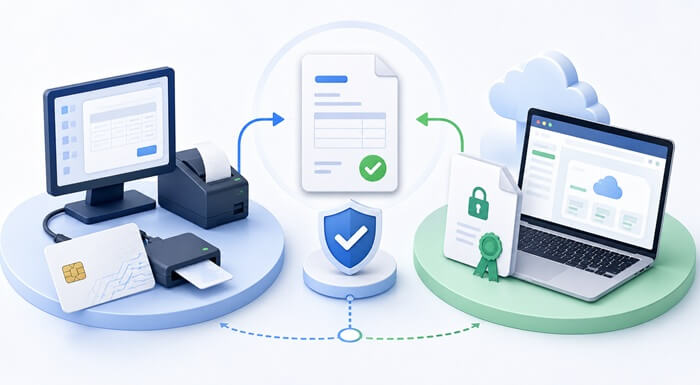
When requesting a fiscal certificate for Fiji VMS, Samoa TIMS or Vanuatu VSMS, businesses may need to choose between a Smart Card and a PFX certificate. Both are used to securely identify and authorize the taxpayer when issuing fiscal invoices, but they are suited to different types of invoicing setups.
For most FiscoBridge users, the choice is straightforward: use a Smart Card with a local FiscoBridge SDC and POS or ERP setup, and use a PFX certificate for FiscoBridge cloud integrations or Web Invoicing.
A retail shop with checkout computers and unreliable internet will normally benefit from a Smart Card and local SDC. A business issuing invoices through Xero, MYOB or another supported cloud platform will normally need a PFX certificate instead.
Neither option is universally better. The correct certificate depends mainly on how and where your business creates fiscal invoices.
TL;DR: Should I request a Smart Card or PFX certificate?
- Using FiscoBridge SDC with a local POS or ERP? Request a Smart Card.
- Using Xero, MYOB or another FiscoBridge cloud integration? Request a PFX certificate.
- Using FiscoBridge Web Invoicing? Request a PFX certificate.
- Need to keep issuing invoices during temporary internet outages? A Smart Card with a local SDC is normally the better setup.
- Want a fully online workflow without a card reader? A PFX certificate is normally the better fit.
If you have not yet decided which POS, accounting software or ERP system you will use, it is usually better to choose your invoicing solution first and request the appropriate fiscal certificate afterward.
What are Smart Cards and PFX certificates?
Smart Cards and PFX files are two ways of providing the secure fiscal credentials issued for a taxpayer or business location.
They allow the fiscal invoicing system to identify the taxpayer and authorize the issuing of fiscal invoices.
The main difference for a business is not the purpose of the certificate, but how it is stored and how the invoicing software uses it.
| Certificate type | Simple explanation |
|---|---|
| Smart Card | A physical fiscal credential stored on a smart card and normally used with a card reader and local SDC. |
| PFX certificate | A digital .pfx certificate file normally used with online FiscoBridge services and cloud integrations. |
Cloud accounting / online integration → PFX Certificate
What is a Smart Card used for?
A Smart Card is a physical card containing the taxpayer's fiscal credential. It is normally inserted into a compatible smart card reader connected to the computer or device running the local fiscalization setup.
With FiscoBridge, a Smart Card is the appropriate choice when using FiscoBridge SDC.
When is a Smart Card a good choice?
- Your POS software runs on computers at your business location.
- You use a locally installed ERP system.
- You use FiscoBridge SDC.
- You have frequent daily transactions.
- You operate a retail shop, restaurant, supermarket or similar business.
- Internet connectivity at the location may sometimes be unreliable.
- You need the local fiscalization workflow to continue during temporary internet outages.
A Smart Card normally requires a compatible card reader. The card remains physically available to the local SDC so fiscal invoices can be securely processed.
Can I keep my existing POS?
Yes, where the existing POS is capable of integrating with an accredited SDC.
A business does not necessarily need to replace its existing POS just because it needs fiscalization. The existing POS can call FiscoBridge SDC, while the Smart Card provides the fiscal credential required by the local SDC setup.
What is a PFX certificate used for?
A PFX certificate is a digital certificate supplied as a .pfx file rather than on a physical card.
For FiscoBridge, PFX certificates are used with online and cloud-based fiscalization workflows.
- FiscoBridge cloud integrations
- Xero integration
- MYOB cloud integration
- QuickBooks Online integration
- Zoho Books integration
- Odoo accounting integration
- Other supported cloud integrations
- FiscoBridge Web Invoicing
A physical smart card reader is not required for these FiscoBridge cloud workflows.
When is a PFX certificate a good choice?
- Your accounting or invoicing software is cloud-based.
- You use Xero.
- You use MYOB Business or a supported MYOB AccountRight online company file.
- You use another supported FiscoBridge cloud integration.
- You use FiscoBridge Web Invoicing.
- You want to avoid installing and managing a physical card reader.
- Your invoicing is performed by staff working remotely or from different devices.
- You prefer a centralized online invoicing workflow.
Smart Card vs PFX certificate: comparison
| Feature or use case | Smart Card | PFX Certificate |
|---|---|---|
| Physical device | Yes | No |
| Card reader required | Usually yes | No |
| Best FiscoBridge option for local POS | Yes | Usually no |
| Best FiscoBridge option for cloud integrations | No | Yes |
| Works with FiscoBridge SDC | Yes | No |
| Works with FiscoBridge Web Invoicing | No | Yes |
| FiscoBridge Xero integration | No | Yes |
| FiscoBridge MYOB cloud integration | No | Yes |
| Can support fiscal invoicing during an internet outage | Yes, with a local SDC | No, in the FiscoBridge cloud workflow |
| Suitable for high-volume local checkout sales | Yes | Depends on the software workflow |
| Suitable for centralized or remote invoicing | Less convenient | Yes |
The table describes the recommended certificate choice for FiscoBridge solutions. Fiscal authorities may support additional certificate arrangements, so businesses using another provider should confirm that provider's requirements before requesting their certificates.
Which one should your business choose?
Neither Smart Card nor PFX is universally better. The correct choice depends on how your business issues invoices.
Choose a Smart Card if:
- Your software runs locally.
- You use a traditional POS system.
- You use FiscoBridge SDC.
- You have frequent daily sales at a physical location.
- You want better resilience to temporary internet outages.
- You use an existing locally installed ERP or custom POS.
Choose a PFX certificate if:
- Your invoicing software is cloud-based.
- You use Xero.
- You use MYOB cloud.
- You use QuickBooks Online, Zoho Books, Odoo Accounting or another supported FiscoBridge integration.
- You use FiscoBridge Web Invoicing.
- You want to avoid physical card readers.
- Your staff issue invoices remotely or from different devices.
Decide on your software before requesting the certificate
One of the easiest mistakes to avoid is requesting a certificate before deciding how invoices will actually be created.
↓
2. Choose the fiscalization method
↓
3. Request the correct certificate
↓
4. Configure and test
↓
5. Start production invoicing
Examples: Which certificate should different businesses use?
Example 1: Retail shop with local POS
A retail business has two checkout computers, locally installed POS software, frequent daily sales and an internet connection that is sometimes unstable.
Recommended FiscoBridge setup: Smart Card + FiscoBridge SDC.
The POS communicates with FiscoBridge SDC locally. The Smart Card is available through the card reader, and the local SDC can support fiscal invoicing when the internet connection to the tax authority is temporarily unavailable.
Example 2: Consulting company using Xero
A consulting company creates and manages its invoices entirely in Xero.
Recommended FiscoBridge setup: PFX certificate + FiscoBridge Xero integration.
The invoicing workflow is already cloud-based, so there is normally no reason to install a local SDC or keep a fiscal Smart Card and card reader beside a computer.
Example 3: Business using MYOB cloud
A business uses MYOB Business or a supported MYOB AccountRight online company file.
Recommended FiscoBridge setup: PFX certificate + FiscoBridge MYOB integration.
Example 4: Small business using Web Invoicing
A small service business issues only a few invoices each week and does not need a full retail POS system.
Recommended FiscoBridge setup: PFX certificate + FiscoBridge Web Invoicing.
Example 5: Existing ERP or custom POS
A company already has an ERP or POS system installed at its premises and does not want to replace it.
Recommended setup where the existing software supports local SDC integration: Smart Card + FiscoBridge SDC.
You do not necessarily need to replace your existing software to become fiscally compliant.
Smart Card vs PFX: What happens if the internet goes down?
Smart Card with local SDC
A Smart Card used with a local SDC can allow the business to continue issuing fiscal invoices when the internet connection is temporarily unavailable.
The local SDC can process invoices locally and retain the required fiscal information until communication with the tax authority is restored, subject to the applicable fiscal rules and configuration.
PFX with a FiscoBridge cloud solution
PFX-based FiscoBridge integrations and Web Invoicing are online workflows. Internet connectivity is therefore required for the cloud fiscalization process.
Can I request both a Smart Card and a PFX certificate?
Depending on the tax authority's rules, the registered business locations and the taxpayer's fiscal setup, a business may have more than one fiscal certificate or secure element.
For example, a company may have a local Smart Card-based POS workflow at a physical retail location and a separate online invoicing workflow that uses a PFX certificate.
Businesses should not assume that they can request an unlimited number of certificates or freely move a certificate between locations. The applicable tax authority registration and certificate rules should be followed.
Do I need one certificate for every business location?
The answer depends on how business locations, POS terminals and fiscal devices are registered in the relevant fiscal system.
- How many business locations are registered.
- Which POS systems issue invoices from each location.
- Whether each location uses a local SDC or cloud workflow.
- How many Smart Cards or PFX certificates are required.
- Which certificate belongs to which business location.
- Whether different invoicing workflows need separate certificates.
How should you protect your Smart Card or PFX certificate?
PFX certificate security
- Do not email the PFX file unnecessarily.
- Do not upload it to unknown websites or software.
- Only provide it to trusted systems that genuinely require it.
- Keep the certificate password secure.
- Do not store the password in the same insecure location as the certificate file.
- Limit access to employees or providers who need it.
Smart Card security
- Keep the Smart Card in a controlled location.
- Do not share the PIN unnecessarily.
- Do not leave the card accessible to unauthorized staff.
- Keep a record of which taxpayer and business location the card belongs to.
- Report a lost or stolen Smart Card according to the tax authority's procedure.
Do Smart Cards and PFX certificates expire?
Yes. Fiscal certificates have validity periods and can eventually require renewal or replacement.
An expired certificate can disrupt fiscal invoicing if the replacement has not been prepared in time.
- Monitor certificate expiry dates.
- Pay attention to renewal notifications from the tax authority.
- Start the renewal process before the current certificate expires.
- Do not wait until fiscal invoices can no longer be issued.
- Test the replacement setup before relying on it for production invoicing.
Smart Card vs PFX in Fiji VMS, Samoa TIMS and Vanuatu VSMS
Smart Card and digital certificate concepts are used across the fiscal systems currently supported by FiscoBridge, but certificate-request procedures and administrative rules may differ between jurisdictions.
Which certificate should I request for Fiji VMS?
- FiscoBridge SDC / local POS or ERP: Smart Card.
- FiscoBridge cloud integration: PFX certificate.
- FiscoBridge Web Invoicing: PFX certificate.
Which certificate should I request for Samoa TIMS?
- Local FiscoBridge SDC: Smart Card.
- FiscoBridge cloud integrations: PFX certificate.
- FiscoBridge Web Invoicing: PFX certificate.
Which certificate should I request for Vanuatu VSMS?
- Local FiscoBridge SDC: Smart Card.
- FiscoBridge Xero, MYOB or other supported cloud integration: PFX certificate.
- FiscoBridge Web Invoicing: PFX certificate.
Common Smart Card and PFX certificate mistakes
Requesting a Smart Card when the business will use only a cloud integration
If the business intends to use FiscoBridge with Xero, MYOB or another supported cloud integration, it needs a PFX certificate for that workflow.
Requesting only a PFX certificate for a local SDC setup
FiscoBridge SDC uses the taxpayer's Smart Card with a compatible card reader.
Buying a card reader before deciding on the setup
A card reader is needed for a Smart Card-based local SDC setup, but not for a FiscoBridge cloud integration using a PFX certificate.
Sharing the PFX certificate insecurely
A PFX certificate is a sensitive fiscal credential. It should not be casually emailed, copied between staff members or uploaded to systems that do not require it.
Losing the Smart Card PIN
The Smart Card PIN is required for authorized use of the card. Businesses should store it securely.
Waiting until the certificate expires
Certificate expiry can create avoidable invoice disruption. Monitor the expiry date and begin the renewal process before the existing Smart Card or PFX certificate becomes unusable.
Requesting certificates before choosing the invoicing software
The required certificate depends heavily on whether the business will use a local SDC, Web Invoicing or a cloud integration.
How FiscoBridge can help you choose the correct certificate
The easiest way to determine whether you need a Smart Card or PFX certificate is to start with the software you already use.
| Your software or workflow | Typical FiscoBridge solution | Certificate |
|---|---|---|
| Existing local POS | FiscoBridge SDC | Smart Card |
| Local ERP with SDC integration | FiscoBridge SDC / ERP integration | Smart Card |
| Xero | FiscoBridge cloud integration | PFX |
| MYOB Business / supported AccountRight online | FiscoBridge MYOB integration | PFX |
| Other supported cloud accounting software | FiscoBridge cloud integration | PFX |
| Browser-based FiscoBridge Web Invoicing | FiscoBridge Web Invoicing | PFX |
Not sure which certificate to request?
Tell FiscoBridge which POS, accounting software or ERP system you use, how many locations you operate and whether you need offline invoicing. We can help you determine whether your proposed FiscoBridge setup needs a Smart Card or PFX certificate before you request the wrong one.
Frequently asked questions about Smart Cards and PFX certificates
What is the difference between a Smart Card and PFX certificate?
A Smart Card is a physical fiscal credential normally used with a card reader and local SDC setup. A PFX certificate is a digital .pfx file. For FiscoBridge, PFX certificates are used with cloud integrations and Web Invoicing, while Smart Cards are used with FiscoBridge SDC.
Do I need a Smart Card for Xero?
Not for the FiscoBridge Xero cloud integration. FiscoBridge uses a PFX certificate for the Xero fiscalization workflow.
Do I need a PFX certificate for MYOB?
Yes, when using the FiscoBridge MYOB cloud integration.
Can I use a PFX certificate with FiscoBridge Web Invoicing?
Yes. FiscoBridge Web Invoicing uses a PFX certificate and does not require a physical Smart Card reader.
Do I need a Smart Card for a POS system?
If your POS is connected to FiscoBridge SDC locally, yes. Other POS fiscalization arrangements may differ.
Can a Smart Card work without internet?
A Smart Card used with a local SDC can support fiscal invoicing during temporary internet interruptions, subject to the applicable rules and configuration.
Does a PFX certificate require internet?
FiscoBridge PFX-based cloud integrations and Web Invoicing are online workflows, so internet connectivity is required for fiscalization.
Do Smart Cards and PFX certificates expire?
Yes. Fiscal certificates have validity periods and may require renewal or replacement.
Can one business have more than one fiscal certificate?
Depending on the tax authority's rules, registered business locations and fiscal setup, a business may have multiple fiscal certificates or secure elements.
Can a business use both a Smart Card and PFX certificate?
Potentially, where the jurisdiction and registered setup support different invoicing workflows.
Do I need one Smart Card for every POS terminal?
Not necessarily. The required number depends on how the POS terminals, SDCs and business locations are configured.
Which certificate does FiscoBridge require?
FiscoBridge SDC uses a Smart Card. FiscoBridge cloud integrations such as Xero and MYOB use a PFX certificate. FiscoBridge Web Invoicing also uses a PFX certificate.
Should I request the certificate before choosing my POS or accounting software?
It is normally better to choose how your business will issue fiscal invoices first.