
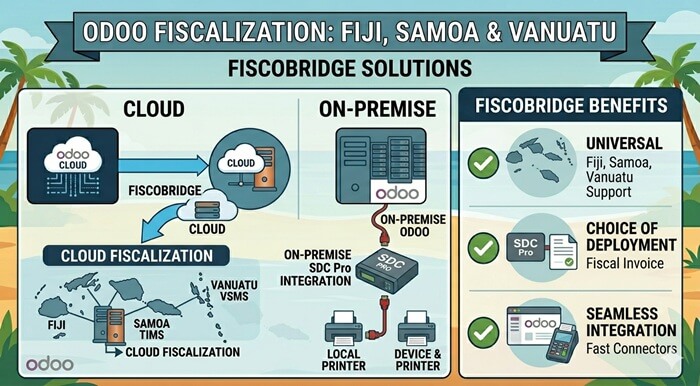
Odoo is a flexible business system used for accounting, invoicing, POS, inventory, sales, CRM, purchasing, and operations. For businesses in Fiji, Samoa, and Vanuatu, the important question is not only whether Odoo can create invoices. The real question is whether Odoo can issue fiscalized invoices under local tax authority requirements.
FiscoBridge supports Odoo fiscalization workflows for Pacific fiscalization systems, including Fiji VMS, Samoa TIMS, and Vanuatu VSMS. The correct setup depends on how your Odoo system is hosted.
The simple difference is:
- If Odoo is running locally or on-premise: use FiscoBridge SDC Pro together with the official FiscoBridge Odoo app.
- If Odoo is running in the cloud: use FiscoBridge cloud integration for Odoo.
The practical message is simple:
Odoo creates the invoice or POS sale → FiscoBridge fiscalizes it → fiscal invoice data is returned to Odoo → the business stays aligned with VMS, TIMS, or VSMS requirements.
TL;DR / Summary
- Odoo can be fiscalized for Fiji VMS, Samoa TIMS, and Vanuatu VSMS through FiscoBridge.
- If Odoo runs locally or on-premise, the recommended setup is FiscoBridge SDC Pro plus the official FiscoBridge Odoo app.
- The FiscoBridge Odoo app works together with FiscoBridge SDC. The app is the Odoo-side module, while the SDC performs the fiscal signing.
- If Odoo runs in the cloud, the recommended setup is FiscoBridge Integrations.
- Odoo fiscalization means invoice or POS sale data is sent to FiscoBridge before the final fiscal invoice is issued.
- Businesses may not need to replace Odoo. In many cases, they only need to connect Odoo to the correct fiscalization workflow.
- Useful search terms include Odoo fiscalization, Odoo fiscalize, Odoo VMS, Odoo VSMS, Odoo TIMS, Odoo fiscal invoice, and Odoo POS fiscalization.
Table of contents
- Why Odoo fiscalization matters in the Pacific
- Can Odoo work with Fiji VMS, Samoa TIMS, and Vanuatu VSMS?
- Odoo Cloud vs on-premise Odoo: which fiscalization path fits?
- How does on-premise Odoo fiscalization work?
- What does the FiscoBridge Odoo app do?
- How does Odoo Cloud fiscalization work?
- Can Odoo POS be fiscalized?
- Can Odoo Accounting invoices be fiscalized?
- Odoo fiscalization for Fiji VMS
- Odoo fiscalization for Vanuatu VSMS
- Odoo fiscalization for Samoa TIMS
- Odoo fiscalization checklist
- How FiscoBridge can help
- Frequently asked questions
Why Odoo fiscalization matters in the Pacific
Odoo is used by many types of businesses because it can combine several business functions in one system. A company may use Odoo for accounting, POS, inventory, sales orders, purchasing, CRM, eCommerce, or operations.
In countries with fiscalization requirements, however, a normal invoice or POS receipt is not always enough. The invoice may need to be processed through an approved fiscalization workflow before it becomes a valid fiscal invoice.
This is especially important for businesses operating in:
- Fiji under FRCS VMS requirements
- Samoa under TIMS requirements
- Vanuatu under VSMS requirements
For these markets, Odoo users should ask a practical question:
Can our Odoo invoices and POS sales be fiscalized before they are issued to customers?
Can Odoo work with Fiji VMS, Samoa TIMS, and Vanuatu VSMS?
Yes, Odoo can be connected to fiscalization workflows for Fiji VMS, Samoa TIMS, and Vanuatu VSMS when the correct FiscoBridge setup is used.
The exact setup depends on how the business uses Odoo:
- Odoo POS for retail, restaurant, or front-desk sales
- Odoo Accounting for customer invoices
- Odoo Sales for quotations and sales orders
- Odoo Inventory connected to invoicing
- Odoo installed locally or on-premise
- Odoo hosted in the cloud or through a managed hosting provider
The important point is that Odoo should not only create a normal invoice. It must send the required invoice data to the fiscalization layer and receive fiscal invoice data back.
Odoo Cloud vs on-premise Odoo: which fiscalization path fits?
The most important decision is whether Odoo is running locally or in the cloud.
| Odoo setup | Recommended fiscalization path | FiscoBridge option |
|---|---|---|
| Odoo running locally or on-premise | Use FiscoBridge SDC Pro with the FiscoBridge Odoo app | FiscoBridge SDC Pro + FiscoBridge Odoo app |
| Odoo hosted in the cloud | Use FiscoBridge cloud integration for Odoo | FiscoBridge Integrations |
| Odoo POS with local checkout devices | Fiscalize POS sales through the Odoo app and local SDC | FiscoBridge Odoo app |
| Odoo Accounting invoices in the cloud | Fiscalize invoices through cloud integration | Connecting Odoo Accounting |
The goal is not to replace Odoo. The goal is to connect Odoo to the correct fiscalization path based on how your business runs it.
How does on-premise Odoo fiscalization work?
On-premise Odoo fiscalization is usually the right path when Odoo is installed locally or hosted in a controlled local environment. In this setup, FiscoBridge SDC Pro works together with the official FiscoBridge Odoo app.
The Odoo app is installed in Odoo, while FiscoBridge SDC performs the actual fiscal signing and communication with the required fiscalization workflow.
A typical on-premise Odoo fiscalization flow looks like this:
- The user creates a POS sale or refund in Odoo.
- The FiscoBridge Odoo app sends the required sale data to FiscoBridge SDC.
- FiscoBridge SDC works with the Secure Element or certificate required by the tax authority.
- The invoice is fiscalized and signed.
- Fiscal invoice data is returned to Odoo.
- Odoo prints the fiscal block, invoice number, signature, and verification QR code on the customer receipt where applicable.
- The SDC stores and reports fiscal data according to VMS, TIMS, or VSMS requirements.
This path is useful for businesses that need local POS operation, local fiscal signing, and a direct connection between Odoo POS and FiscoBridge SDC.
Learn more about the on-premise SDC option here: FiscoBridge SDC.
What does the FiscoBridge Odoo app do?
The official FiscoBridge Odoo app is available on the Odoo Apps Store and is designed for real-time fiscalization of Odoo Point of Sale through FiscoBridge SDC.
The important point is that the app and the SDC work together. The Odoo app handles the Odoo-side POS workflow, while FiscoBridge SDC performs the fiscalization layer.
The FiscoBridge Odoo app can support workflows such as:
- fiscalizing Odoo POS sales through FiscoBridge SDC
- fiscalizing refunds and linking them to the original fiscal invoice
- printing fiscal receipt data and verification QR code
- storing the SDC response on the Odoo order for audit and reprint
- keeping the module dormant if the SDC URL is not configured
For local Odoo POS fiscalization, the app can be downloaded here: FiscoBridge POS on the Odoo Apps Store.
How does Odoo Cloud fiscalization work?
Odoo Cloud fiscalization is the recommended path when Odoo is hosted online and the business wants invoice fiscalization without installing a local Odoo POS fiscalization module.
In this setup, FiscoBridge Integrations connects with the Odoo accounting workflow and sends invoice data for fiscalization.
A typical cloud Odoo fiscalization flow can look like this:
- The business creates or approves an invoice in Odoo.
- The FiscoBridge cloud integration detects the invoice, payment, or selected fiscalization event.
- The invoice data is sent to FiscoBridge for fiscalization.
- The invoice is fiscalized through the correct VMS, TIMS, or VSMS workflow.
- The fiscal invoice result is returned to Odoo.
- The fiscal journal, PDF, verification link, or fiscal data can be stored back on the Odoo invoice.
This path is useful for businesses using cloud accounting workflows and wanting fiscalization to happen automatically after a defined event, such as invoice approval or payment.
Review the Odoo cloud integration guide here: Connecting Odoo Accounting with FiscoBridge.
Can Odoo POS be fiscalized?
Yes. Odoo POS can be fiscalized when the POS sale is connected to FiscoBridge SDC before the receipt is completed.
For POS use cases, timing is important. The cashier should not complete a final fiscal receipt unless the sale has been processed through the required fiscalization layer.
A practical Odoo POS fiscalization workflow should support:
- real-time fiscalization at receipt validation
- sales and refund fiscalization
- receipt printing with fiscal invoice data
- QR code or verification information where required
- clear error handling if the SDC is unavailable while fiscalization is active
- clear staff workflow so cashiers know whether a receipt is fiscalized
For Odoo POS, the local setup is: FiscoBridge SDC Pro + FiscoBridge Odoo app.
Can Odoo Accounting invoices be fiscalized?
Yes. Odoo Accounting invoices can be fiscalized when the invoice data is sent to FiscoBridge at the correct point in the business process.
The business should decide when fiscalization should happen. Common options include:
- when an invoice is approved or posted
- when payment is added
- when the invoice is sent to the customer
- when a specific Odoo status or workflow action is completed
This decision matters because fiscalization should match the business’s tax and operational workflow. A draft invoice, quotation, proforma document, final invoice, refund, and payment event may need different handling.
For Odoo Accounting and cloud invoice workflows, FiscoBridge Integrations can help connect invoice events with fiscalization: FiscoBridge Integrations.
Odoo fiscalization for Fiji VMS
Fiji businesses using Odoo should check whether their invoices and POS sales are ready for FRCS VMS Version 3.
For Fiji VMS, businesses should check:
- whether Odoo is used for POS, accounting, or both
- whether Odoo runs locally or in the cloud
- whether the business needs FiscoBridge SDC Pro plus the Odoo app, or cloud integration
- whether the correct V3 Secure Element is available
- whether invoice types such as sale, refund, copy, proforma, and training are handled correctly
- whether fiscal invoice data is returned to Odoo and shown on the customer document
- whether the setup is ready for VMS Version 3 requirements
If Odoo is installed locally, FiscoBridge SDC Pro and the FiscoBridge Odoo app can support the on-premise fiscalization path. If Odoo is hosted in the cloud, FiscoBridge Integrations may be the better path.
Fiji businesses can learn more here: FiscoBridge Fiji VMS.
Odoo fiscalization for Vanuatu VSMS
Vanuatu businesses using Odoo should review how customer invoices, POS sales, payments, and fiscal invoice records will connect with VSMS.
For Vanuatu VSMS, businesses should check:
- whether Odoo is used for daily POS sales or back-office invoicing
- whether the business is using cloud Odoo, hosted Odoo, or on-premise Odoo
- whether invoice data can be sent to a VSMS-compatible fiscalization workflow
- whether the correct Secure Element or certificate setup is available
- whether fiscalized PDF, journal, verification data, or fiscal response details can be stored back in Odoo
Businesses using Odoo in Vanuatu can review FiscoBridge VSMS options here: FiscoBridge Vanuatu VSMS.
Odoo fiscalization for Samoa TIMS
Samoa businesses using Odoo should check whether their invoicing workflow can issue fiscal invoices under TIMS requirements.
For Samoa TIMS, businesses should check:
- whether Odoo invoices are created from POS, accounting, sales orders, or another workflow
- whether Odoo runs locally or in the cloud
- whether the business needs real-time POS fiscalization or invoice fiscalization after approval
- whether Odoo fiscal invoice results can be stored back on the invoice or order
- whether staff can clearly see which invoices or receipts are fiscalized
Samoa businesses can learn more here: FiscoBridge Samoa TIMS.
What Odoo users should avoid during fiscalization
Odoo fiscalization should be planned carefully. A business should not assume that a normal Odoo invoice automatically satisfies VMS, TIMS, or VSMS rules.
Common mistakes include:
- issuing normal Odoo invoices without fiscalization
- treating draft or proforma documents as final fiscal invoices
- using the Odoo app without a reachable FiscoBridge SDC where local fiscalization is required
- using cloud integration when the daily workflow actually depends on local POS validation
- not deciding whether fiscalization happens on approval, payment, or POS validation
- not storing fiscal response data back in Odoo
- not handling refunds, cancellations, and copies correctly
- forgetting that cloud and on-premise Odoo need different fiscalization paths
Odoo fiscalization checklist
Use this checklist before connecting Odoo to Fiji VMS, Samoa TIMS, or Vanuatu VSMS.
- Confirm your Odoo hosting type: cloud, hosted server, Odoo.sh, or on-premise installation.
- Identify the invoice source: Odoo POS, Odoo Accounting, Sales Orders, eCommerce, or custom modules.
- Choose the fiscalization path: SDC Pro plus Odoo app for local/on-premise Odoo, or FiscoBridge Integrations for cloud Odoo.
- Choose the fiscalization trigger: POS validation, invoice posting, payment added, or another business event.
- Check the country requirement: Fiji VMS, Samoa TIMS, or Vanuatu VSMS.
- Prepare Secure Element or certificate setup: confirm what is required by the local tax authority.
- Map invoice types: sales, refunds, copies, proforma, training, and corrections where applicable.
- Return fiscal data to Odoo: store fiscal invoice number, QR code, verification link, PDF, journal, or response data where needed.
- Test before going live: use sandbox or training workflows where available.
- Train staff: make sure users understand when an Odoo document is fiscalized and when it is only a draft or internal document.
How FiscoBridge can help
FiscoBridge helps businesses connect Odoo with Pacific fiscalization systems.
Depending on your Odoo setup, FiscoBridge can support:
- FiscoBridge SDC Pro for on-premise Odoo fiscalization workflows.
- FiscoBridge Odoo app for Odoo POS fiscalization together with FiscoBridge SDC.
- FiscoBridge Integrations for Odoo Cloud, hosted Odoo, accounting, ERP, and invoice automation workflows.
- Odoo cloud integration guide for businesses connecting Odoo Accounting with FiscoBridge.
- FiscoBridge Web Invoicing for businesses that do not want to use Odoo POS and only need a simple browser-based invoicing workflow.
- FiscoBridge Desktop POS for retail shops, restaurants, cafés, hotels, and other businesses that do not want to use Odoo POS but still need a complete POS with inventory, staff controls, and reporting.
The goal is to let businesses keep Odoo where possible, while adding the correct fiscalization layer for the country where they operate.
Best solution by Odoo setup
| Odoo situation | Main fiscalization risk | Recommended FiscoBridge option |
|---|---|---|
| Odoo installed locally or on-premise | POS sales need local fiscal signing through SDC | FiscoBridge SDC Pro + FiscoBridge Odoo app |
| Odoo Cloud or hosted Odoo | Invoices need automatic fiscalization from a cloud workflow | FiscoBridge Integrations |
| Odoo POS | Receipts must be fiscalized at POS validation time | FiscoBridge Odoo app with FiscoBridge SDC |
| Odoo Accounting | Final invoices need fiscal data, PDF, journal, or verification details | FiscoBridge Integrations |
| Business does not need a full POS | A simpler fiscalized invoice issuing tool may be easier | FiscoBridge Web Invoicing |
| Business does not want to use Odoo POS but needs a complete POS | The business still needs sales processing, inventory, staff controls, and reporting | FiscoBridge Desktop POS |
Frequently asked questions
Can Odoo be fiscalized for Fiji VMS?
Yes. Odoo can be connected to a Fiji VMS fiscalization workflow. If Odoo is on-premise, FiscoBridge SDC Pro and the FiscoBridge Odoo app can support the local POS fiscalization path. If Odoo is cloud-hosted, FiscoBridge Integrations can support a cloud fiscalization workflow.
Can Odoo be fiscalized for Vanuatu VSMS?
Yes. Odoo can be connected to a VSMS-compatible fiscalization workflow through FiscoBridge. The best setup depends on whether Odoo is cloud-hosted, self-hosted, or installed locally.
Can Odoo be fiscalized for Samoa TIMS?
Yes. Odoo invoice and POS workflows can be connected to TIMS fiscalization through the correct FiscoBridge setup. Businesses should confirm whether they need cloud integration or local SDC support with the FiscoBridge Odoo app.
How do I fiscalize Odoo POS sales?
For local Odoo POS fiscalization, the business can use FiscoBridge SDC Pro together with the official FiscoBridge Odoo app. The Odoo app sends POS sale data to FiscoBridge SDC, and the SDC performs the fiscal signing and returns fiscal invoice data back to Odoo.
How do I fiscalize Odoo cloud invoices?
For Odoo cloud invoices, the business can use FiscoBridge Integrations. The cloud integration connects with Odoo Accounting, sends invoice data for fiscalization, and can return fiscal invoice data, PDF, journal, or verification details back to Odoo.
Can I keep my existing Odoo system and add fiscalization?
In many cases, yes. If Odoo can send invoice or POS sale data to FiscoBridge, the business may be able to keep Odoo and add the fiscalization layer required for Fiji VMS, Samoa TIMS, or Vanuatu VSMS.
What is better for Odoo fiscalization: cloud integration or on-premise SDC?
It depends on how Odoo is hosted and how invoices are issued. On-premise Odoo usually fits better with FiscoBridge SDC Pro and the FiscoBridge Odoo app. Odoo Cloud or hosted Odoo usually fits better with FiscoBridge Integrations.
Does the FiscoBridge Odoo app work without FiscoBridge SDC?
No. For the on-premise/local POS fiscalization path, the FiscoBridge Odoo app works together with FiscoBridge SDC. The app handles the Odoo-side workflow, while the SDC performs the actual fiscal signing and fiscalization work.
Does Odoo fiscalization require replacing Odoo?
Not usually. The goal is often to keep Odoo and connect it to a compliant fiscalization workflow. Replacement may only be needed if the current setup cannot send invoice data, receive fiscal response data, or support the required business process.
What keywords should Odoo users search for when looking for this solution?
Useful search phrases include Odoo fiscalization, Odoo fiscalize, Odoo VMS, Odoo VSMS, Odoo TIMS, Odoo fiscal invoice, Odoo POS fiscalization, Odoo Fiji VMS integration, Odoo Samoa TIMS integration, and Odoo Vanuatu VSMS integration.
Final thoughts
Odoo can be a strong business platform for companies in Fiji, Samoa, and Vanuatu, but fiscalization must be planned correctly. A normal Odoo invoice or POS receipt may not be enough if the business is required to issue fiscal invoices under VMS, TIMS, or VSMS.
The safest path is to first identify how Odoo is hosted and how invoices are created. Then choose the correct fiscalization route:
- Use FiscoBridge SDC Pro with the FiscoBridge Odoo app for local or on-premise Odoo fiscalization.
- Use FiscoBridge Integrations for Odoo Cloud, hosted Odoo, and accounting invoice workflows.
- Use Connecting Odoo Accounting if you need help setting up the Odoo cloud integration.
- Use FiscoBridge Web Invoicing if you only need simple browser-based invoicing instead of Odoo.
- Use FiscoBridge Desktop POS if you need a complete POS instead of Odoo POS.
Need help choosing the right Odoo fiscalization setup? Explore FiscoBridge SDC, Integrations, Web Invoicing, Desktop POS, or start with the FiscoBridge Solution Checker.
Official and product sources
- Odoo Apps Store: FiscoBridge POS
- FiscoBridge Help: Connecting Odoo Accounting
- Odoo: Business apps including accounting, inventory, POS, CRM, and eCommerce
- Odoo Documentation: Hosting and deployment options
- Odoo Documentation: External API
- Odoo Customer References: Fiji
- Odoo Partner Reference: Datec Fiji
- FRCS: VMS Phase 3 Guide
- DCIR Vanuatu: Vanuatu Sales Monitoring System
- Samoa Ministry for Revenue: Tax Invoice Monitoring System
- FiscoBridge SDC Pricing
- FiscoBridge Integrations Pricing