
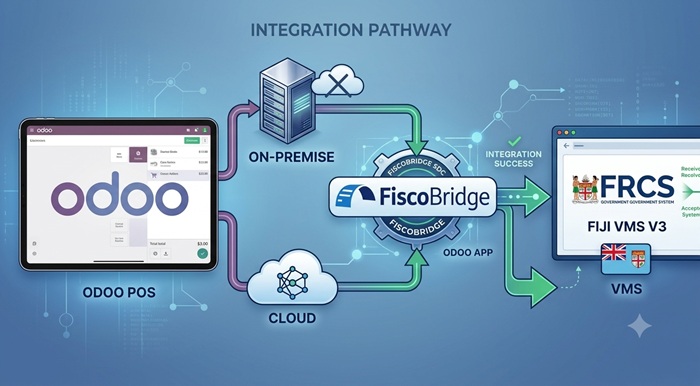
Fiji businesses using Odoo do not necessarily need to replace their existing POS or ERP system to connect with the Fiji Revenue and Customs Service VAT Monitoring System. FiscoBridge provides two different ways to connect Odoo with Fiji VMS Version 3, depending on how the business hosts Odoo and when its sales need to be fiscalized.
For a self-hosted or on-premise Odoo POS, the lower-cost option is to install the FiscoBridge Odoo POS app and connect it to a local FiscoBridge SDC with a Pro licence. Each POS sale and refund can then be fiscalized during checkout.
For Odoo Online or a cloud-based Odoo environment, businesses can use the managed FiscoBridge Odoo cloud integration. This option automatically fiscalizes eligible Odoo invoices after they are posted.
TL;DR: Which Odoo VMS integration do you need?
- Self-hosted Odoo POS: Use FiscoBridge SDC Pro together with the FiscoBridge Odoo POS app.
- Odoo Online or cloud Odoo: Use the managed FiscoBridge Odoo cloud integration.
- Real-time fiscal receipt at the till: The local Odoo POS app and SDC Pro setup is normally the better fit.
- Fiscalization when an Odoo invoice is posted: The cloud integration is normally the simpler option.
- Existing Odoo workflow: In both cases, the objective is to keep Odoo as the main business system and add the required Fiji VMS fiscalization layer.
The correct solution depends on whether each retail transaction must be fiscalized immediately at the POS terminal or whether the business creates and posts individual customer invoices in Odoo.
Why does Odoo POS need a Fiji VMS integration?
Under Fiji VMS, an Electronic Fiscal Device is made up of connected fiscal components. FRCS terminology includes the POS, Sales Data Controller, Secure Element and VAT Monitoring System.
The POS records the transaction. The SDC processes the transaction data, communicates with the Secure Element, produces the fiscal invoice information and transmits the required fiscal data to VMS.
Odoo POS does not automatically perform this Fiji-specific fiscalization process without an appropriate connection. A business therefore needs a compatible integration between Odoo and an SDC or another supported fiscalization service.
FRCS also explains that taxpayers using an Electronic Fiscal Device are responsible for ensuring that their POS is compatible with their chosen External or Virtual SDC.
A suitable Odoo integration should support the business workflow without requiring employees to manually enter the same sale into a second system.
The two FiscoBridge solutions for Odoo in Fiji
FiscoBridge offers two different Odoo fiscalization methods. They should not be treated as identical because they operate at different points in the Odoo sales process.
| Solution | Best suited for | Fiscalization point | Main requirement |
|---|---|---|---|
| FiscoBridge Odoo POS app with SDC Pro | Self-hosted or on-premise Odoo POS | When the cashier validates the POS sale or refund | FiscoBridge SDC Pro, Secure Element and installed Odoo module |
| FiscoBridge Odoo cloud integration | Odoo Online and supported cloud or hosted Odoo environments | When an eligible Odoo invoice is confirmed or posted | Cloud integration account, Odoo connection and taxpayer certificate |
The local SDC option is generally the more economical route for businesses that already operate their own Odoo server and need real-time receipt fiscalization at the POS terminal.
The cloud integration is designed for businesses that prefer a managed connection and do not want to install or maintain the local POS fiscalization module.
Option 1: Connect on-premise Odoo POS to FiscoBridge SDC Pro
Businesses running Odoo on their own server can connect Odoo POS directly to FiscoBridge SDC.
This option requires a FiscoBridge SDC Pro licence and the FiscoBridge POS app from the Odoo Apps Store.
The Odoo app acts as the POS-side connection. FiscoBridge SDC performs the actual fiscal signing and communication required for the Fiji VMS workflow.
How does the on-premise Odoo POS integration work?
- The cashier enters the sale in Odoo POS.
- Odoo prepares the transaction when the cashier selects Validate.
- The FiscoBridge Odoo app sends the required transaction data to FiscoBridge SDC.
- FiscoBridge SDC processes the request and uses the configured Fiji Secure Element to sign the fiscal transaction.
- The SDC returns the fiscal invoice number, signature, verification information and QR code.
- The fiscal block is added to the Odoo customer receipt.
- The fiscal response is stored with the Odoo POS order for audit and reprinting.
This gives the cashier one main workflow. The employee continues using Odoo POS rather than manually copying the transaction into separate fiscal invoicing software.
What does the FiscoBridge Odoo POS app support?
The current Odoo Apps Store listing describes support for real-time fiscalization of Odoo POS sales and refunds through FiscoBridge SDC.
- POS sales can be fiscalized when they are validated.
- Refunds can reference the original fiscal invoice.
- Odoo tax records can be mapped to the relevant SDC fiscal tax labels.
- The fiscal invoice number and verification QR code can be printed on the customer receipt.
- The complete SDC response can be stored on the Odoo POS order.
- Different FiscoBridge SDC URLs can be configured for different POS configurations.
The current module page is available for Odoo 19.0 and also lists versions for Odoo 17.0 and Odoo 18.0. Businesses should confirm their exact Odoo version, edition and custom modules before installation.
What happens if FiscoBridge SDC cannot be reached?
When fiscalization is enabled, the Odoo module is designed to stop the POS sale from completing without a valid response from the configured SDC.
This protects the business from unintentionally issuing an ordinary unsigned receipt where a fiscal invoice is required.
FiscoBridge SDC can also support local operation when the internet connection to the tax authority is temporarily unavailable. Fiscal data can be stored locally and submitted when connectivity returns, subject to the configured Fiji VMS workflow and Secure Element availability.
This can be important for Fiji businesses operating in locations where internet connections are not always stable.
What is required for the local Odoo POS solution?
- A supported self-hosted Odoo installation.
- The Odoo Point of Sale and Accounting modules.
- The FiscoBridge Odoo POS module installed by an Odoo administrator or developer.
- A FiscoBridge SDC installation with an active Pro licence.
- The appropriate Secure Element or fiscal certificate issued for the taxpayer and business location.
- Correct Fiji VMS tax-label mapping for all taxes used by Odoo POS.
- A receipt layout and printer configuration capable of showing the required fiscal information.
- Testing before production use, including sales, refunds, different payment types and applicable tax treatments.
How is the Odoo module installed?
The module should be installed through the standard Odoo server add-ons process. The module folder is copied into the configured Odoo add-ons directory, after which the server is restarted and the app is installed.
The Odoo Apps Store installation note advises against using the basic Import Module function because the integration includes Python components, not only XML or CSV data.
Businesses without an internal Odoo administrator should ask their Odoo partner or technical provider to perform the installation.
Why can the on-premise option be cheaper?
The local approach can have a lower ongoing integration cost because the business operates the Odoo server and FiscoBridge SDC locally. It does not require the complete managed cloud integration workflow for every posted invoice.
However, the business or its Odoo partner is responsible for maintaining the Odoo server, installing module updates, managing backups and keeping the local connection available.
The final cost can depend on the number of POS terminals, business locations, Secure Elements and SDC licences required.
Option 2: Connect cloud Odoo to Fiji VMS
Businesses using Odoo Online or another supported hosted Odoo environment can use the FiscoBridge Odoo cloud integration.
This solution runs as a managed fiscalization connection between Odoo and FiscoBridge. The business continues creating invoices in Odoo, while FiscoBridge handles the fiscalization workflow after an eligible invoice is posted.
How does the Odoo cloud integration work?
- The business creates a FiscoBridge integration account.
- The taxpayer certificate required for the Fiji VMS connection is configured.
- The Odoo company is connected to FiscoBridge.
- The applicable Odoo tax rates and fiscal mappings are checked.
- The business creates and posts invoices in Odoo as usual.
- FiscoBridge processes eligible posted invoices through the configured fiscalization workflow.
- The fiscal journal can be written back to the Odoo invoice record.
Can the cloud integration work with Odoo POS?
It can fiscalize invoices created from Odoo POS when those transactions are posted as Odoo accounting invoice records.
However, businesses must check the timing of their Odoo POS accounting workflow. Some Odoo configurations post accounting entries at the end of a POS session rather than creating and posting an individual customer invoice for every sale.
If each receipt must be fiscalized immediately while the customer is at the checkout, the local Odoo POS app with FiscoBridge SDC Pro is normally the more appropriate solution.
If the business creates a separate posted Odoo invoice for each relevant transaction, the cloud integration may be sufficient.
Who should choose the cloud option?
The managed cloud integration is usually suitable for:
- Businesses using Odoo Online.
- Companies that mainly issue invoices through Odoo Accounting or Invoicing.
- Businesses that do not want to install a local SDC application beside each POS environment.
- Companies with an Odoo configuration that creates individual posted invoices from POS transactions.
- Businesses that prefer a managed connection and automatic write-back of the fiscal journal.
Before selecting this option, FiscoBridge should review how the company creates sales, invoices, refunds and credit notes in Odoo.
Odoo POS SDC integration vs Odoo cloud integration
| Question | Odoo POS app and SDC Pro | Odoo cloud integration |
|---|---|---|
| Where does it run? | On the business server or local network | Through the managed FiscoBridge cloud service |
| Best Odoo environment | Self-hosted or on-premise Odoo | Odoo Online or supported hosted Odoo |
| When is the transaction fiscalized? | When the POS sale or refund is validated | When an eligible Odoo invoice is posted |
| Does it support a real-time till receipt? | Yes, this is the main purpose of the module | Only where the Odoo workflow creates and posts the required invoice at that point |
| Does it require a local FiscoBridge SDC? | Yes, with a Pro licence | No local SDC installation is normally required |
| Does it require an Odoo module? | Yes | Normally no custom POS module is required for the managed invoice integration |
| Internet outage handling | Local SDC operation can reduce disruption when the tax-authority connection is temporarily unavailable | Requires connectivity between Odoo, FiscoBridge and the relevant online services |
| Technical maintenance | Managed by the business, its IT team or its Odoo partner | Most integration infrastructure is managed by FiscoBridge |
| Typical cost structure | Usually lower recurring cost, with local setup and SDC Pro licensing | Managed cloud integration subscription |
Which Fiji VMS solution should your Odoo business choose?
Choose FiscoBridge SDC Pro and the Odoo POS app when:
- You host Odoo on your own server.
- You use Odoo POS for retail, restaurant or counter sales.
- Each sale must receive a fiscal response before the receipt is issued.
- You want the fiscal QR code printed immediately on the POS receipt.
- You need better protection against invoice disruption during temporary internet problems.
- You have an Odoo administrator or partner who can install and maintain the module.
- You prefer the lower-cost local integration model.
Choose the Odoo cloud integration when:
- You use Odoo Online.
- Your business mainly creates customer invoices through Odoo Accounting.
- Your POS workflow produces individual posted invoices that can be fiscalized through the integration.
- You want a managed accounting software integration.
- You prefer not to maintain a local Odoo fiscalization module.
- You want the fiscal journal attached to or recorded against the Odoo invoice.
Ask for a workflow review when:
- Your Odoo POS only posts accounting entries when the session closes.
- You have several stores or Odoo companies.
- You issue sales from both Odoo POS and Odoo Invoicing.
- You use custom Odoo modules or a heavily customised receipt flow.
- You need different Secure Elements for different business locations.
- You process deposits, advance payments, refunds, credit notes or mixed payment transactions.
FiscoBridge can review the existing Odoo workflow and help identify which transactions require real-time POS fiscalization and which can use invoice-based cloud fiscalization.
Odoo Fiji VMS integration checklist
Before starting the integration, the taxpayer, accountant, Odoo partner and fiscalization provider should confirm the following points.
Business and FRCS information
- Is the correct taxpayer and business location registered for VMS?
- Has the appropriate Secure Element or digital certificate been issued?
- Is the certificate active and associated with the correct business location?
- Which sales locations and POS terminals must be included?
- Does the business need VMS V3 rather than an older VMS V2 workflow?
Odoo technical information
- Is the business using Odoo Online, Odoo.sh or a self-hosted Odoo server?
- Which Odoo version is installed?
- Is it Odoo Community or Enterprise?
- Which POS, Accounting and Invoicing modules are enabled?
- Are any custom POS, payment, tax or receipt modules installed?
- Does every POS transaction create an individual Odoo invoice?
- When are Odoo accounting records posted?
Transaction information
- Which Fiji VAT rates and fiscal tax labels are used?
- Does the business process exempt, zero-rated or other special tax treatments?
- How are refunds and credit notes created?
- Are customer TIN or VAT details collected for relevant Tax Invoices?
- Are deposits, prepayments or Proforma Invoices used?
- Which payment methods are accepted?
Testing information
- Has the full workflow been tested in the appropriate non-production environment?
- Does the printed receipt show the fiscal invoice information and QR code?
- Can the fiscal invoice be verified through the official verification service?
- Are refunds correctly linked to the original fiscal transaction?
- Do Odoo totals, tax totals and fiscal totals match?
- Has the business tested temporary loss of internet connectivity?
Tax Invoices, fiscal invoices and VAT input tax credit
Businesses should not treat every Odoo document as the same type of invoice.
A Proforma Invoice is normally a preliminary commercial document. It should not automatically be treated as a final Tax Invoice or fiscal invoice.
FRCS has published guidance reminding VAT-registered taxpayers that a Tax Invoice used for VAT input tax credit must meet the applicable requirements. Businesses should review the current FRCS guidance with their accountant or tax adviser.
An Odoo VMS integration should therefore be configured around the business’s actual transaction types, including:
- Final sales and fiscal invoices.
- Tax Invoices issued to VAT-registered customers.
- Refunds and credit notes.
- Advance payments and deposits.
- Proforma Invoices that should not yet be treated as final sales.
Correct fiscalization does not replace the need to configure the correct customer details, VAT treatment, invoice type and supporting information in Odoo.
Common Odoo VMS integration mistakes to avoid
Choosing the cloud connector without checking POS posting
A business may assume that every Odoo POS receipt immediately becomes a posted accounting invoice. This depends on the Odoo configuration.
The sales and accounting workflow should be reviewed before selecting the cloud integration.
Using the local module without an SDC Pro licence
The Odoo POS app is the front-end connection. It does not replace the FiscoBridge SDC that performs the fiscal signing.
The local Odoo POS solution requires an active FiscoBridge SDC Pro licence.
Installing the module through the wrong method
The FiscoBridge Odoo POS app contains server-side components. It should be installed through the normal Odoo add-ons deployment process by someone with access to the Odoo server.
Leaving Odoo taxes unmapped
Every tax used by Odoo POS should have the appropriate fiscal tax-label mapping. Missing or incorrect mappings can cause rejected transactions or incorrect fiscal tax totals.
Testing only a basic cash sale
A complete test should include different tax rates, payment methods, customer types, discounts, refunds, credit notes and any custom Odoo workflows used by the business.
Using the wrong Secure Element
The Secure Element or certificate must belong to the correct taxpayer, environment and business location. Businesses should not move or reuse fiscal credentials without checking the applicable FRCS process.
Treating a Proforma Invoice as a final Tax Invoice
The business should clearly separate preliminary documents from final fiscal sales and Tax Invoices. This is especially important where the customer may use the document to support a VAT input tax credit claim.
How to start an Odoo POS integration with Fiji VMS
Businesses using self-hosted Odoo can review and download the FiscoBridge Odoo POS app here:
Download the FiscoBridge Odoo POS app
The module must be used together with FiscoBridge SDC Pro:
Learn more about FiscoBridge SDC
Businesses using Odoo Online or a supported cloud environment can review the managed integration here:
Connect Odoo to FiscoBridge cloud integration
Before selecting a solution, provide FiscoBridge with the Odoo version, hosting type, number of POS terminals, number of locations and an explanation of when POS sales become Odoo invoices.
Frequently asked questions about Odoo POS and Fiji VMS
Can I keep my existing Odoo POS and connect it to Fiji VMS?
Yes, in many cases. A self-hosted Odoo POS can use the FiscoBridge Odoo POS app together with FiscoBridge SDC Pro. Odoo Online and supported cloud environments can use the managed FiscoBridge Odoo integration. The exact setup depends on how your Odoo system creates and posts sales.
Which solution provides real-time fiscalization at the Odoo POS terminal?
The FiscoBridge Odoo POS app connected to FiscoBridge SDC Pro is designed for real-time fiscalization when the cashier validates a sale or refund. The fiscal invoice number, signature and verification QR code can then be returned to the POS receipt.
Can Odoo Online use the FiscoBridge Odoo POS app?
The local POS integration requires the ability to install and operate the required Odoo module and connect it to FiscoBridge SDC. For standard Odoo Online environments, the managed FiscoBridge cloud integration is normally the simpler option. FiscoBridge should review the exact hosting plan before confirming the setup.
Does the cloud integration fiscalize every Odoo POS receipt immediately?
Not necessarily. The cloud integration processes eligible posted Odoo invoices. If Odoo POS does not create and post an individual invoice for each sale at checkout, fiscalization may happen later in the accounting workflow. Businesses requiring immediate fiscal receipts should consider the local SDC Pro integration.
Do I need FiscoBridge SDC Pro for the on-premise integration?
Yes. The FiscoBridge Odoo POS app sends transactions to FiscoBridge SDC, which performs the fiscal signing and VMS communication. A Pro licence is required for this POS integration workflow.
Can the Odoo POS integration process refunds?
Yes. The module supports refund transactions and can link a refund to the original fiscal invoice. The exact Odoo refund process should be tested before production use.
What happens if the internet connection goes down?
A local FiscoBridge SDC can continue processing the local fiscal workflow where the Secure Element and required local services remain available. Fiscal data can be queued and transmitted when the connection returns. Businesses should test their exact outage procedure before going live.
Does Odoo need special Fiji tax-label mapping?
Yes. Taxes used by Odoo POS must be mapped to the correct Fiji VMS fiscal tax labels. Businesses should confirm the current FRCS rates and labels and test every tax treatment used in production.
Is FiscoBridge SDC accredited for Fiji VMS V3?
FiscoBridge SDC is listed by FRCS as an accredited ESDC in the VMS V3 accreditation list. Businesses should still check that their complete POS, SDC and Secure Element configuration is appropriate for their location and workflow.
Can a Proforma Invoice be fiscalized as a final Tax Invoice?
A Proforma Invoice should not automatically be treated as a final Tax Invoice. The business should configure the integration so that fiscalization occurs at the correct transaction stage and should follow current FRCS guidance on Tax Invoices and VAT input tax credit claims.
How do I know which Odoo integration is right for my business?
Check where Odoo is hosted and when each sale becomes a posted invoice. Use the Odoo POS app with SDC Pro for real-time checkout fiscalization on self-hosted Odoo. Use the cloud integration when eligible invoices are posted in Odoo Online or another supported hosted environment.