
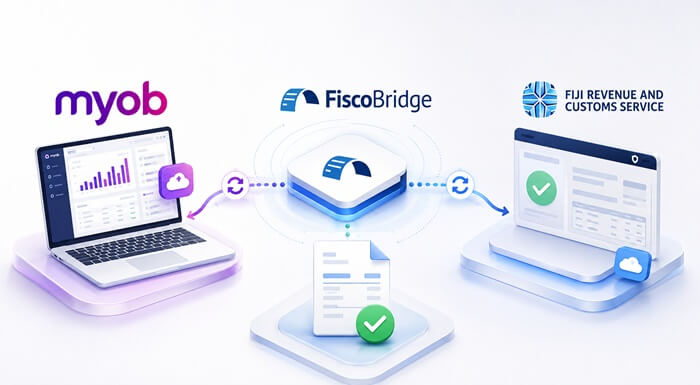
If your Fiji business already uses MYOB AccountRight Online, you do not need to recreate every invoice in a separate fiscal invoicing system just to connect with FRCS VMS V3. FiscoBridge can connect to your online AccountRight company file, retrieve eligible invoices, fiscalize them through the Fiji VMS workflow, and write the fiscal result back to MYOB.
This guide is for businesses actively asking: “I use MYOB AccountRight Online in Fiji. How do I connect it to FRCS VMS V3?”
The setup requires an online AccountRight company file, an FRCS-issued PFX fiscal certificate, a FiscoBridge integration licence, access to authorize the MYOB company file, and correct MYOB tax-code mapping.
TL;DR: How to connect MYOB AccountRight Online to Fiji VMS V3
- Make sure your MYOB AccountRight company file is available online.
- Request or obtain the correct FRCS PFX fiscal certificate.
- Create a MYOB integration in the FiscoBridge Client Portal.
- Upload the PFX certificate and enter its password.
- Select MYOB AccountRight as the MYOB product.
- Choose when invoices should be fiscalized.
- Sign in to MYOB and authorize the correct company file.
- Map MYOB tax codes to the applicable FRCS fiscal tax labels.
- Use Training mode to test the workflow before live fiscalization where appropriate.
- Continue creating invoices in AccountRight as usual.
↓
FiscoBridge retrieves the invoice
↓
MYOB tax codes are mapped to FRCS fiscal tax labels
↓
Invoice is fiscalized through Fiji FRCS VMS V3
↓
Fiscal reference and verification information are written back to MYOB
Does MYOB AccountRight support Fiji VMS directly?
MYOB AccountRight is an accounting platform. It does not natively perform the Fiji-specific FRCS VMS V3 fiscalization workflow by itself.
FiscoBridge provides the connection between your MYOB AccountRight company file and the Fiji VMS fiscalization process.
After the connection is configured, FiscoBridge can retrieve eligible MYOB invoices, process them using your FRCS PFX certificate, submit the fiscal transaction, and write the resulting fiscal information back to MYOB.
This means your accounting team can continue working from AccountRight rather than manually entering the same invoice into a second fiscalization application.
Which MYOB AccountRight setup is supported?
For the FiscoBridge cloud integration, the AccountRight company file needs to be available through MYOB's online API connection.
FiscoBridge supports MYOB AccountRight online company files. During setup, FiscoBridge connects to MYOB using OAuth, and the user authorizes the company file that should be fiscalized.
This includes AccountRight company files that are hosted online and accessible through the supported MYOB AccountRight connection.
What about old desktop-only AccountRight installations?
An old AccountRight installation where the company file exists only locally and is not available through the supported online MYOB API workflow cannot use the same cloud integration in the normal way.
If you are unsure whether your company file is online, check how your staff normally access the file or ask your MYOB provider or IT administrator.
What do you need before starting?
Before connecting MYOB AccountRight to Fiji FRCS VMS V3, prepare the following:
- MYOB AccountRight online company file – the company file that contains the invoices you want to fiscalize.
- FRCS PFX fiscal certificate – the digital certificate used for the cloud fiscalization workflow.
- FiscoBridge account and active integration licence.
- MYOB login with access to authorize the company file.
- Correct MYOB tax codes used on your sales invoices.
- A decision about the fiscalization trigger – for example, when an invoice is created or when payment is recorded, depending on your workflow.
If you do not yet have the PFX certificate, review the FiscoBridge certificate guide before starting:
How to connect MYOB AccountRight Online to FiscoBridge
The connection is completed from the FiscoBridge Client Portal.
Step 1: Create a new integration
Log in to FiscoBridge and go to Integrations. Choose Create Integration and select MYOB.
Step 2: Upload your FRCS PFX certificate
Select the PFX certificate issued for your Fiji fiscal setup and enter the certificate password.
The PFX certificate is a sensitive credential. Store it securely and only upload it to systems that genuinely require it.
Step 3: Select MYOB AccountRight
When FiscoBridge asks which MYOB product you use, choose AccountRight.
FiscoBridge also supports MYOB Business, but this guide is specifically focused on AccountRight online company files.
Step 4: Choose the fiscalization trigger
Select when FiscoBridge should process the invoice. FiscoBridge supports different invoice triggers, including fiscalization when the invoice is created or when payment is recorded.
The correct option depends on your business and tax workflow. This setting can be changed later if necessary.
Step 5: Choose Training or live mode
Training mode can be used to test the complete connection before issuing live fiscal invoices.
Businesses should confirm their invoice flow, tax-code mapping and write-back behavior before relying on the integration in production.
Step 6: Sign in to MYOB
Click Connect. FiscoBridge redirects you to MYOB, where you sign in directly to your MYOB account.
FiscoBridge uses OAuth for the connection. You do not give your MYOB password to FiscoBridge.
Step 7: Authorize the company file
Select the AccountRight company file that should be connected and authorize FiscoBridge to access it.
If your MYOB account contains several company files, make sure you select the correct Fiji entity.
Step 8: Map your MYOB tax codes
After the connection is active, configure the tax-label mapping before processing live invoices.
FiscoBridge reads the tax codes used in the AccountRight company file and allows you to map them to the fiscal tax labels required by the Fiji VMS workflow.
Step 9: Test an invoice
Create a suitable test transaction and confirm that:
- The invoice is retrieved by FiscoBridge.
- The correct tax treatment is applied.
- The invoice is successfully fiscalized.
- The fiscal result appears back on the MYOB invoice.
- The verification information is correct.
For the current guided connection process, see:
What happens when you create an invoice in MYOB AccountRight?
Once the connection is active, your normal accounting workflow changes very little.
↓
2. FiscoBridge retrieves the eligible invoice
↓
3. The configured MYOB tax codes are mapped to the correct fiscal labels
↓
4. FiscoBridge fiscalizes the invoice through Fiji FRCS VMS V3
↓
5. The fiscal result is written back onto the MYOB invoice
FiscoBridge writes fiscal information back into MYOB so the accounting record and fiscal record remain connected.
The current integration writes a FiscoBridge block into the MYOB invoice Comment field containing the fiscal result, receipt number and verification information. The Journal Memo can also contain a link to the fiscal journal.
This makes it possible for staff to check the fiscalization status without leaving their normal MYOB workflow for routine invoice processing.
Should MYOB invoices be fiscalized on invoice creation or payment?
This is an important setup decision.
FiscoBridge can be configured to process MYOB invoices according to the selected fiscalization trigger, including when the invoice is created or when payment is recorded.
Example A: Fiscalize when the invoice is created
A Fiji wholesaler creates final sales invoices in MYOB as soon as goods are supplied.
For this workflow, the business may configure FiscoBridge to fiscalize the invoice when it is created.
Example B: Fiscalize when payment is recorded
Another business may have an invoicing workflow where the relevant fiscal event occurs when payment is recorded.
Where that approach is appropriate for the business and applicable requirements, the payment-based trigger can be selected.
The taxpayer should select the trigger that matches the actual business transaction and applicable Fiji requirements. Do not choose a trigger only because it is more convenient operationally.
How does MYOB tax-code mapping work for Fiji VMS?
MYOB and FRCS VMS do not use the same tax-code names.
MYOB may use accounting tax codes such as GST, FRE, N-T or business-specific codes. The fiscal system expects its own accepted fiscal tax labels.
FiscoBridge therefore requires a one-time mapping between the codes in your AccountRight company file and the appropriate fiscal tax labels.
| MYOB | Fiji fiscalization |
|---|---|
| MYOB tax code | Mapped to the applicable FRCS fiscal tax label |
| Tax rate configured in AccountRight | Must correspond with the intended fiscal treatment |
| Unmapped or incorrect tax code | Can cause a failed or incorrect fiscalization attempt |
FiscoBridge does not guess the tax mapping automatically. The business should review the codes it actually uses and confirm the appropriate mapping.
This is especially important where the company uses:
- Standard VAT sales
- Zero-rated transactions
- Exempt transactions
- Non-tax codes
- Custom MYOB tax codes
An invoice can be mathematically correct in MYOB but still be fiscalized incorrectly if the tax code is mapped to the wrong fiscal category.
What changes for staff after the MYOB VMS integration?
Very little.
Your staff continue creating invoices in MYOB AccountRight as part of their normal accounting process.
They do not need to:
- Recreate every invoice manually in another application.
- Copy customer and item information into a separate fiscal system.
- Manually submit each ordinary invoice to FiscoBridge.
- Maintain a second invoice numbering process just for routine fiscalization.
FiscoBridge works as the fiscalization layer between AccountRight and Fiji VMS V3.
Staff should still understand how to identify a failed fiscalization message and how special transactions such as credit notes or advance payments are handled.
Example: Fiji wholesaler using MYOB AccountRight Online
ABC Trading uses MYOB AccountRight Online to invoice business customers in Fiji.
The accounting team creates an invoice for FJD 2,500 in MYOB.
Instead of opening another application and entering the FJD 2,500 invoice again, the workflow is:
↓
FiscoBridge retrieves the MYOB invoice
↓
Configured tax-code mapping is applied
↓
Invoice is sent through the FRCS VMS V3 fiscalization workflow
↓
Fiscal reference and verification details are associated with the MYOB invoice
The accounting team continues using AccountRight as its main invoicing and accounting system.
This is the main benefit of the integration: the business keeps its existing MYOB workflow while adding the required fiscalization layer.
What about MYOB credit notes?
Credit notes require a different fiscal workflow from an ordinary Sale.
In the fiscal transaction model used by Fiji VMS, a credit adjustment is handled through the corresponding Refund workflow and needs the appropriate reference to the original fiscal Sale.
For FiscoBridge cloud integrations, negative credit-note documents are not simply sent as negative Normal Sales. The user should follow the FiscoBridge Refund workflow from the original fiscal invoice.
For a full explanation, see:
What about deposits and advance payments in MYOB?
Deposits and prepayments may require an Advance Sale rather than being treated as an ordinary completed Normal Sale.
The correct workflow depends on when payment is received, when the product or service is supplied, and how the transaction needs to be connected to the final fiscal invoice.
If your business regularly accepts deposits, hotel prepayments, project installments or other advance payments, review the advance-payment workflow before enabling automatic invoice processing.
For a detailed explanation, see:
Advance Payments and Deposits: How Advance Sale and Advance Refund Work
What happens if an MYOB invoice fails fiscalization?
A failed fiscalization should not disappear silently.
FiscoBridge can write a failure message back to the MYOB invoice so staff can see that the fiscalization did not complete successfully.
A common cause is an unmapped tax code.
If an invoice is not being fiscalized, check:
- Is the MYOB integration status Active?
- Was the correct AccountRight company file selected?
- Is the PFX certificate valid?
- Are all MYOB tax codes used on the invoice mapped?
- Is the integration licence active?
- Is the selected invoice trigger appropriate for the transaction?
- Does the MYOB invoice itself contain valid customer, tax and line information?
MYOB invoices are retrieved periodically rather than by an instant push from MYOB, so there can also be a short delay before a newly created invoice is processed.
Local Fiji MYOB and FiscoBridge support through Datec
Businesses that prefer local assistance in Fiji can also work with Datec Fiji, an authorised FiscoBridge reseller partner.
Datec is an established Fiji technology provider and also lists MYOB among its accounting solutions. This can be useful for businesses that want local help with MYOB, implementation planning, or the wider technology environment around the integration.
FiscoBridge remains responsible for the FiscoBridge fiscalization platform, while local partner support can make implementation and coordination easier for Fiji businesses.
Common MYOB AccountRight VMS integration mistakes
Using a desktop-only company file
The FiscoBridge cloud integration needs access to the supported online AccountRight company file. Confirm the file is available online before starting.
Requesting the wrong fiscal certificate
The FiscoBridge MYOB cloud integration uses a PFX certificate. A Smart Card is intended for a different local SDC workflow.
Skipping tax-code mapping
MYOB tax codes must be mapped to the correct fiscal labels before invoices can be processed reliably.
Selecting the wrong company file
Businesses with multiple AccountRight files should make sure the correct Fiji entity is authorized during setup.
Choosing the fiscalization trigger without reviewing the business workflow
Invoice creation and payment triggers can produce different timing. Choose the one appropriate to the actual transaction and applicable requirements.
Testing only one simple invoice
Before production, test the tax treatments and invoice types the business actually uses.
Expecting a credit note to behave like a normal invoice
Credit adjustments require the fiscal Refund workflow and reference to the original fiscal Sale.
Ignoring deposits and advance payments
Businesses that receive money before supply should review whether those transactions need the Advance Sale workflow rather than ordinary Normal Sale treatment.
Already using MYOB AccountRight Online in Fiji?
You may not need to replace your accounting software.
Connect your AccountRight company file to FiscoBridge and add Fiji FRCS VMS V3 fiscalization to your existing invoicing workflow.
Frequently asked questions about MYOB AccountRight and Fiji VMS V3
Can MYOB AccountRight connect to Fiji FRCS VMS V3?
Yes. FiscoBridge can connect a supported MYOB AccountRight online company file to the Fiji VMS fiscalization workflow. Invoices are retrieved from MYOB, fiscalized using the configured FRCS PFX certificate and the fiscal result is written back to the MYOB invoice.
Does MYOB AccountRight fiscalize invoices to FRCS by itself?
MYOB AccountRight does not natively perform the Fiji-specific FiscoBridge VMS workflow by itself. FiscoBridge provides the fiscalization integration between the AccountRight company file and FRCS VMS V3.
Does my AccountRight company file need to be online?
Yes, for the FiscoBridge cloud integration described in this guide. FiscoBridge connects through MYOB's online API authorization workflow, so the relevant company file must be accessible through that supported online connection.
Can an old desktop-only MYOB AccountRight file use this integration?
Not through the standard cloud connection unless the company file is available through the supported online AccountRight API workflow. Businesses using older desktop-only files should review their MYOB setup before purchasing the integration.
Do I need a Smart Card for the MYOB cloud integration?
No. The FiscoBridge MYOB cloud integration uses an FRCS PFX certificate. A Smart Card is used for local FiscoBridge SDC workflows instead.
How do I connect MYOB AccountRight to FiscoBridge?
Create a MYOB integration in the FiscoBridge Client Portal, upload the PFX certificate, select AccountRight, choose the fiscalization trigger, sign in to MYOB, authorize the company file and configure the MYOB tax-code mappings.
Does FiscoBridge need my MYOB password?
No. The connection uses MYOB OAuth. You sign in directly with MYOB and authorize FiscoBridge to access the selected company file.
Can I choose whether MYOB invoices are fiscalized on creation or payment?
Yes. FiscoBridge supports configurable fiscalization triggers including invoice creation and payment-based processing. The business should choose the trigger that fits its transaction workflow and applicable Fiji requirements.
Why do I need to map MYOB tax codes?
MYOB uses its own accounting tax codes, while the Fiji fiscal system accepts its own fiscal tax labels. FiscoBridge needs the mapping so each MYOB tax treatment is translated correctly during fiscalization.
What happens after an invoice is fiscalized?
FiscoBridge writes the fiscal result back onto the MYOB invoice, including the fiscal receipt information and verification details, so the accounting invoice remains connected to its fiscal record.
Do staff need to recreate invoices in FiscoBridge?
No for ordinary supported invoice flows. Staff continue creating invoices in MYOB AccountRight, while FiscoBridge retrieves and fiscalizes them automatically according to the configured integration settings.
How are MYOB credit notes handled?
Credit notes require the fiscal Refund workflow and a reference to the original fiscal Sale. FiscoBridge cloud integrations do not simply send negative credit-note values as negative Normal Sales. Use the appropriate FiscoBridge Refund workflow for the original fiscal invoice.
What about MYOB deposits and advance payments?
Deposits and prepayments may require Advance Sale and Advance Refund treatment rather than an ordinary Normal Sale. Businesses accepting advance payments should review that workflow before relying on automatic fiscalization.
Can I test the MYOB connection before going live?
Yes. FiscoBridge provides a Training mode that can be used to test the connection and fiscal workflow before switching to live fiscal invoices.
Who can help locally in Fiji?
FiscoBridge provides the fiscalization platform, and Datec Fiji is an authorised FiscoBridge reseller partner that can provide local assistance. Datec also provides MYOB solutions in Fiji.