
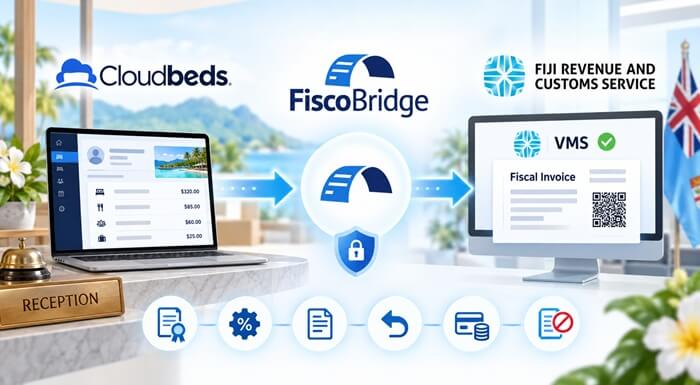
FiscoBridge connects Cloudbeds guest invoicing to Fiji VMS V3, helping hotels and resorts add FRCS fiscalization to their existing billing workflow. Your team can keep working in Cloudbeds while eligible guest transactions are processed through the integration.
The Cloudbeds integration is available through an assisted setup. Contact FiscoBridge to arrange the connection and receive a quote for the one-time setup fee. After setup, you continue with a monthly or yearly integration subscription.
For the front desk, the important questions are practical: when does the guest bill become a fiscal invoice, are the taxes correct, and which document should be given to the guest? This guide explains what to prepare and what to test before going live.
TL;DR: connecting Cloudbeds to Fiji VMS
- Start with FiscoBridge: arrange the one-time setup and choose monthly or yearly billing.
- Prepare your certificate: this cloud workflow uses an FRCS-issued PFX file.
- Agree the billing process: decide which guest transactions should trigger fiscalization.
- Test the result: reconcile the guest bill, tax breakdown and returned fiscal document.
- Check accounting connections: prevent the same guest sale being fiscalized again through Xero, MYOB or another system.
How does the Cloudbeds FRCS integration work?
Cloudbeds remains your hotel billing system. FiscoBridge adds the fiscalization step rather than asking reception to type the same ordinary guest invoice into another application.
- Prepare the guest bill in Cloudbeds.
- The agreed billing event occurs.
- FiscoBridge processes the eligible transaction for Fiji VMS.
- The fiscal result is returned for staff to check and deliver.
This is the distinction to remember: a reservation confirmation or a payment entry is not, by itself, proof that a fiscal invoice has been issued. Check the fiscal result, not only the booking status.
FRCS explains that fiscal receipts can be verified using their QR code. Its VMS guidance also places responsibility on the taxpayer to issue fiscal invoices to customers. The integration supports that process, but your team still needs a clear invoice-delivery procedure.
For the broader registration and accommodation rollout topic, see our separate Fiji VMS guide for Accommodation Group 2.
What do you need before connecting Cloudbeds to Fiji VMS?
Prepare the items below before the setup session. Having a sample guest bill ready is especially useful because it shows how your hotel actually charges guests.
| What to prepare | What to check |
|---|---|
| Cloudbeds access | A user who can authorize an integration for the intended property. |
| Fiji taxpayer details | The correct legal entity, TIN and registered business location. |
| FRCS PFX certificate | The certificate file, password and PAC requested during certificate setup. |
| FiscoBridge account | The Cloudbeds setup arranged with our team and the required integration subscription. |
| Tax configuration | Your actual room taxes, taxable extras and tax-inclusive or tax-exclusive pricing. |
| Sample transactions | A normal stay, a deposit, an adjustment and a bill with any additional charges you use. |
Request a PFX certificate, not a Smart Card for this connection
FiscoBridge cloud integrations use a digital .pfx certificate. You do not need a local SDC or card reader for this Cloudbeds connection. Request the certificate through the Fiji Taxpayer Administration Portal and follow our certificate-request guide.
Keep the file, password and PAC secure. Do not include them in a general support email. Check the certificate's taxpayer, location and validity before using it.
Tell us about every property
The documented setup uses one connection and certificate per Cloudbeds property. Tell us about all locations before requesting credentials or choosing subscriptions.
How to arrange your Cloudbeds integration setup
1. Contact FiscoBridge with your hotel details
Send your property name, number of properties, approximate monthly invoice volume and accounting software. Explain whether you take deposits, split guest bills or post restaurant charges to rooms.
We will confirm the setup scope and quote the one-time fee. This is the starting point, rather than assuming a general integration subscription activates Cloudbeds without setup.
2. Agree which transactions the connection will cover
Walk through a real guest bill with the team. Identify the sale being reported, who receives the invoice and which system creates it. Agree the go-live date and treatment of existing bookings so old and new transactions are not mixed accidentally.
3. Connect the property
Once Cloudbeds is enabled, open Integrations > Create Integration > Cloudbeds. Upload the PFX, configure the connection, then sign in to Cloudbeds and authorize access. FiscoBridge does not receive your Cloudbeds password.
The Cloudbeds connection guide provides the current screen-by-screen instructions. Follow those steps with our setup team.
4. Check configuration before live use
Use the Integrations page to confirm the connection is active. Check the property details, certificate, tax setup and chosen event. Complete the test cases below before enabling ordinary production processing.
Which Cloudbeds events trigger fiscalization?
The documented choices are:
| Setting | Trigger |
|---|---|
| Checkout-based | Checkout or a zero folio balance, whichever happens first. |
| Folio creation | Notification of a new folio, without waiting for checkout. |
A prepaid booking can have a zero balance before the stay. For that reason, choosing a setting is not a substitute for checking the tax treatment of the payment. Agree which event is appropriate for your hotel's transactions before activation.
Later folio edits are not automatically re-fiscalized. See the documented event options and the adjustment guidance below.
For practical testing, use one reservation paid at checkout and another paid before arrival. Check both the moment of fiscalization and the invoice type produced. Do not assume the two scenarios should be handled identically.
How should Cloudbeds taxes be set up for Fiji VMS?
Review the tax percentage, the fiscal category and whether your selling price includes tax. A total that looks reasonable on screen can still be wrong if those settings do not agree.
For this connector, name-based mapping expects the fiscal label letter as the Cloudbeds tax name. Match the corresponding percentage too. Our setup team should confirm the labels for your property.
Check the price basis
FRCS's VAT calculation notice explains the 12.5% calculation for standard-rated transactions. For example, FJD 100 before VAT becomes FJD 112.50 after VAT. If FJD 112.50 is already the tax-inclusive price, adding another 12.5% would charge VAT twice.
Use that same check on a room rate, a discounted stay and an extra charge. Compare the source bill with the fiscal receipt, including rounding.
Check TST separately where it applies
FRCS introduced Tax Label H for 5% Tourism Services Tax, effective 1 September 2026. A hotel subject to TST needs the appropriate treatment in both its source charges and fiscal output. Do not assume that a generic tax called “Tourism Tax” is correctly mapped.
Use the FRCS Tax Label H notice and current TST guidance to confirm applicability. Ask your accountant about uncertain bookings or charges rather than applying the same treatment to every guest bill.
Do not bypass a tax warning
Unmapped taxes can stop an invoice from being fiscalized. Check the explanation in the reservation note, correct the setup and confirm successful processing. Renaming a tax does not, by itself, prove the guest has received a fiscal invoice. Our failed-invoice guide explains how to investigate.
Worked example: a two-night Cloudbeds guest bill
Consider an illustrative Fiji hotel booking for two nights at FJD 450 per night before VAT. Assume standard VAT applies, TST does not apply to this particular example, and there are no deposits or additional charges.
| Bill component | Calculation | Amount |
|---|---|---|
| Accommodation | 2 nights × 450.00 | 900.00 |
| VAT | 900.00 × 12.5% | 112.50 |
| Total guest bill | 900.00 + 112.50 | 1,012.50 |
Reception completes the agreed billing process in Cloudbeds. After fiscalization, the staff member compares the returned document with the original bill:
- Does it belong to the correct hotel and guest transaction?
- Do the accommodation charge, VAT and FJD 1,012.50 total reconcile?
- Is there a fiscal invoice number and working verification link or QR code?
- Is it the intended invoice type, rather than a test document?
The useful outcome is not simply “the integration connected”. It is that reception can confidently identify and deliver the right fiscal document for that stay.
This room-only example is not a promise that every restaurant, spa, transfer or third-party charge is included automatically. Add your actual extras to the acceptance tests and confirm that none are missing or duplicated.
Where do staff find the fiscal guest invoice?
After successful processing, look on the Cloudbeds reservation for the FiscoBridge note and attached fiscal PDF. The returned information includes a fiscal reference and verification details.
- Open the relevant reservation. Match the document to the guest bill being settled.
- Open the fiscal PDF. Check the amount and tax breakdown before sending it.
- Provide it to the guest. Use your agreed print or email process and confirm that staff send the fiscal document, not just a booking confirmation.
Do not assume that a document attached to a reservation has also been emailed automatically. Test the guest-delivery step separately.
You can also open Integrations > Integration Invoices in the FiscoBridge portal. The invoice-management guide shows how to filter records and view the journal, QR code and verification link.
For business travellers, confirm the required buyer details before fiscalization. In particular, check that an invoice intended for a company carries the appropriate company information rather than assuming the lead guest's profile is sufficient.
How should Cloudbeds work alongside Xero or MYOB?
Your hotel may use Cloudbeds for guest billing and send sales information to an accounting platform for bookkeeping. That does not mean both systems should fiscalize the same underlying sale.
Choose one fiscalization source for each guest sale. If the Cloudbeds guest transaction has already produced its fiscal invoice, an accounting copy should not create another Normal Sale for the same charge.
| Record | Role in the agreed workflow |
|---|---|
| Cloudbeds guest bill | Source for the guest sale being fiscalized. |
| Fiscal invoice | The fiscal record associated with that sale. |
| Accounting entry | Bookkeeping and reconciliation, without reporting that sale again as a new sale. |
Ask your accountant whether the accounting feed contains individual invoices or daily summaries. Then agree how already-fiscalized Cloudbeds sales will be kept out of any separate accounting fiscalization process. Do not assume automatic duplicate detection across different platforms.
Separate sales created directly in Xero or MYOB may still need their own treatment. The aim is to cover every genuine sale without counting the same one twice. Linked deposits, refunds and corrections are different fiscal events, not automatically duplicates.
Apply the same check to restaurant charges posted to a room. Establish whether the restaurant already fiscalized the sale before including it in the guest's final bill.
What about deposits, refunds and changes to a guest bill?
Deposits received before arrival
A payment before the stay may require an Advance Sale and a linked final-settlement process. An advance reversal may require an Advance Refund. Do not assume that selecting an earlier folio trigger automatically configures this entire sequence.
Discuss deposits and full prepayments during setup. Our advance payments and deposits guide explains the distinction.
Refunds after a sale has been fiscalized
For a fiscal refund, locate the original sale in the FiscoBridge portal and use the appropriate Refund action. The refund must retain the fiscal reference to the sale being adjusted. Keep the related Cloudbeds and accounting records consistent with that action.
A booking cancellation, negative line or accounting credit note should not be assumed to reverse an existing FRCS fiscal invoice automatically. Follow the credit notes and fiscal refunds guide and the procedure agreed for your property.
Changes after the guest invoice is issued
Before changing a billed stay, check whether a fiscal document already exists. Ask which correction is needed instead of creating another full sale just to make the figures match. This is particularly important for late charges and shortened stays.
What should hotel staff check before going live?
Ask reception and accounts to test together. Reception knows how charges are created; accounts can confirm how the amounts and taxes should reconcile.
| Test | What to establish |
|---|---|
| Ordinary completed stay | The expected event produces the correct document, once. |
| Taxes and pricing | Room rates, applicable VAT or TST, discounts and rounding reconcile. |
| Deposits and full prepayments | Advance treatment and final settlement are agreed before activation. |
| Additional charges | Restaurant postings, transfers, fees and other extras are either included correctly or have a separate agreed process. |
| Guest and company billing | The correct buyer, currency and business details appear. |
| Payments and dates | The fiscal payment classification and issue date suit the actual billing process. |
| Refund or correction | Staff can find the original fiscal reference and complete the appropriate adjustment. |
| Delivery and accounting | The guest receives the document and accounting does not fiscalize the same sale again. |
Check payment detail explicitly. The documented mapping uses one “Other” payment and the checkout date. Do not assume it reproduces split card/cash payments or a different billing date.
Use Training mode during the setup tests, then confirm live settings before production. Training documents count towards the relevant invoice allowance, as explained in the invoice-limits guide.
Also nominate a staff member to check exceptions each day and monitor certificate expiry. FRCS provides renewal guidance in its VMS FAQs. A working connection today is not a reason to ignore an approaching expiry date.
What if the guest's fiscal document is missing?
Check the reservation note for a failure message, then check the integration status, certificate and invoice allowance. A successful Cloudbeds payment alone does not establish successful fiscalization.
If a tax is unmapped, resolve the named problem and confirm that processing succeeds. If the result is uncertain, check for an existing fiscal record before retrying or creating another invoice.
When requesting help, include the property name, reservation identifier and approximate transaction time. Do not send the PFX file or password in the same message. Refer to the troubleshooting guide for the current checks.
Plan for connectivity interruptions too. This is an online integration, not an offline checkout solution. Agree how reception will handle a delay without treating an ordinary guest bill as a successfully issued fiscal invoice.
How much does Cloudbeds fiscalization setup cost?
There are two parts to the FiscoBridge arrangement:
| Charge | How it works |
|---|---|
| One-time setup fee | Contact FiscoBridge for a quote and confirmation of your property's setup scope. |
| Ongoing integration subscription | Continue on a monthly or yearly plan after setup. |
Provide your expected busy-month volume, not just your quiet-season average. Subscription allowances apply to fiscal documents, and reaching a plan limit can interrupt processing.
Already using Cloudbeds in Fiji?
Contact FiscoBridge with your property details and a description of your guest-billing process. We can help arrange the connection, confirm the one-time setup fee and select the monthly or yearly subscription for your hotel.
Frequently asked questions
Can Cloudbeds connect to Fiji FRCS VMS?
Yes. FiscoBridge offers a Cloudbeds integration with assisted setup. Contact the team to arrange the connection and one-time setup fee, then continue on a monthly or yearly subscription.
What certificate do I need for the Cloudbeds integration?
Prepare an FRCS-issued PFX certificate for the correct taxpayer and business location, together with the credentials requested during setup. This cloud connection does not require a local Smart Card reader.
Can I activate Cloudbeds just by buying an integration plan?
Contact FiscoBridge first. Cloudbeds requires the one-time setup arrangement as well as an ongoing integration subscription.
Should a hotel fiscalize at checkout or before arrival?
Agree the event with FiscoBridge and your accountant. A prepaid stay and a completed stay can require different treatment, so selecting a trigger alone does not settle the tax question.
Where can I check the fiscal invoice?
Use the returned document associated with the guest reservation and the Integration Invoices page in FiscoBridge. Check the fiscal reference, totals and verification details before giving it to the guest.
Does the Cloudbeds connection replace my Xero or MYOB accounting setup?
No. Plan the fiscalization source separately from bookkeeping. An accounting copy of an already-fiscalized guest sale should not create a second Normal Sale for the same charge.
Are restaurant charges and deposits automatically covered?
Do not assume this from a room-only test. Review the actual restaurant postings, extras and advance-payment scenarios during setup, and agree a supported process for each.
Does cancelling a Cloudbeds reservation cancel its fiscal invoice?
Do not assume it does. First check the existing fiscal record, then complete the appropriate refund or correction using the original fiscal reference. Keep Cloudbeds and accounting records aligned.
How should a hotel group arrange several properties?
List every property and invoicing location when requesting setup. Confirm the required connections, certificates and subscriptions with FiscoBridge before purchasing or requesting credentials.
Is the setup fee a replacement for the subscription?
No. The one-time setup fee and the ongoing subscription are separate. After setup, the integration continues on a monthly or yearly plan.
Official sources
Check current FRCS requirements for your taxpayer and transactions. Product instructions should be read alongside those requirements, not as a substitute for them.
- FRCS: VMS FAQs, fiscal receipts and certificate renewal
- FRCS: VAT calculation notice
- FRCS: 5% TST Tax Label H
- FRCS: Tourism Services Tax guidance notice