
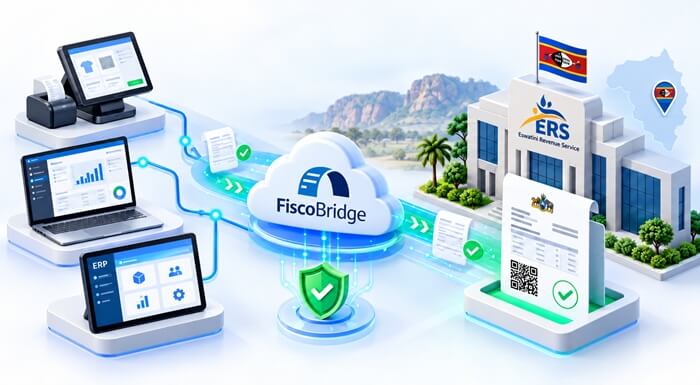
Eswatini is moving towards more structured business invoicing through the Eswatini Revenue Service (ERS) e-Invoicing programme. For businesses, the practical question is not simply whether to switch from paper to email. It is how the software already used to make sales can produce the required fiscal documents and report the transaction information to ERS.
ERS describes e-Invoicing as a standardised way to issue, transmit and store invoices electronically. Its stated aims include a more transparent VAT chain, fewer paper-related costs and errors, and more efficient tax administration and refunds. Read the ERS e-Invoicing overview.
A supermarket with several tills has different needs from a consultancy using Xero or a wholesaler invoicing through an ERP. The right Eswatini e-Invoicing solution starts with how your business works today.
TL;DR: what does your business need for ERS e-Invoicing?
- Confirm your requirements with ERS. Check the notices, registration instructions and implementation date that apply to your taxpayer account.
- Choose an approved setup. Check the supplier and the relevant fiscal products before purchasing or integrating software.
- Start with your existing system. A compatible POS, accounting platform or ERP may be connected rather than replaced.
- Match the setup to your connectivity. Local SDC installations and cloud invoicing have different internet requirements.
- Test the complete invoice workflow. Check taxes, customer information, refunds, fiscal documents and reporting before going live.
What is ERS e-Invoicing in Eswatini?
ERS e-Invoicing is the programme through which businesses use approved fiscal solutions to create electronic invoices and securely transmit the required transaction information to the revenue service.
You may encounter names such as ERS.EIS, the Eswatini electronic invoicing system, and TaxCore, the platform used for the programme. The term fiscalization, also spelled fiscalisation, describes the fiscal processing behind the invoice. You do not need to understand the underlying technology to choose a suitable business setup.
The practical workflow is:
- Your business records the sale in its POS, invoicing application or ERP.
- The transaction passes through the approved fiscalization setup.
- The required fiscal information is generated for the customer document.
- The fiscal transaction information is securely transmitted to ERS according to the applicable reporting workflow.
- Your business keeps the accounting and fiscal records together for reconciliation.
Sending an ordinary PDF by email is not, by itself, ERS e-Invoicing. A PDF may be how a customer receives a document, but the required fiscal processing must still take place. ERS directs businesses to approved fiscal devices and software, not simply to a different invoice file format.
Why is Eswatini introducing e-Invoicing?
The change is intended to improve how invoice information moves between businesses and the tax authority.
A clearer VAT record. Structured invoice information can make transactions easier to trace than records held only in separate systems or paper files.
Less manual administration. Standardised electronic records can reduce repetitive handling and the errors associated with paper invoicing.
More efficient tax administration. ERS identifies improved administration and refunds among the programme's intended benefits. The outcome for an individual business still depends on its records and the applicable tax processes.
Greater transparency can also support fairer competition between businesses that report their sales correctly. This is a potential benefit, not a claim that electronic invoicing will eliminate under-reporting. See the programme objectives published by ERS.
What does ERS e-Invoicing mean for your business?
It means looking at the complete path from a sale to the fiscal invoice, not only changing the appearance of your receipt.
Before choosing a provider, establish where invoices are created, which branches issue them, how many transactions you process and what happens when the internet connection drops. Also identify who manages the software: your own IT team, an accounting provider or a POS vendor.
There is no single best e-Invoicing setup for every Eswatini business. A busy checkout needs a different working arrangement from an accountant preparing a few customer invoices each week.
Who needs to use ERS e-Invoicing, and from when?
Confirm the requirements for your taxpayer account directly with ERS. The official notices and onboarding instructions should determine whether your business must implement e-Invoicing and which date applies.
Do not assume that your business has the same deadline as another company, or that a provider's product availability determines your legal start date. Use the ERS e-Invoicing portal and official FAQ as your starting points, and ask ERS to clarify your position where necessary.
Why choosing an ERS-approved e-Invoicing solution matters
Before buying Eswatini e-Invoicing software, check both the ERS approved-vendor list and the register of approved fiscal elements.
These checks answer different questions: who supplies the solution, and which fiscal products are approved for use. Ask the provider to identify the exact products and configuration being proposed, including any relevant version or approval details.
FiscoBridge is accredited for Eswatini ERS e-Invoicing
FiscoBridge's ERS accreditation covers its Sales Data Controller (SDC) and Cloud POS / Web Invoicing solutions. These are the accredited components described on the FiscoBridge Eswatini solutions page.
Approval of a fiscal component should not be treated as automatic approval of every POS or application connected to it. Confirm the appropriate ERS-approved product combination for your installation before committing to live use.
Which Eswatini e-Invoicing solution fits your business?
Start with the system your staff already use. The following five routes cover different invoicing needs.
| Your situation | Route to consider | What to confirm first |
|---|---|---|
| You already have a POS | Existing POS + FiscoBridge SDC | POS compatibility and the approved fiscal configuration |
| You need a complete till | FiscoBridge Desktop POS + SDC | The current ERS-approved product combination for your installation |
| You issue a smaller number of invoices | FiscoBridge Web Invoicing | ERS credentials and reliable internet access |
| You use accounting software | A supported accounting or ERP integration | The exact software, hosting arrangement and invoice workflow |
| You have custom software | FiscoBridge API / custom integration | Required invoice data, development work and testing |
Option 1: keep your existing POS and connect FiscoBridge SDC
A supermarket, retailer or restaurant may already have checkout software that staff know well. Replacing it should not be the automatic first step.
Where the POS is compatible, FiscoBridge SDC can provide the fiscalization component. The POS supplies the invoice information and receives the fiscal result for the receipt.
Existing POS → FiscoBridge SDC → ERS e-Invoicing
Ask your POS vendor whether the application can send the required transaction data and handle the returned fiscal information. A connection may require development or configuration; an ordinary receipt printer is not enough.
You may not need to replace your POS, but its compatibility and approval requirements still need checking.
Option 2: use Desktop POS when you need a complete till
A new shop, café or restaurant may need an operational POS as well as fiscalization.
FiscoBridge Desktop POS provides checkout, shifts and reporting, with inventory and restaurant features available according to the selected edition. It works with FiscoBridge SDC for fiscal processing.
Before purchasing for an Eswatini rollout, contact FiscoBridge to confirm the current ERS-approved product combination and the edition that fits your business. Keep the operational POS choice and the fiscal approval check as two explicit parts of the decision.
Option 3: use Web Invoicing for a simpler invoicing workflow
A consultant or small service business may not need a till, stock management or a custom integration.
FiscoBridge Web Invoicing provides a browser-based invoicing interface through the Cloud POS solution. With the appropriate ERS-issued credentials configured, staff can create fiscal invoices online without installing a full local POS.
This suits businesses that need straightforward customer invoicing and have reliable internet access. If staff already create every invoice in another accounting system, an integration may avoid entering the same information again.
Option 4: can Xero, QuickBooks, Odoo or Sage connect to Eswatini ERS?
FiscoBridge offers accounting and ERP integration routes for Eswatini, including Xero, QuickBooks Online, Odoo, Sage 300 and Zoho Books.
The aim is to keep invoice creation in the existing business system and add fiscal processing, rather than ask staff to recreate every invoice manually.
- Xero and Zoho Books: consider the supported cloud integration.
- QuickBooks: confirm that you use QuickBooks Online. Do not assume a QuickBooks Desktop installation uses the same connection.
- Odoo: confirm the version, hosting arrangement and whether invoices originate in POS or Accounting.
- Sage: specify Sage 300 and the deployment details. Do not assume every product carrying the Sage name uses the same integration.
During setup, agree when fiscal processing happens, how tax codes are mapped and where staff find the returned fiscal document or reference. Review refunds and advance payments separately rather than assuming every accounting document follows an ordinary sale workflow.
See FiscoBridge's Eswatini integration options and supported accounting integrations.
Option 5: add fiscalization to a custom ERP or business application
Some wholesalers, hotel operators and larger retailers use specialised billing software. POS vendors may also need to connect an application used by many clients.
A FiscoBridge API connection can provide a route to fiscalization where the application can exchange the required invoice data. The integration needs to send the right information and handle the fiscal result, references and errors.
Start with a workflow review, not just an API connection test. Agree who will implement the changes, maintain the integration and support each installation.
Online or offline: which ERS e-Invoicing setup do you need?
For a shop with customers waiting at the till, an internet interruption is an operational issue, not just an IT inconvenience.
A local SDC setup can support fiscal invoicing during temporary internet interruptions, provided the local POS, SDC and required ERS credentials remain available. Fiscal data is retained for transmission when connectivity returns.
Cloud integrations and Web Invoicing use an online fiscalization workflow. They suit businesses already invoicing online, but should not be selected on the assumption that they provide the same offline capability as a local SDC.
Offline capability does not remove reporting obligations. Confirm the permitted reporting timeframe and recovery procedure for your approved setup with ERS and your provider. ERS addresses invoice-submission timing in its e-Invoicing FAQ.
For multiple branches, review connectivity and equipment at each location. A reliable head-office connection does not solve an outage at a remote checkout.
What should your business prepare before going live?
Use this checklist with your accountant, IT team and software provider. ERS provides programme forms and technical guidance through its e-Invoicing portal.
- Confirm your obligations. Establish whether the requirements apply to your taxpayer account and which onboarding instructions and date you must follow.
- Complete the required ERS registration. Follow the official process for the fiscal credentials and business details needed by your chosen setup.
- Identify where invoices originate. Record the exact POS, accounting or ERP product, its version and whether it runs locally or online.
- Count companies, branches and tills. Note monthly invoice volumes and which system issues invoices at each location.
- Decide whether offline operation matters. Explain how often connectivity drops and whether sales must continue during an interruption.
- Check integration feasibility. Ask the current software provider what changes are required and who will make them.
- Choose the approved products and supplier. Check the relevant ERS registers and confirm the proposed configuration before purchase.
- Configure taxes and document types. Review tax-code mapping, required customer information, payments, refunds and any advance-payment workflow.
- Test before live invoicing. Use the agreed test environment or supported Training workflow. Check the returned fiscal document, references and reporting, not only whether the connection succeeds.
- Train staff and agree support procedures. Staff should know how to recognise a failed fiscal invoice, locate the result and contact the right person for help.
Before signing off, follow one representative sale from the original application to the customer document and fiscal record. Then test an adjustment. This is often where missing references or incorrect tax mappings become visible.
Why should businesses prepare before the last moment?
Even before a mandatory date applies to a particular business, implementation may require software decisions, registration, integration work, tax mapping and staff training.
Starting early gives your POS vendor or accountant time to resolve those questions. It does not mean buying a new system before checking whether your existing one can be connected.
Avoid three expensive shortcuts: choosing software without checking approval, assuming all branches need identical arrangements, and switching to live invoicing before refunds and invoice references have been tested.
How FiscoBridge's fiscalization experience helps
Eswatini's programme uses a fiscalization model that is familiar to the FiscoBridge team. FiscoBridge also develops and operates solutions for TaxCore-based systems in Fiji, Samoa and Vanuatu.
That experience is relevant to practical integration questions, including tax mapping, fiscal references, local processing and returned invoice information. It does not mean another country's rules can simply be copied into an Eswatini installation.
The starting point remains your ERS requirements and your business workflow. Explore FiscoBridge's Eswatini solutions.
Frequently asked questions about Eswatini ERS e-Invoicing
What is ERS e-Invoicing in Eswatini?
ERS e-Invoicing is the programme for creating, transmitting and storing electronic invoice information through approved fiscal solutions. It involves fiscal processing and reporting to ERS, not simply emailing an ordinary PDF invoice.
Who needs to use e-Invoicing in Eswatini?
Check the current ERS notices and onboarding instructions for your taxpayer account. ERS determines which businesses must implement the requirements and when. Do not assume every business has the same implementation date.
Is FiscoBridge accredited by ERS?
FiscoBridge holds ERS accreditation for its Sales Data Controller and Cloud POS / Web Invoicing solutions. Confirm the current approved product combination for your installation, particularly when connecting an existing POS or selecting a new complete till.
Can I keep my existing POS and connect it to ERS?
Potentially, yes. A compatible POS can connect to FiscoBridge SDC and receive the fiscal result for its receipts. Ask your POS vendor to confirm the required integration work and check the approval requirements for the proposed setup.
Can Xero connect to Eswatini ERS e-Invoicing?
Yes. FiscoBridge lists Xero among its Eswatini accounting integration routes. Your business can keep creating invoices in Xero, with the fiscalization workflow configured through FiscoBridge. Confirm tax mapping, processing timing and returned fiscal information during setup.
Can QuickBooks Online connect to ERS?
Yes. QuickBooks Online is included among FiscoBridge's Eswatini integration options. QuickBooks Desktop is a different deployment and should not be assumed to use the same cloud connection. Confirm your exact product before selecting the solution.
Can Odoo connect to ERS e-Invoicing?
Yes. FiscoBridge offers Odoo integration routes for Eswatini. The appropriate method depends on your Odoo version, hosting arrangement and whether invoices originate in POS or Accounting. Review those details before implementation.
Can Sage 300 connect to ERS?
Yes. FiscoBridge lists Sage 300 as an ERP integration route for Eswatini. The setup should be reviewed with the implementation team, including tax codes, customer details and document types. This should not be treated as a blanket statement about every Sage product.
Do I need internet all the time for ERS e-Invoicing?
A correctly configured local SDC setup can support fiscal invoicing during temporary internet interruptions while the required local equipment and ERS credentials remain available. Cloud integrations and Web Invoicing require an online fiscalization workflow. Reporting must still follow the applicable ERS requirements.
How do I choose an approved e-Invoicing provider in Eswatini?
Check the ERS approved-vendor list and register of approved fiscal elements. Then confirm the proposed product combination, compatibility with your software, connectivity requirements, implementation responsibilities and support arrangements before purchasing.
Not sure which ERS e-Invoicing solution fits your business?
Tell FiscoBridge how you issue invoices today. Include your software name, number of branches and tills, approximate invoice volume and whether offline operation is important.
Whether you use a POS, Xero, QuickBooks Online, Odoo, Sage 300, another ERP or simply need browser-based invoicing, we can help you identify the most practical route for your Eswatini setup.
Discuss your Eswatini setup View FiscoBridge Eswatini solutions
Official sources
Use ERS's own notices and instructions to confirm the requirements for your business.
- ERS: e-Invoicing programme overview
- ERS: e-Invoicing frequently asked questions
- ERS: approved e-Invoicing vendors
- ERS: register of approved fiscal elements
- ERS: e-Invoicing forms
- ERS: technical guidance for developers and integrators
FiscoBridge product information
- Eswatini solutions and product-specific accreditation information
- FiscoBridge SDC for existing POS and ERP systems
- FiscoBridge Desktop POS
- FiscoBridge Web Invoicing
- Accounting and ERP integrations
- POS-to-SDC integration guide
This guide explains software choices and preparation. It does not replace ERS notices or advice on your individual tax obligations. Confirm any uncertain requirement, implementation date or transaction treatment with ERS or your tax adviser before going live.