
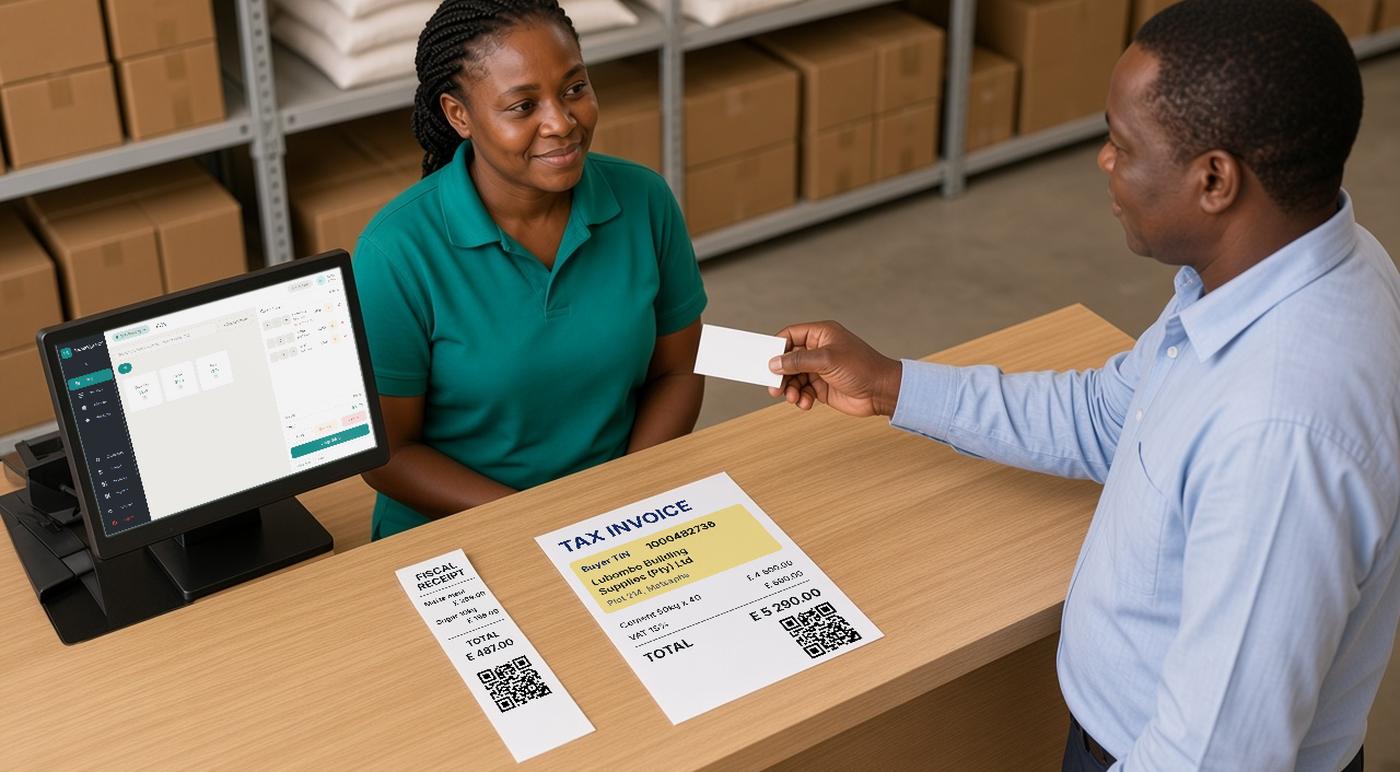
Selling to a VAT registered business in Eswatini? Issue a tax invoice that shows their TIN, name and physical address. Selling to anyone else? Issue a fiscal receipt. That is the core of ERS's Fiscalisation Notice, in force since 15 July 2026. [1]
This guide is for business owners and accountants. It explains which document to issue, what each one must show, and how to correct a business invoice, in plain terms. For the wider picture, start with our overview of Eswatini ERS e-invoicing.
Summary
- The rule: a tax invoice when the buyer is identified for VAT (VAT registered and gives you their TIN), a fiscal receipt when not.
- Buyer TIN: mandatory on a tax invoice.
- Business sale details: the invoice must be marked as a business (B2B) sale and show the buyer's name and physical address.
- A TIN on a receipt does not, in our reading, make it a tax invoice.
- Corrections: a credit note or debit note for the difference only; cancellation only for immediate errors before payment.
Which document to issue
ERS's Fiscalisation Notice requires a fiscal document for every transaction, issued through an electronic fiscal device. Its list of document types is open: a fiscal document "may include" the types below, or any other document ERS prescribes. [1]
| Document | When it is used | Buyer TIN |
|---|---|---|
| Fiscal receipt | The buyer is not identified for VAT purposes. ERS describes it as a document with a simplified set of information. | Not required by the Notice |
| Tax invoice | The buyer is identified for VAT purposes: in practice, VAT registered and gives you their TIN. | Mandatory |
| Credit note | A correction when the tax charged was too high. | Required for business sales |
| Debit note | A correction when the tax charged was too low. | Required for business sales |
Two terms you will meet in ERS material:
- EFD (electronic fiscal device): the approved till or invoicing software plus the signing component that secures each sale and sends it to ERS.
- SDC (sales data controller): the signing component inside that setup, which signs each invoice and reports it to ERS.
Which taxpayers must issue fiscal documents, and from when, is set by ERS. The Notice allows phased implementation by category and by public or written notice, so check what applies to your business on the ERS website. [1][4]
What every fiscal document must show
ERS's Fiscalisation Notice lists twelve details for every fiscal document. In short, each document must show: [1]
- the supplier's TIN, the date and time, a unique transaction number and the document type;
- the taxable value, tax amount, total, tax rate and payment method;
- a description of the goods or services and, where required, item codes;
- identification of the fiscal device and a digital signature or other security feature;
- anything else ERS prescribes.
If you already use item codes or barcodes for your products, the Notice says they must appear on the document. ERS's technical rules also require the unit price excluding tax, the unit of measure and an item code on every invoice, not only business ones. [1][3]
Your fiscal system adds most of these details automatically. What it cannot invent is the buyer's details, which is where business sales go wrong. The full list is in the Fiscalisation Notice.
The buyer details on a business sale
ERS's Fiscalisation Notice says a tax invoice must include the buyer's TIN. ERS's technical rules for POS systems go further: a tax invoice must carry [1][3]
- the buyer's TIN;
- a marker that it is a business (B2B) sale;
- the buyer's name;
- the buyer's physical address.
If your till or accounting system has no place to record the buyer's TIN, name and address, it cannot produce a valid tax invoice for a business sale, whatever the printed layout looks like. Ask your POS supplier to confirm it sends these details.
A TIN on a fiscal receipt
ERS's technical rules contain a narrow note: a business may add a buyer's TIN to an ordinary receipt in special cases, such as supporting a tax return or project grant claim. [3]
ERS does not say this turns the receipt into a tax invoice, and in our reading it does not. The Notice treats a sale to a buyer identified for VAT as a tax invoice, with all the buyer details above. If your customer is VAT registered, give them a tax invoice rather than a receipt with a TIN added.
Credit notes, debit notes and cancellation
ERS's technical rules treat each correction as a new fiscal document. You never edit an issued invoice. [3]
| Situation | What the system issues | Key rule |
|---|---|---|
| Tax charged was too high | A credit note, recorded as a refund for the overcharged amount, with the reason | Covers only the difference, not the full original sale |
| Tax charged was too low | A debit note, recorded as an extra sale for the undercharged amount, with the reason | Covers only the difference |
| Error noticed straight away | A cancellation that repeats the original invoice exactly and refers to its number | Only before payment; if paid, issue a refund instead. Only ordinary sales and refunds can be cancelled, not training, proforma or copy documents |
Credit notes, debit notes and cancellations of a business sale must also show the buyer's TIN, name and address. Our guide to credit notes, debit notes, sale and refund explains the logic in more detail. [3]
Checklist for the till or invoicing screen
- Ask first. Before completing the sale, ask whether the buyer is VAT registered and needs a tax invoice.
- Capture the details correctly. Record the buyer's TIN, name and physical address exactly. For regular customers, keep them on the customer record so they are not retyped each time.
- Issue the right type. Never issue a business sale as a fiscal receipt to save time.
- Correct with the right document. A credit note is a refund for the difference; a debit note is an extra sale for the difference. Do not issue a new negative sale.
- Cancel only immediate errors. If the buyer has already paid, issue a refund, not a cancellation.
- Test before going live. Issue a business training invoice and a credit note and check the printed buyer details. See our guide to testing with training invoices.
Illustrative example (not an ERS example)
This is our illustration. A Manzini hardware wholesaler sells building materials to a VAT registered contractor. The cashier asks for the contractor's TIN, name and site office address and issues a tax invoice marked as a business sale. A week later, part of the order comes back. In our reading, the wholesaler issues a credit note as a business refund for the returned items only, with the reason recorded. ERS's technical rules do not give this exact example, so confirm partial returns with your supplier.
This article summarises ERS public material and is not legal or tax advice. It does not cover the VAT Act input tax rules for buyers. Check the official sources below or ask ERS before acting.
Where FiscoBridge fits
Start with the FiscoBridge Eswatini ERS page, which sets out the options by how your business issues invoices today. [5]
- Existing POS: FiscoBridge SDC works with your till only if the till has the required integration and can send the buyer's details to FiscoBridge. Ask your POS supplier. [8]
- Browser invoicing: FiscoBridge Web Invoicing issues sales, refunds, copies and cancellations from the invoice list, and needs an internet connection. For credit notes that cover only part of an invoice, contact us. [6][7]
- Accounting software: integrations for Xero, QuickBooks Online and Odoo invoicing take the buyer's TIN, name and address from the customer record, so keep customer details complete before going live. [5]
Not sure which fits? Answer a few questions in the FiscoBridge solution checker.
Frequently asked questions
When must I issue a tax invoice instead of a fiscal receipt?
ERS's Fiscalisation Notice, in force since 15 July 2026, says a tax invoice is issued where the buyer is identified for VAT purposes, which in practice means the buyer is VAT registered and gives you their TIN. Where the buyer is not identified for VAT, you issue a fiscal receipt. Ask the buyer before you complete the sale.
Is the buyer TIN mandatory?
On a tax invoice, yes. ERS's Fiscalisation Notice says the buyer's TIN must be included. The Notice does not require a buyer TIN on a fiscal receipt. ERS's technical rules allow a TIN to be added to an ordinary receipt in narrow cases, such as supporting a tax return or project grant claim. In our reading, that does not turn the receipt into a tax invoice.
What other buyer details are needed on a business (B2B) tax invoice?
ERS's technical rules say a tax invoice must be marked as a business (B2B) sale and must show the buyer's TIN, the buyer's name and the buyer's physical address.
The customer asked for a tax invoice after I issued a fiscal receipt. What now?
The ERS Notice and technical rules we reviewed do not describe this case. Do not edit the issued receipt or issue a second sale for the same goods. Ask ERS or your fiscalisation supplier how to correct it, and capture buyer details before the sale in future.
How do I correct a business (B2B) tax invoice?
ERS's technical rules say a credit note is recorded as a refund for the overcharged amount only, and a debit note as an extra sale for the undercharged amount only, each with the reason for the correction and the buyer's details. Cancellation is only for an error noticed straight after the invoice was created, before payment, and only for ordinary sales and refunds.
Can the buyer check the invoice?
Yes. ERS's technical rules say every fiscal invoice carries a scannable QR code that contains a verification link, and an emailed invoice shows the verification link as a clickable hyperlink. The buyer can check the invoice straight after it is issued.
Sources
All sources were reviewed on 2 November 2026.
Official ERS sources
- ERS: Value Added Tax (Electronic Submission of Fiscal Data and Return-Supporting Records) Notice, 2026, in force 15 July 2026: definitions, paragraph 8 (fiscal documents), paragraphs 13 and 15 (phased implementation) (PDF)
- ERS: VAT Act amendment of the Third Schedule 2026, fiscalisation (PDF)
- ERS: Technical Guidelines for the Accreditation of EFD solutions, 2026: sections 10.1 to 10.3 (sales and refunds, B2B tax invoice), 11.1 to 11.3 (credit notes, debit notes, cancellation), invoice checklist Q4 and Q12 (PDF)
- Eswatini Revenue Service home page